1. Sign up — Create an account at platform.respan.ai
  2. Create an API key — Generate one on the API keys page
  3. Add credits or a provider key — Add credits on the Credits page or connect your own provider key on the Integrations page
Add the Docs MCP to your AI coding tool to get help building with Respan. No API key needed.
{
  "mcpServers": {
    "respan-docs": {
      "url": "https://respan.ai/docs/mcp"
    }
  }
}

What is Pydantic AI?

Pydantic AI is a Python agent framework from the creators of Pydantic. It provides a type-safe way to build AI agents with tool use, structured outputs, and multi-model support. The Respan integration uses respan-exporter-pydantic-ai to capture traces, spans, and metrics from agent runs via OpenTelemetry.

Setup

1

Install packages

pip install pydantic-ai respan-exporter-pydantic-ai
respan-exporter-pydantic-ai automatically installs respan-tracing.
2

Set environment variables

export RESPAN_API_KEY="YOUR_RESPAN_API_KEY"
export OPENAI_API_KEY="YOUR_OPENAI_API_KEY"
RESPAN_API_KEY is used for trace export. OPENAI_API_KEY is used by Pydantic AI to call the LLM directly.
You can skip OPENAI_API_KEY by routing calls through the Respan gateway. The gateway uses your RESPAN_API_KEY for both the LLM call and trace export.
export RESPAN_API_KEY="YOUR_RESPAN_API_KEY"
# No OPENAI_API_KEY needed
Set the provider’s base URL and key to your Respan credentials:
import os

os.environ["OPENAI_BASE_URL"] = "https://api.respan.ai/api"
os.environ["OPENAI_API_KEY"] = os.environ["RESPAN_API_KEY"]
See the full gateway guide for more details.
3

Initialize and run

from pydantic_ai import Agent
from respan_tracing import RespanTelemetry
from respan_exporter_pydantic_ai import instrument_pydantic_ai

telemetry = RespanTelemetry(app_name="pydantic-ai-hello-world")
instrument_pydantic_ai()

agent = Agent(
    model="openai:gpt-4o",
    system_prompt="You are a helpful assistant.",
)
result = agent.run_sync("What is the capital of France?")
print("Agent Output:", result.output)

telemetry.flush()
4

View your trace

Open the Traces page to see your agent trace.
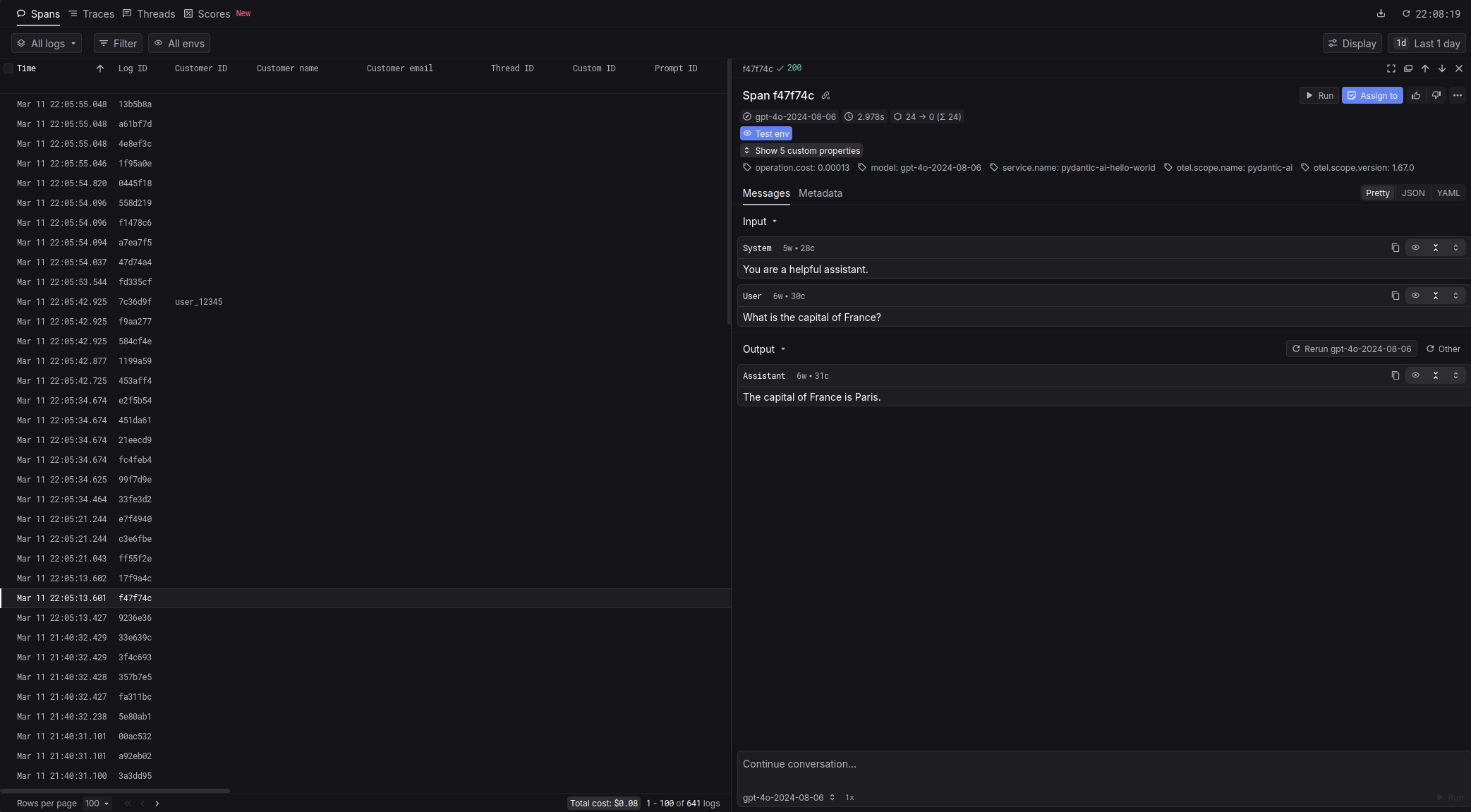
hello_world

Configuration

RespanTelemetry options

ParameterTypeDefaultDescription
app_namestrApplication name shown in Respan.
api_keystrRESPAN_API_KEY env varRespan API key. Optional if env var is set.
base_urlstrRESPAN_BASE_URL env varRespan base URL. Optional if env var is set.
is_enabledboolTrueSet to False to disable tracing.
is_batching_enabledboolTrueBatch export; set False for immediate flush in tests.

instrument_pydantic_ai() options

ParameterTypeDefaultDescription
agentAgent | NoneNoneInstrument a single agent. If None, all agents are instrumented globally.
include_contentboolTrueInclude message content in telemetry.
include_binary_contentboolTrueInclude binary content in telemetry.

Attributes

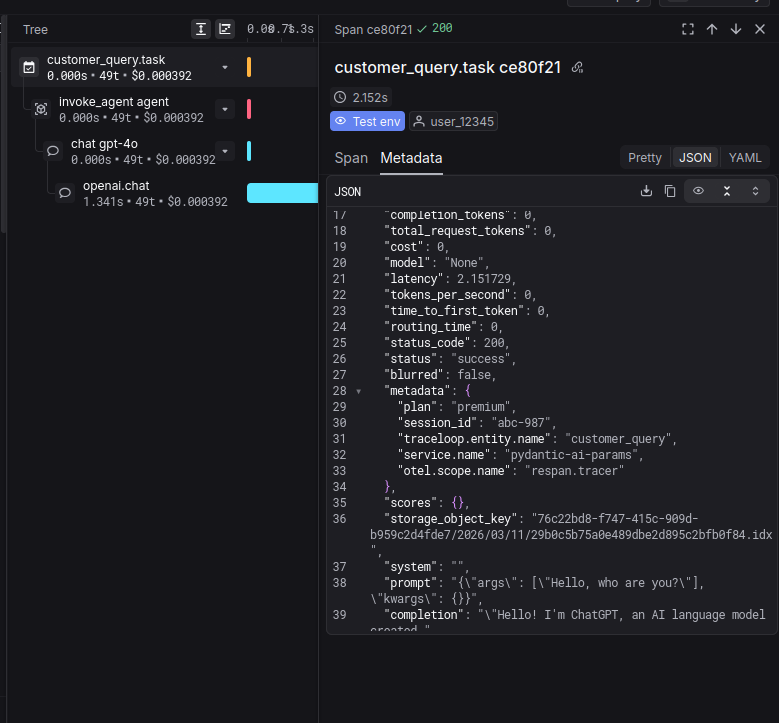
Attach Respan attributes to the current span using get_client().update_current_span():
from pydantic_ai import Agent
from respan_tracing import RespanTelemetry, get_client
from respan_tracing.decorators import task
from respan_exporter_pydantic_ai import instrument_pydantic_ai

agent = Agent("openai:gpt-4o")

@task(name="customer_query")
def customer_query(query: str):
    client = get_client()
    if client:
        client.update_current_span(
            respan_params={
                "customer_identifier": "user_12345",
                "metadata": {"plan": "premium", "session_id": "abc-987"},
                "custom_tags": ["pydantic-ai", "test-run"],
            }
        )
    result = agent.run_sync(query)
    return result.output
AttributeTypeDescription
customer_identifierstrIdentifies the end user in Respan.
metadatadictArbitrary key-value metadata attached to the span.
custom_tagslist[str]Tags for filtering and grouping in the dashboard.
respan_params

Examples

Workflows and tasks

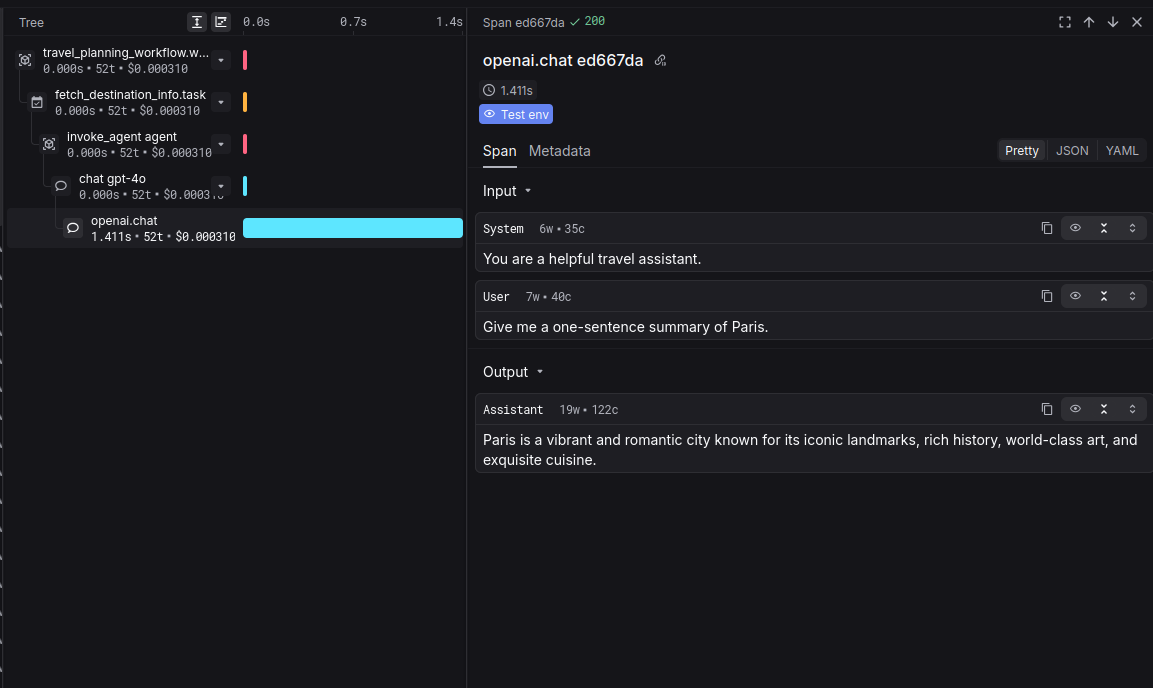
Use @workflow and @task decorators from respan-tracing to group spans into logical workflows and tasks.
import os

respan_api_key = os.environ["RESPAN_API_KEY"]
respan_base_url = os.getenv("RESPAN_BASE_URL", "https://api.respan.ai/api")
os.environ["OPENAI_BASE_URL"] = respan_base_url
os.environ["OPENAI_API_KEY"] = respan_api_key

from pydantic_ai import Agent
from respan_tracing import RespanTelemetry
from respan_tracing.decorators import workflow, task
from respan_exporter_pydantic_ai import instrument_pydantic_ai

agent = Agent("openai:gpt-4o", system_prompt="You are a helpful travel assistant.")

@task(name="fetch_destination_info")
def fetch_destination_info(destination: str) -> str:
    result = agent.run_sync(f"Give me a one-sentence summary of {destination}.")
    return result.output

@workflow(name="travel_planning_workflow")
def travel_planning_workflow(destination: str):
    info = fetch_destination_info(destination)
    return info

def main():
    telemetry = RespanTelemetry(
        app_name="pydantic-ai-tracing",
        api_key=respan_api_key,
        base_url=respan_base_url,
    )
    instrument_pydantic_ai()
    output = travel_planning_workflow("Paris")
    print("Workflow Output:", output)
    telemetry.flush()

if __name__ == "__main__":
    main()
tracing

Tool calls

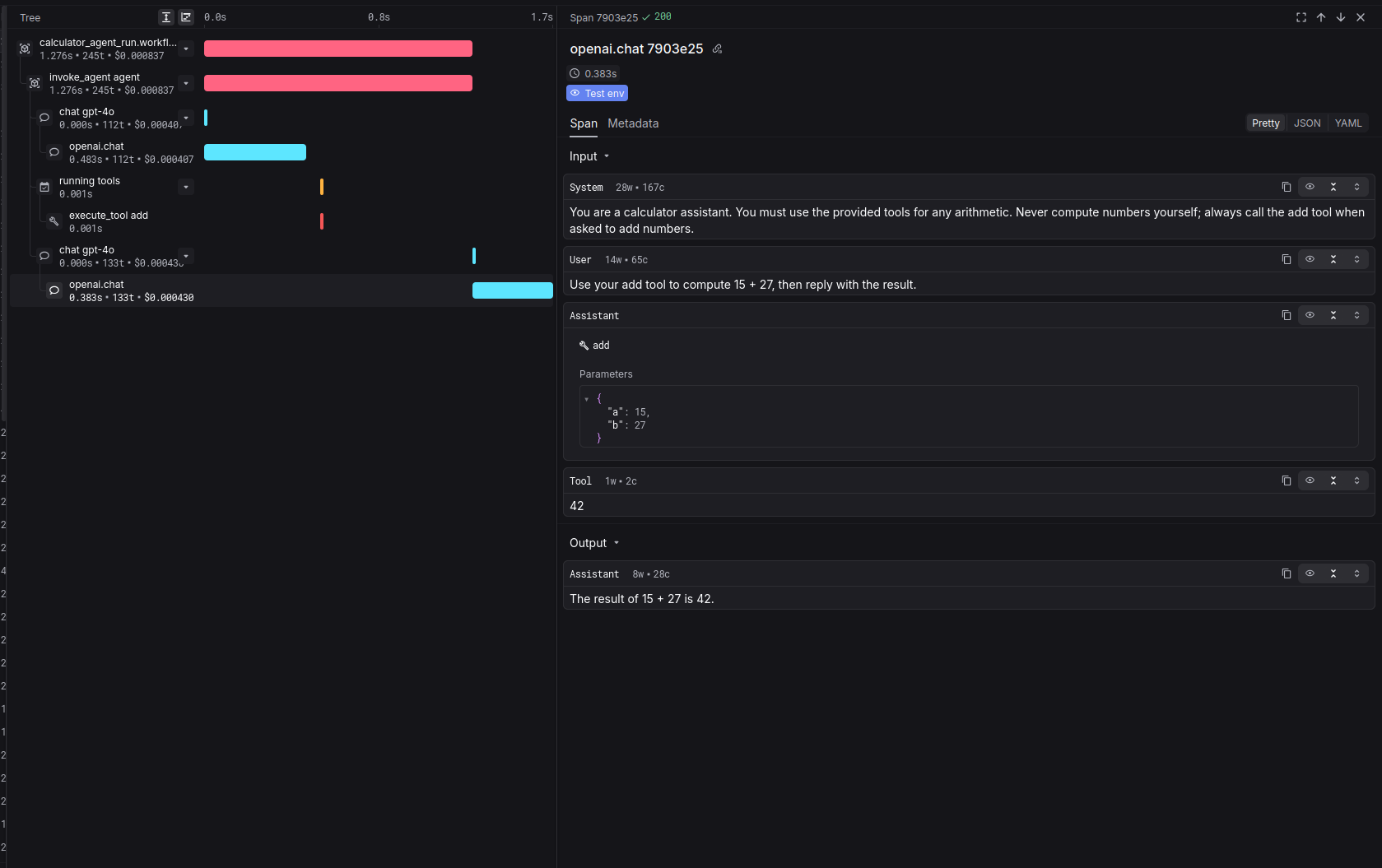
Agents that use tools are traced automatically — tool calls and results appear as spans.
import os

respan_api_key = os.environ["RESPAN_API_KEY"]
respan_base_url = os.getenv("RESPAN_BASE_URL", "https://api.respan.ai/api")
os.environ["OPENAI_BASE_URL"] = respan_base_url
os.environ["OPENAI_API_KEY"] = respan_api_key

from pydantic_ai import Agent
from respan_tracing import RespanTelemetry
from respan_tracing.decorators import workflow
from respan_exporter_pydantic_ai import instrument_pydantic_ai

agent = Agent(
    "openai:gpt-4o",
    system_prompt=(
        "You are a calculator assistant. You must use the provided tools for any arithmetic. "
        "Never compute numbers yourself; always call the add tool when asked to add numbers."
    ),
)

@agent.tool_plain
def add(a: int, b: int) -> int:
    """Add two numbers together."""
    return a + b

@workflow(name="calculator_agent_run")
def run_calculator_agent(prompt: str):
    result = agent.run_sync(prompt)
    return result.output

def main():
    telemetry = RespanTelemetry(
        app_name="pydantic-ai-tool-use",
        api_key=respan_api_key,
        base_url=respan_base_url,
    )
    instrument_pydantic_ai()
    output = run_calculator_agent("Use your add tool to compute 15 + 27, then reply with the result.")
    print("Agent Output:", output)
    telemetry.flush()

if __name__ == "__main__":
    main()
tool_use
Looking for gateway integration? See Gateway > Pydantic.