

Span types & multimodal
Span types & multimodal
How to log different types of LLM interactions — chat completions, embeddings, tool calls, audio, images, and more.
Set up Respan
- Sign up — Create an account at platform.respan.ai
- Create an API key — Generate one on the API keys page
- Add credits or a provider key — Add credits on the Credits page or connect your own provider key on the Integrations page
Use AI
Add the Docs MCP to your AI coding tool to get help building with Respan. No API key needed.
Overview
Every span has a log_type field that determines its input/output format. The most common type is chat, but Respan supports logging embeddings, audio, tool calls, and workflow spans.
All span types use universal input and output fields and are sent to the same logging endpoint. For the complete field reference, see Span fields & parameters.
All span types
LLM inference
Workflow & agent
Other
Chat
The default span type. Input is an array of messages, output is the assistant’s response.
Images
Include images in your messages using the image_url content type. This follows the same format as the OpenAI vision API.
The detail parameter can be auto, low, or high.
Videos
Include videos in your messages using the video_url content type. Supported formats: mp4, mov, wmv, avi.
Videos are rendered in Logs, Playground, Prompts, and Experiments.
Thinking blocks
When using models with thinking capabilities (e.g. Claude with extended thinking), the response includes additional reasoning fields that are automatically captured.
Request:
Response fields:
For more on enabling thinking mode via the gateway, see Enable Thinking.
Prompt variables
Pass prompt variables so they appear in the side panel for easy inspection and can be added to testsets with one click.
Wrap variables in {{}} in your input and pass a variables object:
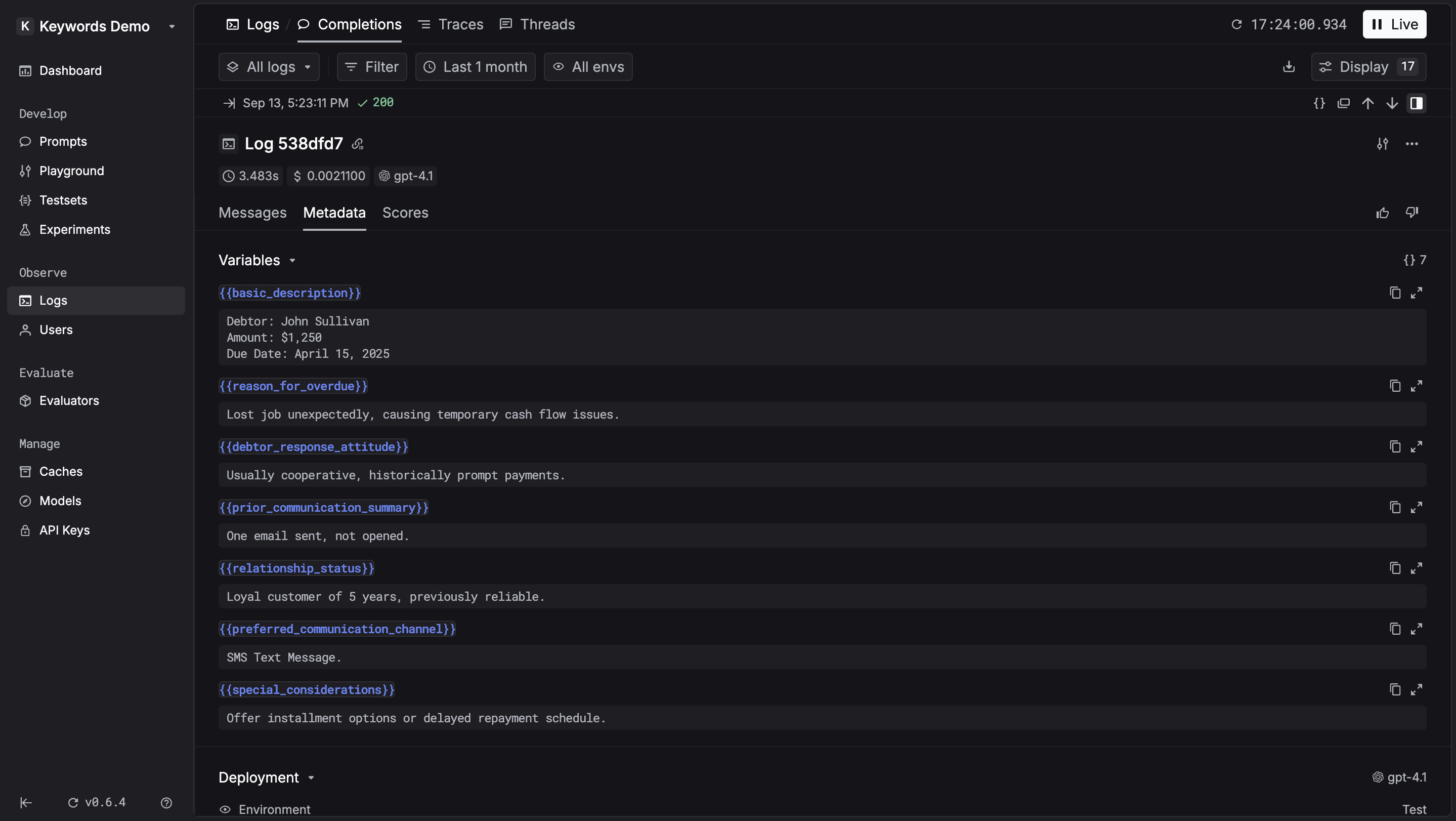
If you are using prompts via the LLM Gateway, variables are logged automatically — no need to pass them manually.
Tool calls
Record tool calls and function calling interactions as part of chat messages:
Key fields:
tool_callsin the assistant message — array of function calls madetoolsat the top level — array of available function definitionstool_choice(optional) — specify which tool the model should use
Embedding
Set log_type to "embedding". Input is text, output is the vector array.
Speech & transcription
Transcription (speech-to-text)
Set log_type to "transcription". Input is audio metadata, output is transcribed text.
Speech (text-to-speech)
Set log_type to "speech". Input is text, output is audio metadata.
Workflow & agent types
These span types are used by tracing to represent spans in a trace hierarchy:
workflow— Root-level workflow orchestrationtask— Individual task within a workflowtool— Tool or function executionagent— AI agent operationhandoff— Agent-to-agent transferguardrail— Safety and validation check
For details on how to create and orchestrate these span types, see Tracing SDK.