Every token an LLM writes depends on every token before it. Without a way to remember that earlier work, a model generating its 10,000th token would have to reread the first 9,999 from scratch, and long chats, coding agents, and 100K-token prompts would grind to a halt.
The KV cache is how models avoid that, and it has turned into one of the main constraints in serving LLMs. It lives in GPU memory, it grows with every token in a session, and on a large model one long conversation can fill most of a GPU by itself.
When that memory runs out, something has to give. Old sessions get evicted, copied to slower memory, or recomputed, and each of those choices shows up as latency for whoever sends the next request, and as cost for whoever pays for the GPU.
Understanding what KV cache is in LLMs, how much memory it uses, and how eviction decides what stays starts with what the model stores when it reads your prompt.
What is KV cache in LLMs?
KV cache is the memory a transformer model keeps of the keys and values it has already computed for each token, at every layer, so it doesn't recompute them when it generates the next token. It speeds up generation at the cost of GPU memory, and the cache grows with every token in the session.
The cache stores the model's work, not your text. Prompt caching, which providers offer through their APIs, is the same cache kept around between your requests instead of thrown away when one finishes.
How does KV cache work?
A transformer reads text one token at a time, and at every layer it turns each token into vectors that describe what that token means in context. The KV cache holds two of those vectors per token, and which two it keeps comes down to how attention works.
Query, key, and value
Each token gets three vectors. A query asks what this token is looking for, a key describes what the token contains, and a value is what the token hands over if another token picks it. Every token compares its query with the keys of all the tokens before it and takes the most from the values that match.
When the model reads "it" in a sentence about an apple, the query for "it" asks what "it" refers to. The key of "apple" a few words back matches, so "it" borrows the value of "apple" and carries that meaning forward.
A query is used once, while its own token is being read. Keys and values are used by every token that comes after, which is why keys and values are the part worth keeping, and why the cache is called a KV cache rather than a QKV cache.
Prefill and decode
LLM inference runs in two phases. Prefill reads the whole prompt at once, computing keys and values for every prompt token in parallel and writing them into the cache. That phase sets how long you wait before the first word of the response appears.
Decode then generates the response one token at a time. Each new token computes its own query, key, and value, compares its query against every cached key, and adds its key and value to the cache for the tokens that follow. Without the cache, every decode step would recompute keys and values for the entire sequence so far, and the work per token would keep climbing as the response got longer.
The cache doesn't make the prompt itself any cheaper to read the first time. It saves work on everything after that, which is also why reusing it across requests matters so much. In Respan's tests running Qwen3-8B with vLLM 0.33 on one H100, the same 100K-token prompt took 7.55 seconds to read the first time and 0.14 seconds the second time, when its keys and values came from the cache.
KV cache size and memory usage
The catch is size. The cache holds a key and a value for every token, at every layer, so it grows with the length of the session, and for long sessions it can take up most of a GPU.
KV cache size formula
For a standard transformer, the memory per token is:
KV cache bytes per token = 2 × layers × KV heads × head dimension × bytes per value
The 2 covers one key and one value. Multiply the result by the number of tokens in the session, and by the number of sessions the server holds at once, to get the total.
Llama 3.3 70B has 80 layers, 8 KV heads, and a head dimension of 128. At BF16, which stores each value in 2 bytes, that works out to 2 × 80 × 8 × 128 × 2 = 327,680 bytes, or about 328 KB per token. A 150K-token session needs about 49.2 GB of cache for that one conversation.
The same math tells you how many sessions fit on a GPU. Qwen3-8B uses about 147 KB per token, and its weights take about 16 GB at BF16. On an 80 GB H100, vLLM's default memory setting leaves roughly 50 to 55 GB for cache after the weights and runtime overhead, which holds about 340,000 to 370,000 tokens, or around 21 to 23 sessions of 16K tokens each at the same time.
KV cache size across popular models
The same formula, applied to the published configs of popular open-weight models, gives very different answers for a 150K-token session at BF16:
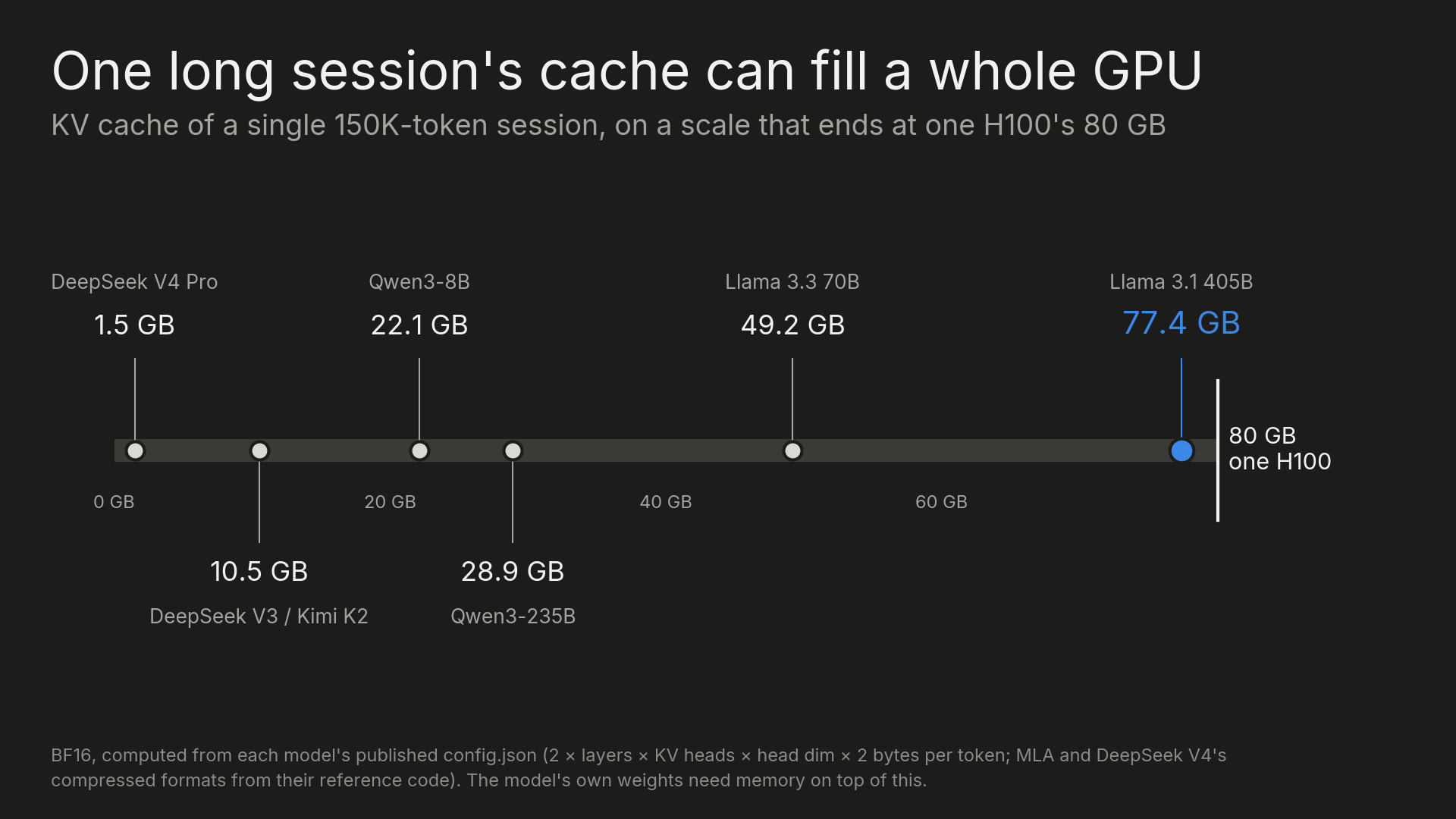
Llama 3.1 405B needs 77.4 GB, nearly a full H100's memory on top of the weights, which already span several GPUs, while DeepSeek V4 Pro needs about 1.5 GB for the same session. Parameter count doesn't predict the result either: Qwen3-235B is more than three times the size of Llama 3.3 70B, yet its cache is smaller, at 28.9 GB against 49.2 GB.
How GQA and MLA shrink the KV cache
The difference comes from how each model shares keys and values across attention heads. In the original transformer design, every query head had its own key and value heads, so the KV heads term in the formula matched the full head count.
Grouped-query attention (GQA) lets several query heads share one set of keys and values. Llama 3.3 70B has 64 query heads but only 8 KV heads, which makes its cache eight times smaller than it would be without sharing, and Qwen3-235B goes further with 64 query heads sharing 4 KV heads.
Multi-head latent attention (MLA), used by DeepSeek V3 and Kimi K2, changes the formula itself. Instead of storing separate keys and values per head, it stores one compressed vector per token per layer, 576 values in DeepSeek V3's case, and rebuilds keys and values from it when needed. Across 61 layers that comes to about 10.5 GB for 150K tokens, and DeepSeek V4 Pro's newer compressed format brings the same session down to about 1.5 GB.
Where KV cache is stored
The cache is created where the model does its math, in GPU memory. On a gaming card that memory is called VRAM, while data-center GPUs use HBM, which is faster and much scarcer. An H100 has 80 GB, and Nvidia's newest chips, B300 and Rubin, have 288 GB.
That memory is shared. The model's weights take a big share of it, and the rest has to serve everyone's requests, so while your session sits idle between turns, the GPU is busy with other people's work and needs the memory your cache is holding.
KV cache eviction
Inference servers handle this by evicting old caches from GPU memory, least recently used first. In Respan's tests running Qwen3-8B with vLLM 0.33 on an H100, GPU memory utilization was set to 0.35 so the cache pool held only about 71,000 tokens, and eight 16K-token sessions were opened one after another:
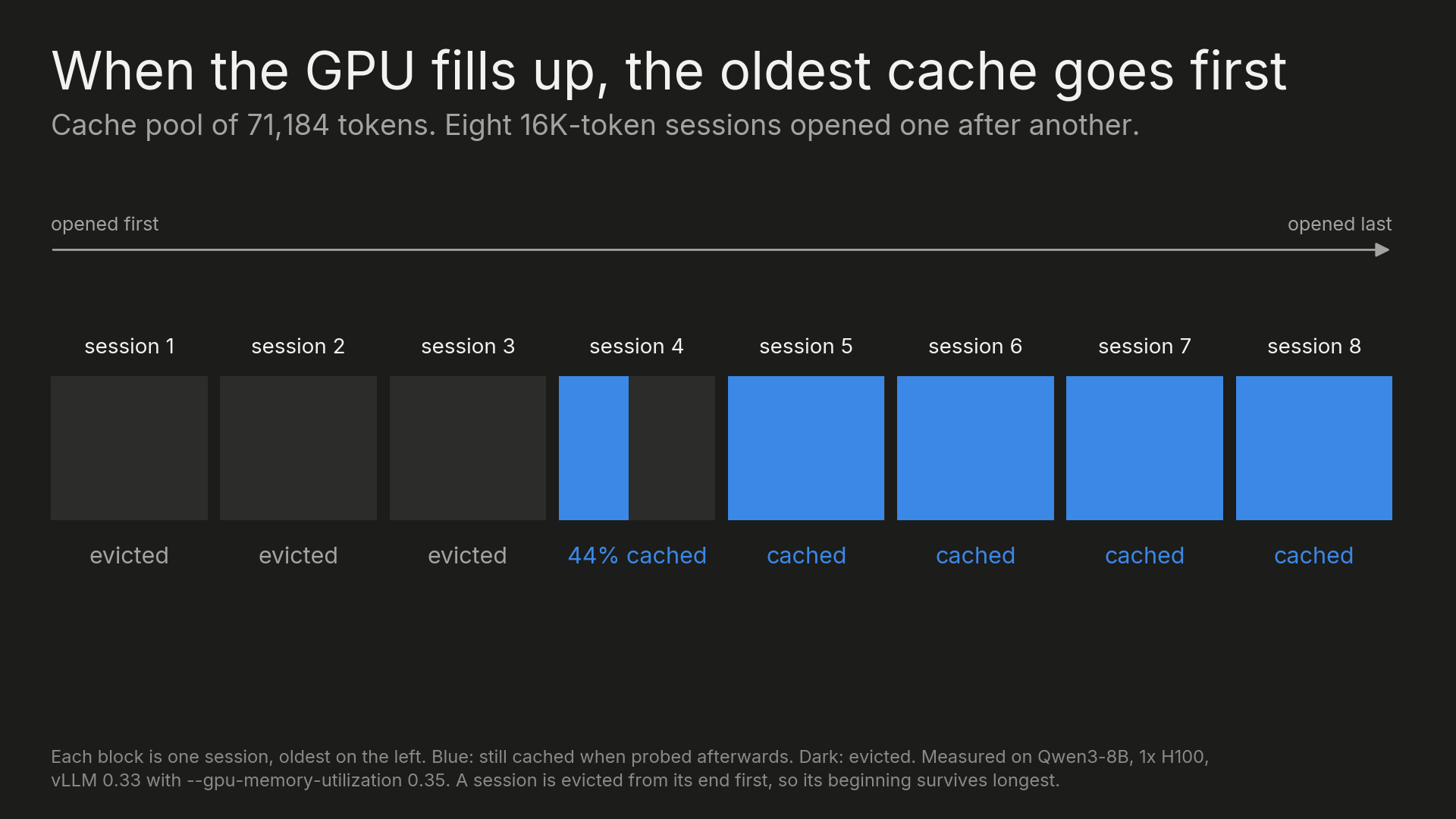
The four newest sessions were still fully cached, and the three oldest were gone. The session in between had lost its end but kept its beginning, because a session is evicted from its tail first. vLLM's prefix caching design docs give the reasoning: the last blocks of a finished request are the least likely to be shared with a future one, while the beginning is the part another request is most likely to repeat.
For the next request in an evicted session, the result is a slower response. Everything that fell out of the cache has to be read again during prefill before the first token comes back. If you run vLLM yourself, vllm:kv_cache_usage_perc shows how full the cache pool is, and vllm:prefix_cache_hits against vllm:prefix_cache_queries shows how often requests reuse a cached prefix.
KV cache offloading
Evicted doesn't have to mean deleted. Inference servers can copy the cache to cheaper, bigger memory as it's created, starting with the server's CPU memory, then local SSD, and in the biggest deployments a storage pool shared across machines.
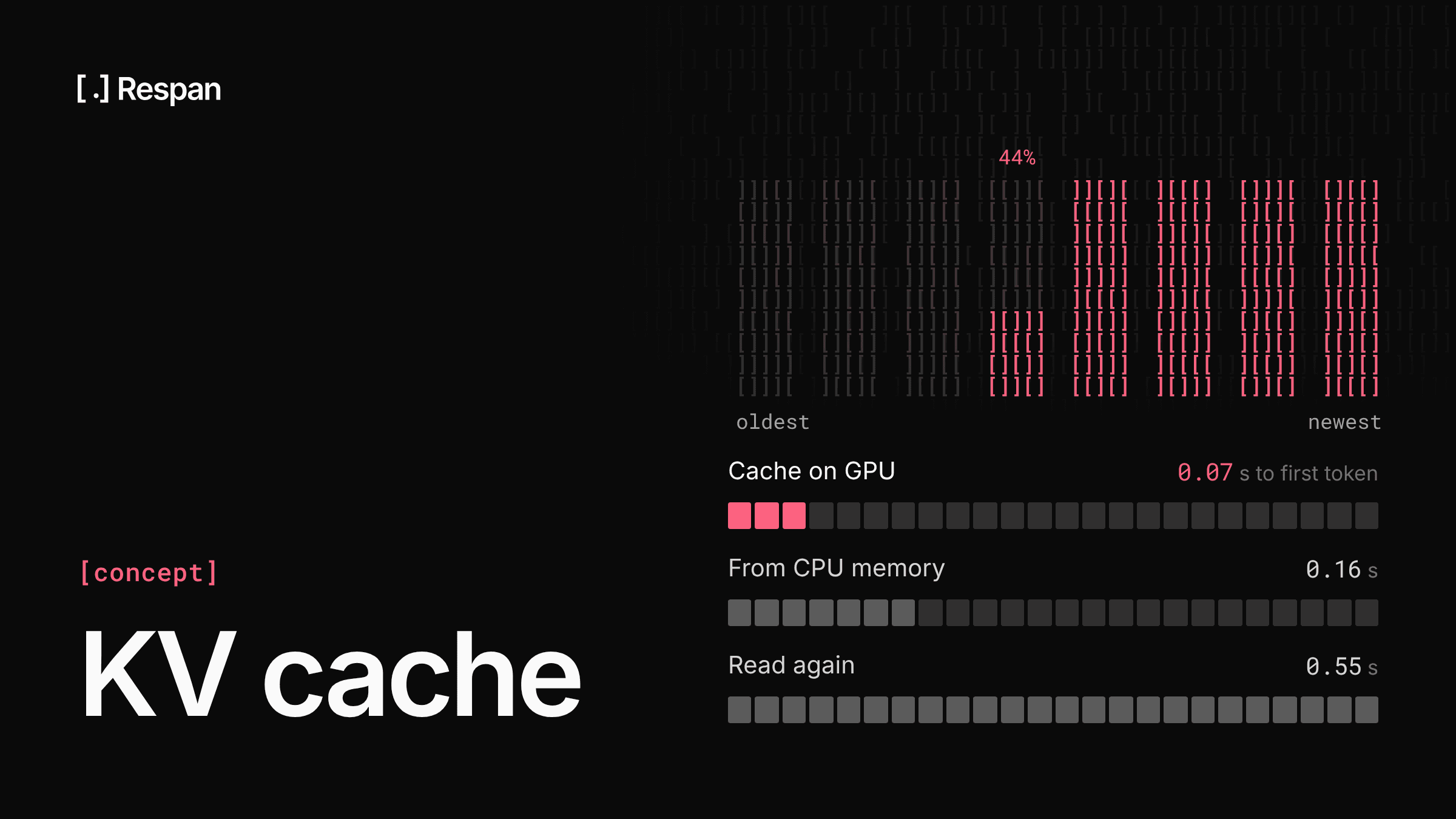
When another request comes in, the cache can be moved back to the GPU. That is slower than having it stay on the GPU, but much faster than reading the prompt again. In Respan's tests running Qwen3-8B on an H100 with vLLM 0.33's native KV offloading and a 40 GB CPU memory tier, a 16K-token prompt had a time to first token of 0.07 seconds when its cache was on the GPU, 0.16 seconds when it was pulled back from CPU memory, and 0.55 seconds when it had to be read again:
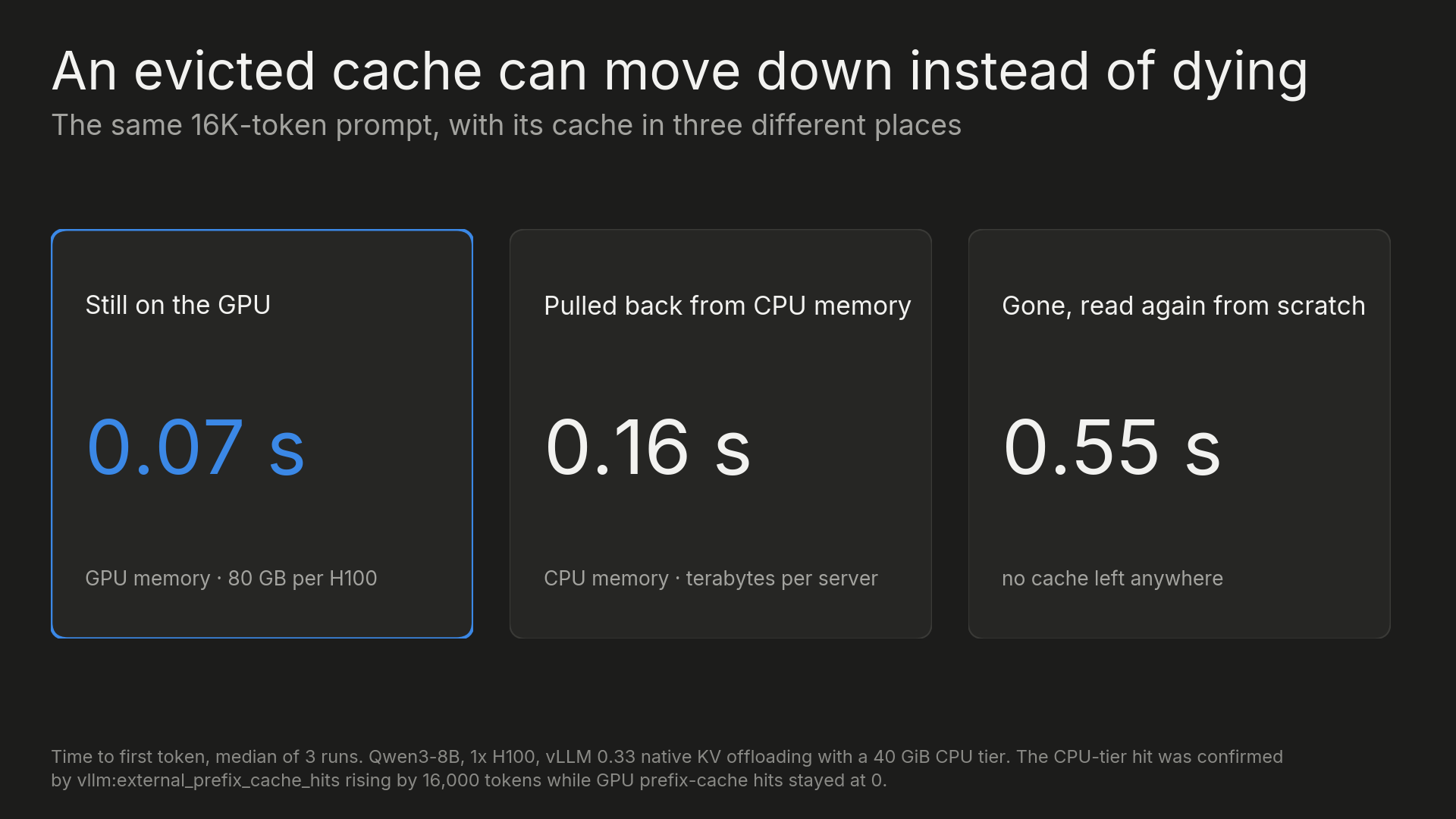
The gap widens with prompt length, since reading the prompt again scales with its size, which is why offloading pays off most for long agent sessions and large shared system prompts.
KV cache optimization techniques
Offloading moves the cache somewhere cheaper. Other techniques make the cache itself smaller or waste less of the memory it already has, and inference servers often combine several of them.
PagedAttention
Early inference servers reserved one contiguous block of GPU memory per request, sized for the longest response it might produce. Most requests never used all of it, so a large share of cache memory sat empty while new requests waited.
PagedAttention, introduced with vLLM, splits the cache into fixed-size blocks, 16 tokens each by default in vLLM, and allocates them as a sequence grows, the same way an operating system pages virtual memory. Blocks don't have to sit next to each other, so very little memory goes unused. Requests that share a prefix can also point at the same blocks, and that sharing is how vLLM's prefix caching works.
KV cache quantization
Quantization stores keys and values at lower precision. Moving from BF16 to an 8-bit format halves the cache, so the same GPU holds twice as many tokens, which means longer contexts or more sessions at once.
vLLM supports an FP8 KV cache through one setting, and its docs note that some layers are more sensitive to quantization than others, recommending calibrated scales for the best quality. Lower-bit formats save more memory with more risk to output quality, so like other ways to optimize AI models, the change is worth testing on your own workload before it goes to production.
Token eviction and compression
The most aggressive techniques keep fewer tokens. Sliding-window attention, used in Mistral 7B and on alternating layers in Gemma 2, only attends to the most recent tokens, so the cache for those layers stops growing once it hits the window size.
Research methods go further. H2O keeps the tokens that receive the most attention, SnapKV picks the prompt tokens that matter most for the question being asked, and KIVI keeps every token but quantizes keys and values to very low bit widths. Each of these trades some accuracy for memory, since a dropped or approximated token can no longer be attended to exactly, and most are still research methods, so check whether your inference server supports one before planning around it.
KV cache vs prompt caching
The KV cache and prompt caching use the same keys and values. The difference is how long they're kept and who controls them.
Within a single request, the KV cache always exists, because the model needs it to generate a response at all. Prompt caching is the provider keeping that cache after your request finishes, so the next request that starts with the same tokens can skip prefill for that part. That is where the 7.55 seconds versus 0.14 seconds comes from, and providers pass the savings on as discounted input pricing for cached tokens.
The same mechanics explain how prompt caching behaves. Only a matching prefix can be reused, a cache built by one model is useless to another, and an idle session's cache can be evicted or offloaded before you send the next turn. The pricing, hit rates, and provider rules for prompt caching are a separate topic, as is how both sit alongside response caching in the full LLM cache stack.
Tracking KV cache hits through an API
If you call models through a provider's API, you don't see the KV cache directly, but every response reports how many input tokens were read from the provider's cache, and some providers also report how many were written to it. Tracking those numbers across requests shows when your cache is being evicted, cut short, or thrown away by a model switch, and the Respan AI gateway records them for every call:
- Route your calls through the gateway - Point the OpenAI SDK, or any OpenAI-compatible client, at one endpoint that reaches 1,000+ models, and every request is logged with its latency, tokens, and cost.
- Read cache reads and writes on each log - Each request shows cache read, cache write, and uncached tokens, with cost priced at the model's cache rates. Cache reads that drop to zero after an idle gap usually mean the cache expired or was evicted, and reads that cover only the start of a long prompt can mean the rest was evicted or the prompt changed partway through.
- Group turns into threads - Pass the same thread ID on every turn, and threads tie the turns of a session together, so you can see the turn where cache reads fell off instead of checking requests one at a time.
- Set a monitor on cost or latency - An alert in Slack, email, or a webhook tells you when spend or latency crosses a threshold, which can be the first sign that cache hits dropped.
- Turn on cache-aware routing if you switch models - Set the model to
span-routerand send each turn's full history under the samethread_identifier. With cost-aware routing and mid-conversation switching on, Respan Router weighs cached reads and writes before it moves a session to a cheaper model. It's in beta, enabled per organization on request, and runs on Respan credits.
Routing a session through Respan Router takes the same OpenAI client you already use, with the full message history and one thread ID per conversation:
import os
from openai import OpenAI

client = OpenAI(
    base_url="https://api.respan.ai/api/",
    api_key=os.environ["RESPAN_API_KEY"],
)

response = client.chat.completions.create(
    model="span-router",
    messages=history,  # the full conversation so far, every turn
    extra_body={"thread_identifier": "conv-8f2c"},  # same ID for every turn of this conversation
)
Once those numbers sit next to each other, a cache that stopped hitting shows up on the request where it happened, so you don't find out from the invoice.
FAQ
How much memory does KV cache use per token?
It depends on the model's layers, KV heads, head dimension, and precision. At BF16, Llama 3.3 70B uses about 328 KB per token and Qwen3-8B about 147 KB, while models that use MLA, like DeepSeek V3, use about 70 KB. Multiply by the number of tokens in the session to get the total.
How do you use KV caching with an LLM?
In most cases it's already on. Hugging Face Transformers caches keys and values by default when you call generate(), and it offers offloaded and quantized cache types when memory is tight. vLLM manages the cache automatically with PagedAttention and turns on prefix caching by default for text models. Through a provider's API, the KV cache is handled for you, and the part you control is prompt caching, by keeping the start of your prompts identical between requests.
Does KV cache affect output quality?
A standard KV cache doesn't change the output, since it stores the same keys and values the model would get by recomputing them. Quality can change once the cache is approximated, through quantization to lower precision or methods that drop tokens, so those are worth testing against your own workload before you rely on them.