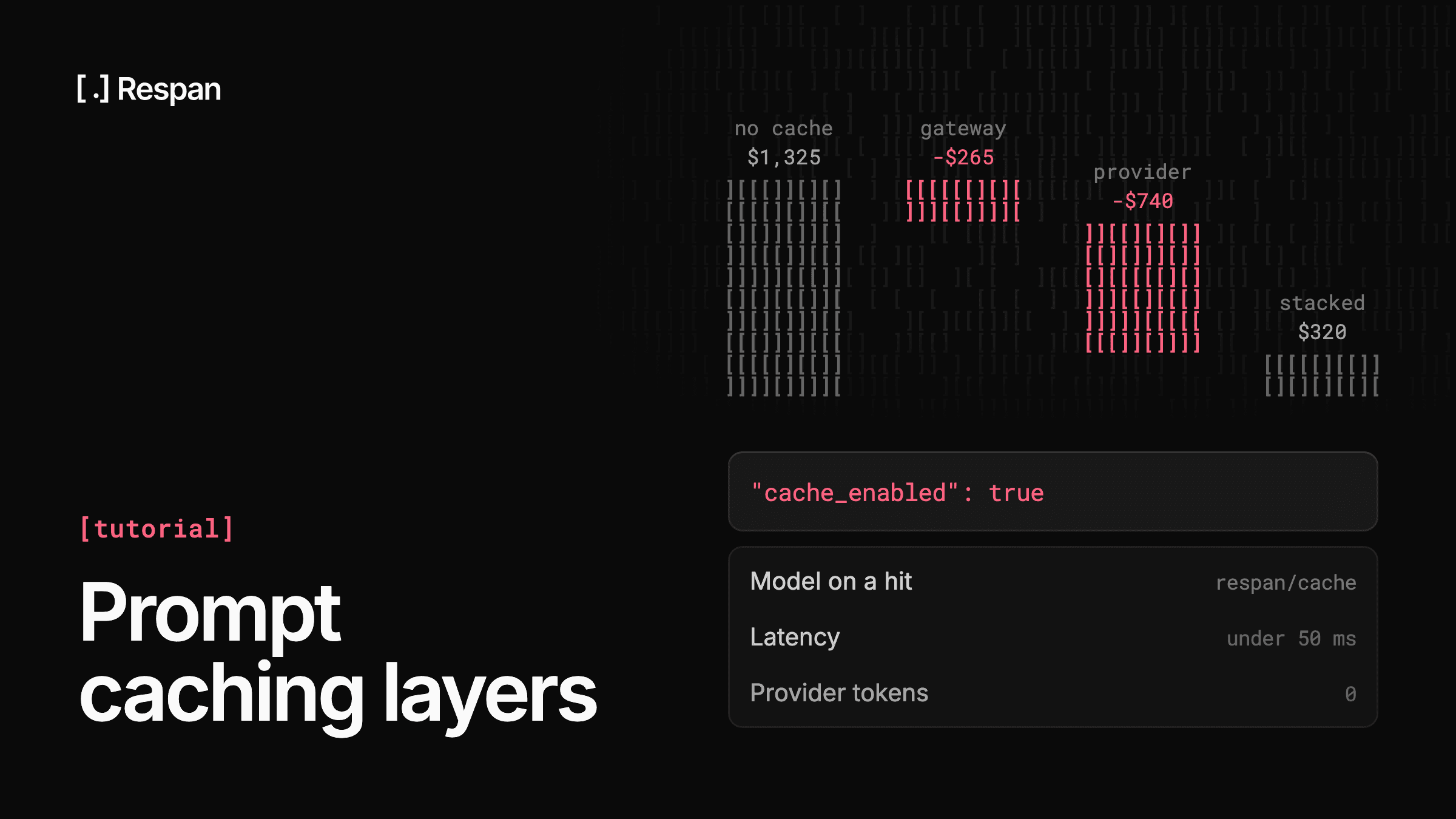
Every major model provider now offers prompt caching, and for agents it has become one of the biggest levers in LLM cost optimization. In a modeled 60-turn coding session on Claude Opus 5.5, a warm cache cuts the bill by about 80%, more than switching to a model at half the price would save.
The catch is that caching breaks quietly. Change one character near the start of a session, and the next "continue" can cost around 25 times what it should. OpenCode users saw a version of this when the date in the system prompt changed at midnight and every open session re-read its history at full price.
What is prompt caching?
Prompt caching is a provider feature that stores the work a model did reading the start of your prompt, so the next request that opens the same way can skip that work. The reused part is billed at a fraction of the normal input price, often 5% to 10% on the major providers, and the response starts sooner because there is less to read.
Prompt caching is different from caching a response. A response cache returns a stored answer to an identical request without calling the model at all, while prompt caching still runs the model on every request and discounts only the part of the input it has already read.
How prompt caching works in 5 steps
1. The model reads your prompt and stores its work
When a model reads a prompt, it doesn't keep the words. For every token, at every layer, it works out what that token means in context and stores the result as vectors. Two of them, a key and a value, are used by every token that comes after, so they are the ones worth keeping. That stored state is the KV cache, and a prompt cache is the provider holding onto it between your requests.
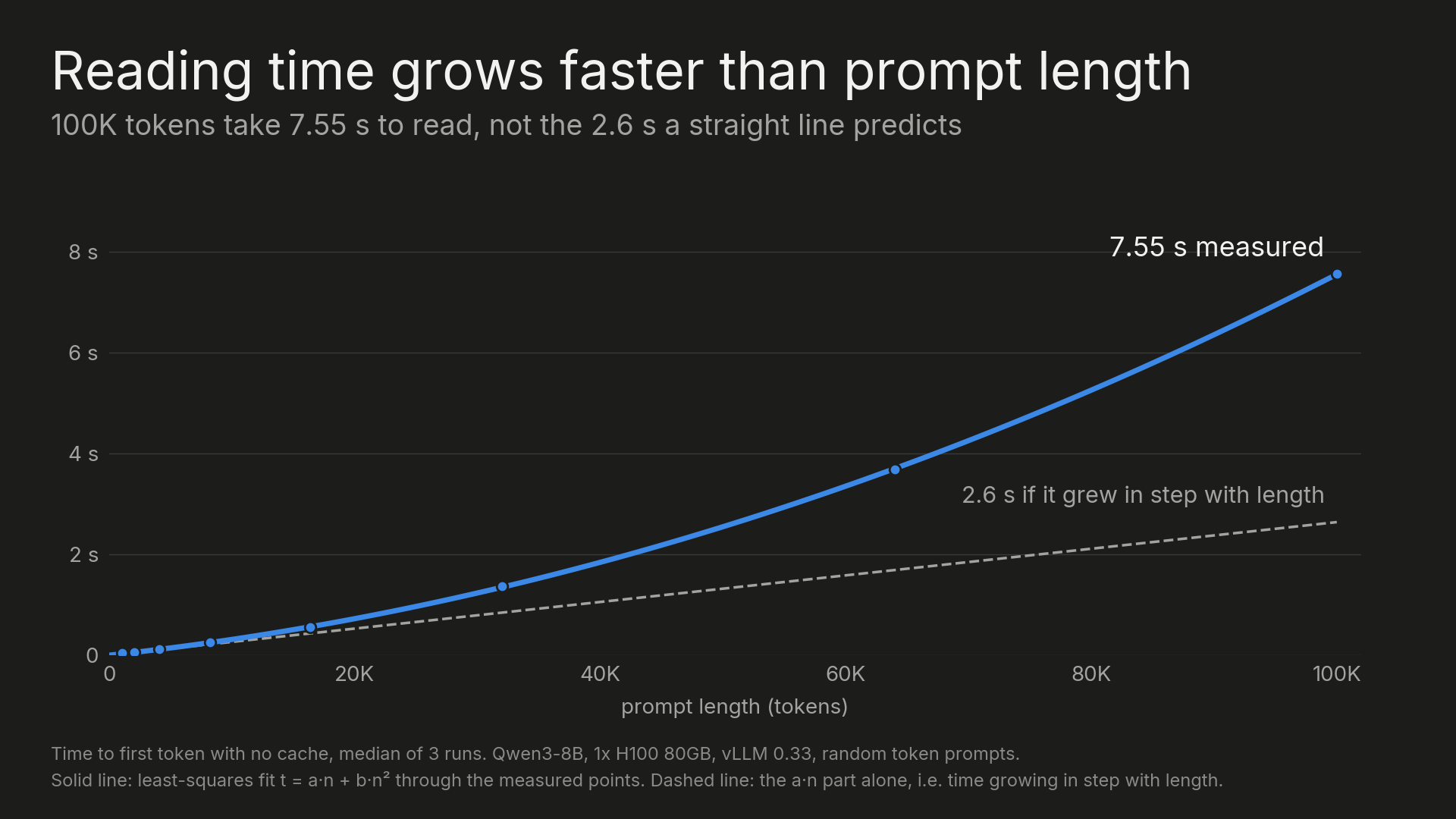
Reading is where the cost comes from. In Respan's tests, which ran Qwen3-8B with vLLM 0.33 on one H100 for every measurement in this post, the same 100K-token prompt took 7.55 seconds to read the first time and 0.14 seconds the second time, when it came from the cache.
2. The provider keeps that work for one model
Keys and values come out of a specific model's weights, so another model can't use them. If you switch models mid-session, the new model reads the whole history from scratch and pays to write a new cache of its own. Anthropic, OpenAI and Google all say so in their docs.
3. Your next request reuses the longest matching prefix
Every token's key and value depends on everything before it, so a cache can only be reused from the start of the prompt up to the first token that differs. Change one token, and everything after it is read again at full price, however much of the rest is identical.
In a cached 32K-token prompt, the position of a single changed token decided how much survived. Changing the first token meant nothing came from cache and the first output token took 1.34 seconds. Changing token 16,000 kept half the cache (0.82 seconds), and changing token 31,990 kept 99.9% of it (0.10 seconds). vLLM keeps the cache in 16-token blocks, so a hit stops at the last full block before the change.
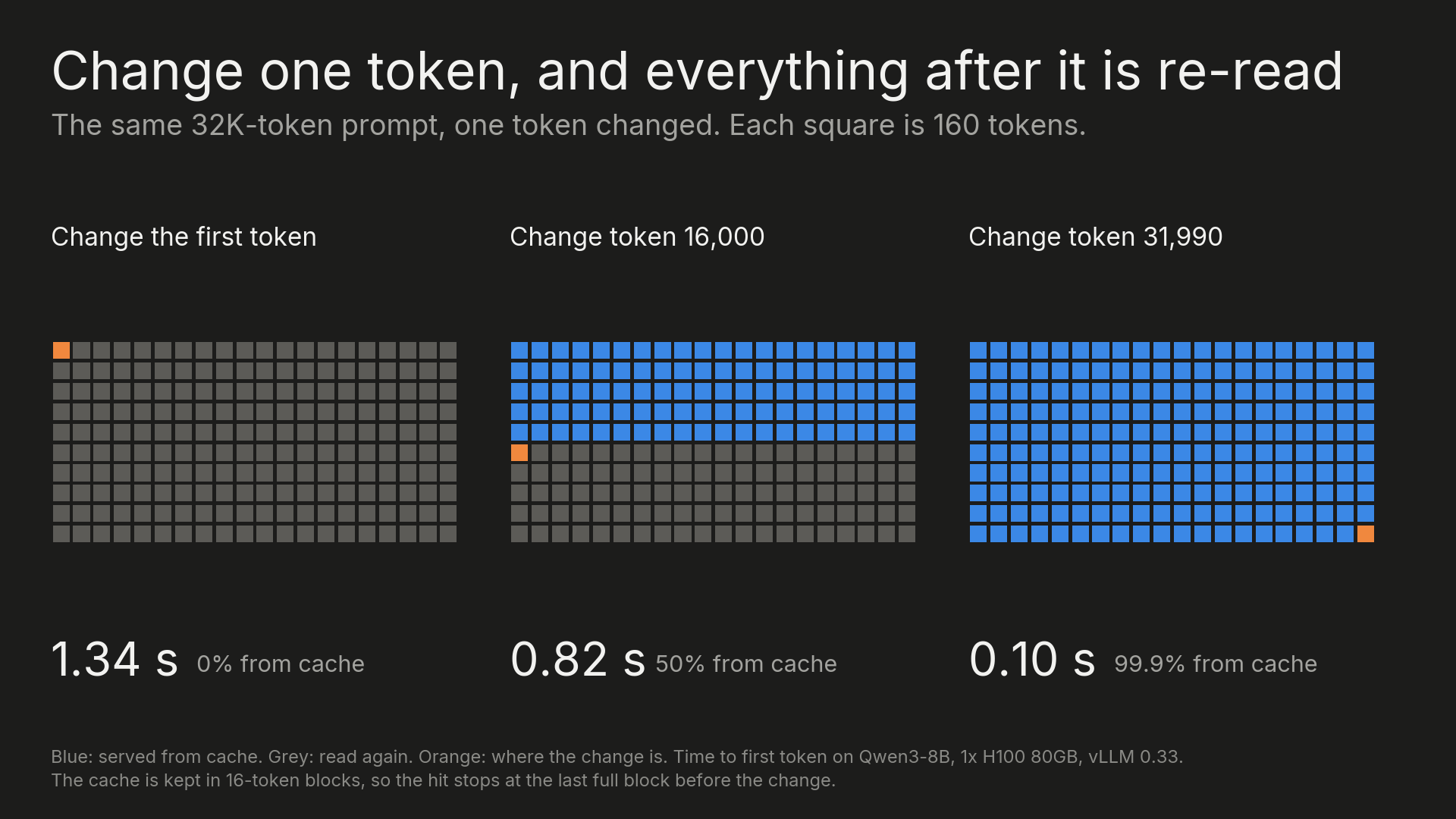
Because of that, prompt order is a cost decision. Stable content such as tool definitions and the system prompt belongs at the top, and anything that changes per request belongs at the end.
4. The request has to land on the machine holding the cache
A cache lives in the memory of one machine, and a provider runs thousands of them. If your next turn lands on a different machine, it's a miss even though your cache exists. OpenAI's docs state that cached states live on individual machines, and providers try to route each conversation back to the machine that has its cache unless that machine is too busy.
With two copies of the model running side by side, the same 15 six-turn conversations went through three ways. Keeping each conversation on one machine served 75% of tokens from cache, sending each turn to a random machine served 56%, and alternating between the two served 54%.
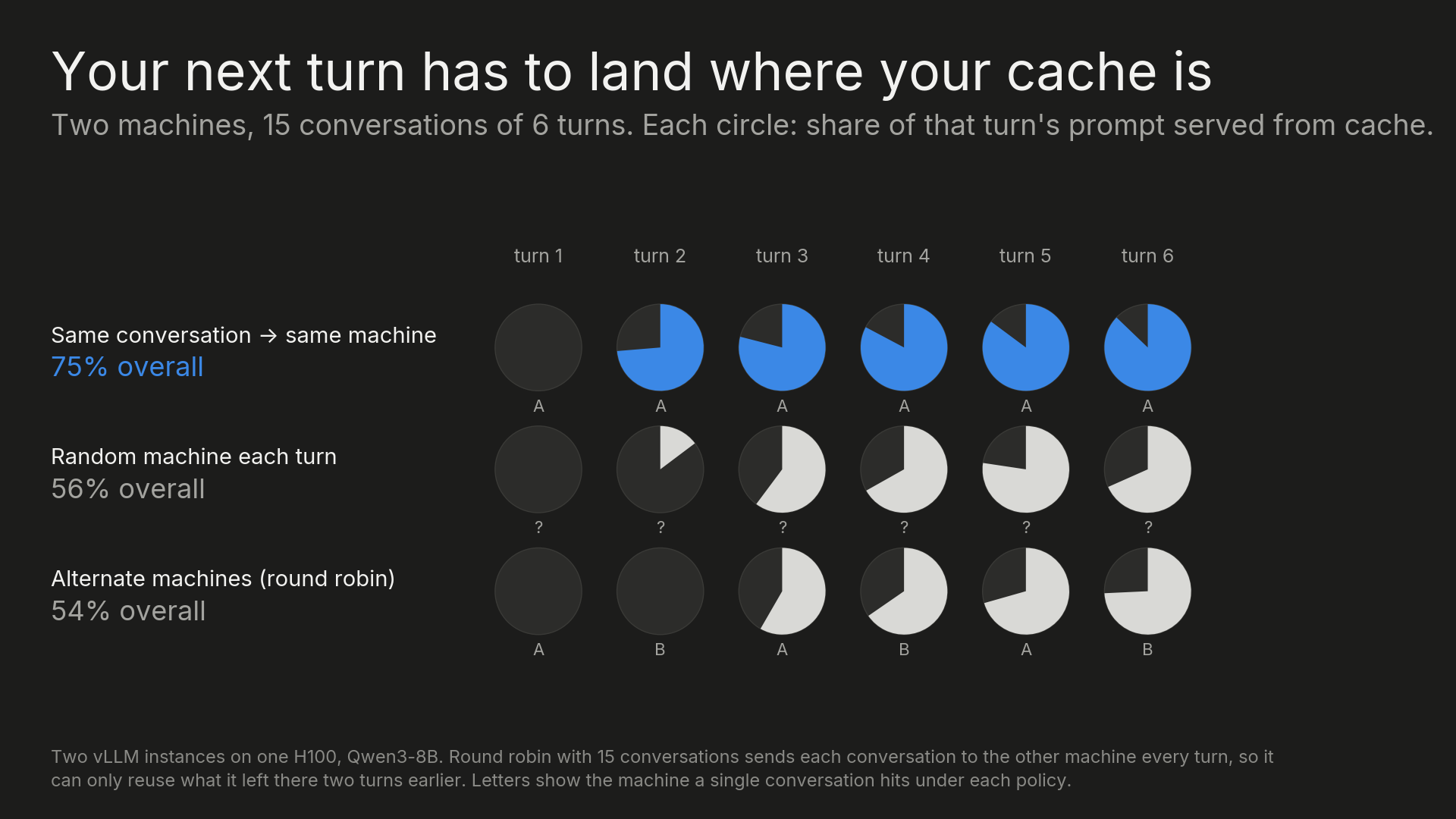
Some large deployments share a cache pool across machines, so any machine can fetch your cache. It still has to pull the cache over first, which means landing on the right machine stays faster.
5. The cache expires or gets evicted
The cache is created in GPU memory, which also holds the model's weights and serves everyone else's requests. While your session sits idle, the GPU needs that memory back, so old caches are evicted, least recently used first. Evicted caches can move down to cheaper memory, first the server's CPU memory and then local SSD, and pulling one back is slower than a hit on the GPU but faster than reading the prompt again.
Every kind of memory has its own cost of holding a cache, and at some point holding it costs more than reading the prompt again. For a 100K-token cache on Llama 3.3 70B, Respan's estimate puts that point at about 4.5 minutes in GPU memory, 1.6 hours in CPU memory, and 2.2 days on SSD. The estimate assumes an H100 at $3.50 per hour and 50% utilization, where re-reading 100K tokens takes about 55 seconds, so these are estimates of provider economics, not numbers any provider has published.
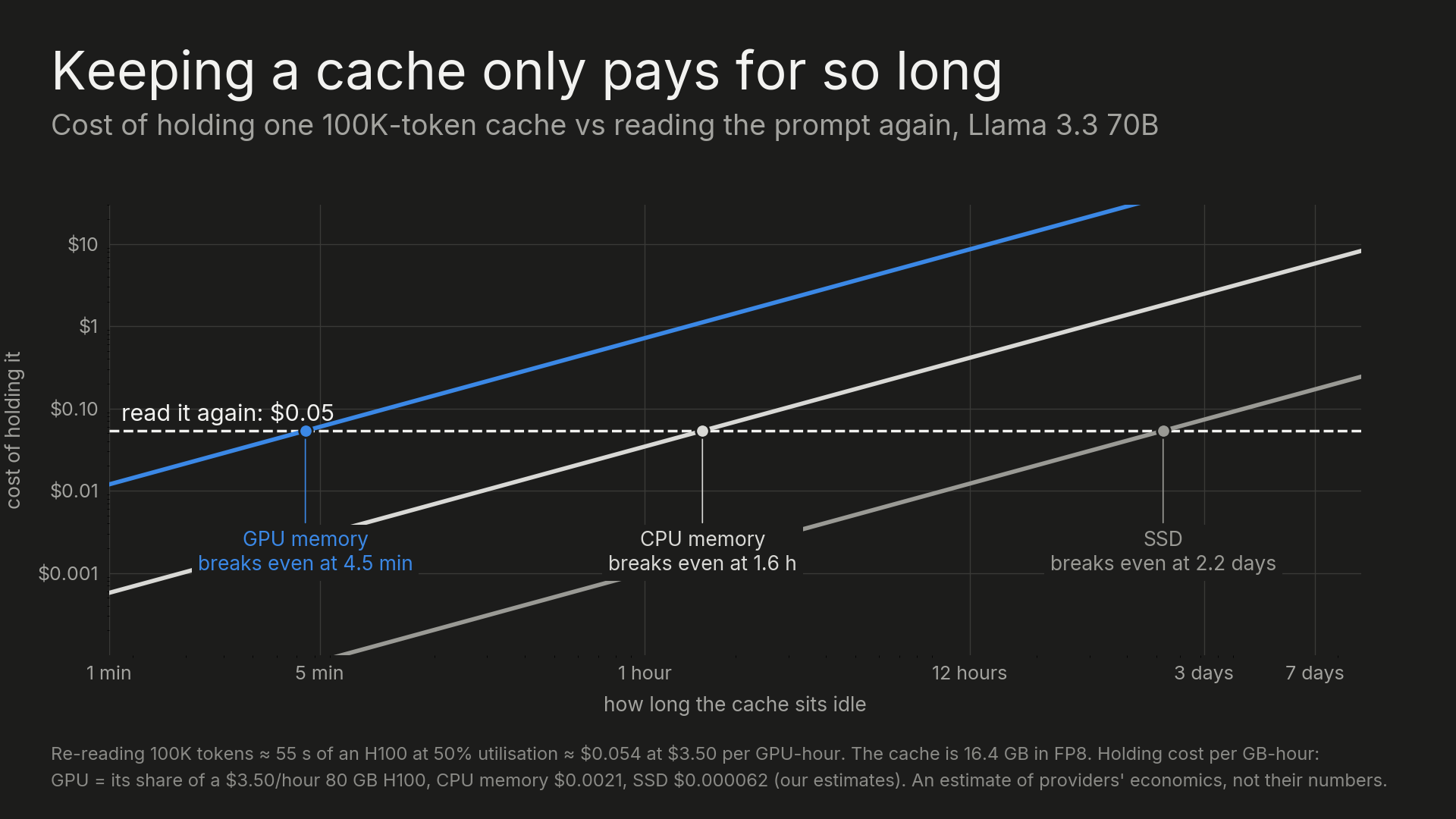
That lines up with what Anthropic sells: a 5-minute cache and a 1-hour cache, with nothing in between. Five minutes is about as long as a cache is worth keeping on the GPU, while an hour fits comfortably in CPU memory, so the lifetime you pick likely also decides where your cache lives.
How prompt caching reduces inference costs
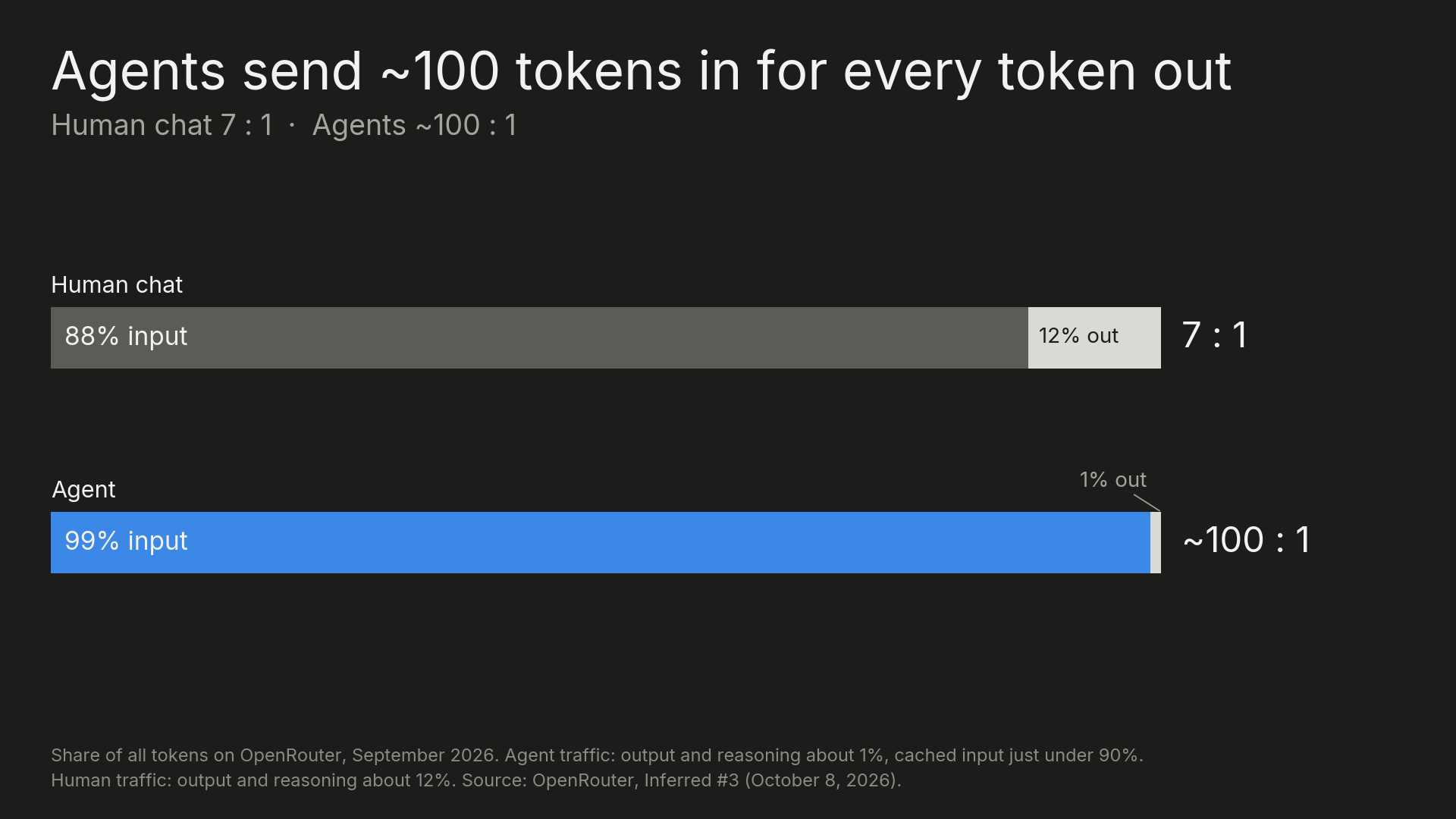
Prompt caching saves the most where the repeated part of each request is nearly all of it, and that describes agents. They send far more input than output, and that input grows faster than the session does.
Agent cost is almost all input
In human chat, input is about seven times output. For agents, output and reasoning make up about 1% of tokens, so input runs closer to 100 times output, according to OpenRouter's September 2026 usage data.
Input also grows roughly with the square of the turns, because every turn resends everything before it. A 30-turn session reads about 2 million input tokens and a 60-turn session reads about 6.7 million, so doubling the turns multiplies input by 3.4.
Long prompts cost more than their length
Inference cost tracks GPU time, and within a single read, time grows faster than the length of the prompt. The 100K-token read that took 7.55 seconds would have taken 2.6 seconds if time grew in step with length, which makes the curve close to quadratic.
Some providers now price that in. Claude Haiku 5.5 costs five times as much per token once a prompt passes 100K tokens, and GPT-6.1 Sol costs twice as much above 272K.
Cheap reads make writes the expensive part
Once reads cost 5% of input, writing the cache becomes the larger line on the bill. Respan modeled a 60-turn coding session on Claude Opus 5.5 that grows to 200K tokens, with each turn adding about 3K tokens of tool results and messages and 900 output tokens, at list prices of $4 per million input tokens, $5 for 5-minute cache writes, $0.20 for cache reads, and $20 for output.
With caching, the session costs $5.68, and $3.40 of that, 60%, goes to cache writes. Without caching, the same session costs $27.74.
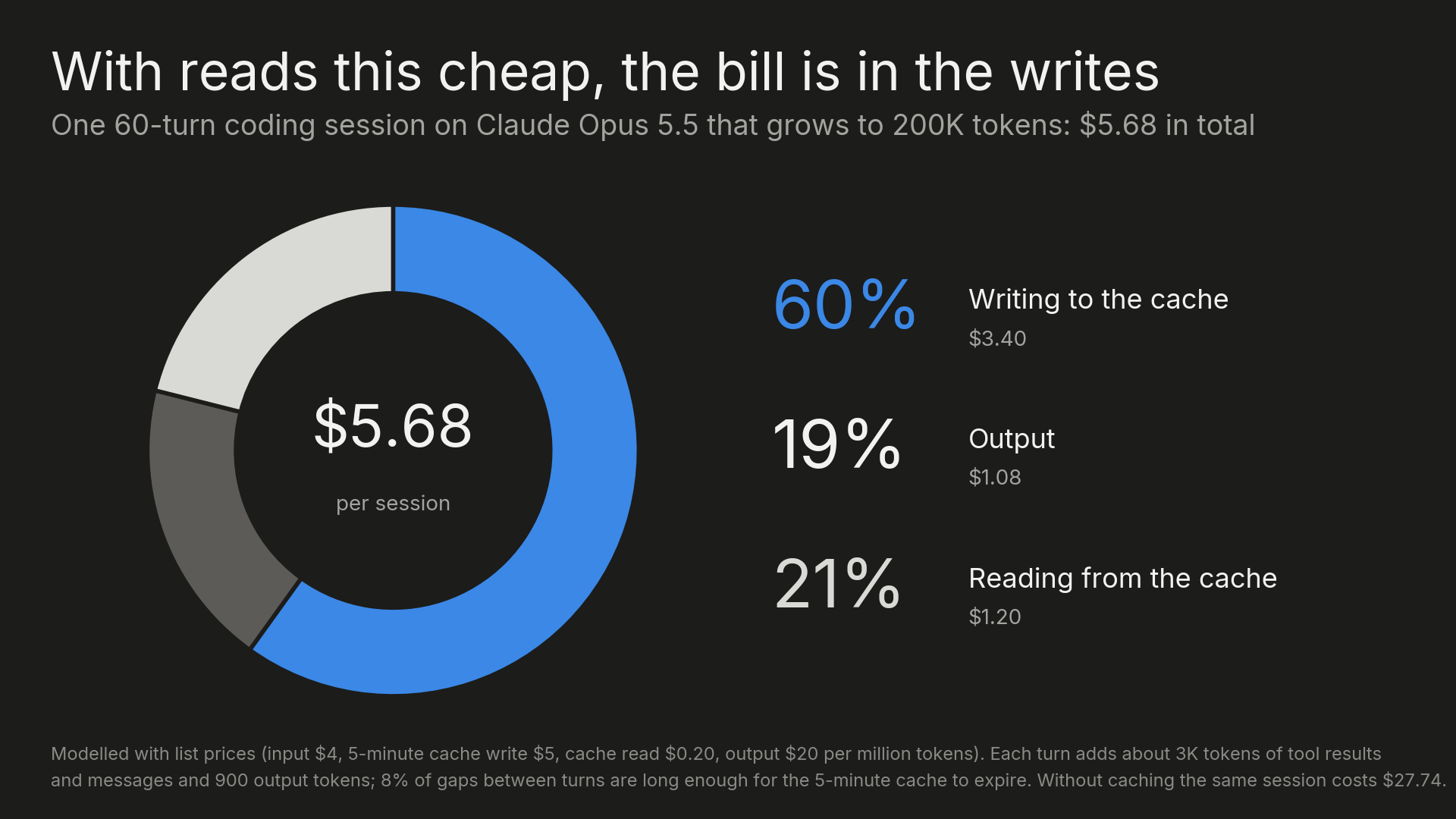
Each turn writes its new tokens to the cache. In this model, 8% of the gaps between turns are long enough for the 5-minute cache to expire, and each of those makes the next message write the whole history again.
Prompt caching on popular providers
Every major provider caches the start of a prompt, but they differ on whether caching is automatic, how long a cache lives, and what writes cost. Rates are from each provider's docs as of November 2026.
| Provider | Caching | Cached read | Minimum prompt | Cache lifetime |
|---|---|---|---|---|
| OpenAI | Automatic | 0.1x (0.05x GPT-6.1 Sol and Terra) | 1,024 tokens | 30 min, 12h option |
| Anthropic | Top-level flag or breakpoints | 0.05x Opus/Sonnet 5.5, 0.1x Haiku 5.5 | 512 tokens (5.5 models) | 5 min or 1 hour |
| Google Gemini | Implicit by default | 95% off (Gemini 4 Argon) | 4,096 tokens (newest) | Not published |
| Amazon Bedrock | Implicit or checkpoints | Varies by model | 512 to 4,096 tokens | 5 min; 1h Claude; 30m GPT |
| OpenRouter | Same as provider | Same as provider | Same as provider | Sticky for 60 min idle |
OpenAI
OpenAI caches automatically on supported models, so there is nothing to mark in the request. The table's numbers apply to GPT-5.6 and later, where writes are billed too: 1.25 times input for the 30-minute lifetime and 2.5 times for the 12-hour option. Earlier models didn't charge for writes, which is worth keeping in mind when you compare OpenAI vs Anthropic pricing from older sources.
Requests are routed by a hash of the prompt's opening tokens, and OpenAI notes that traffic above about 15 requests per minute on the same prefix can overflow to other machines and miss.
Anthropic
Anthropic has you mark what to cache with cache_control, either once at the top level, where the breakpoint moves forward as the conversation grows, or on up to four individual blocks. Writes cost 1.25 times input for the 5-minute cache and 2 times for the 1-hour cache, which makes the lifetime the main decision in Claude prompt caching.
Google Gemini context caching
Gemini API caching is implicit by default on Gemini 2.5 and newer, and the savings pass through automatically when a request hits. Explicit caches, which you create and reference yourself, work through generateContent on supported Gemini 3 and 2.5 models but not on Gemini 4 Argon and later.
The minimum drops to 2,048 tokens on Gemini 2.5, and Gemini 4 caches the full previous request only if the new one adds at least 2,050 tokens.
Amazon Bedrock
Amazon Bedrock supports implicit caching, where Bedrock reuses eligible prefixes on its own, and explicit caching, where you place checkpoints. Neither guarantees a hit, since entries live on the server that handled the request. Caching works with cross-Region inference, though AWS notes that routing across Regions during high demand can increase cache writes, and it isn't available for batch inference.
OpenRouter
OpenRouter passes each provider's caching through, so the rules for whichever provider serves the request apply. To keep caches warm, it uses provider sticky routing: after a cached request, later requests for the same model go to the same provider, as long as that provider's cache reads are cheaper than its regular input. Stickiness ends after 60 minutes of inactivity and is skipped if you set a manual provider order.
Open-weight model hosts
For open-weight models served by many hosts, the cache price usually follows what the model maker charges on its own API. Per OpenRouter endpoint data from November 6, 2026, most Kimi K3 hosts charge 10% of input for a cache hit, the same as Moonshot, while GLM hosts sit around Z.ai's 19% and DeepSeek hosts around DeepSeek's 2%.
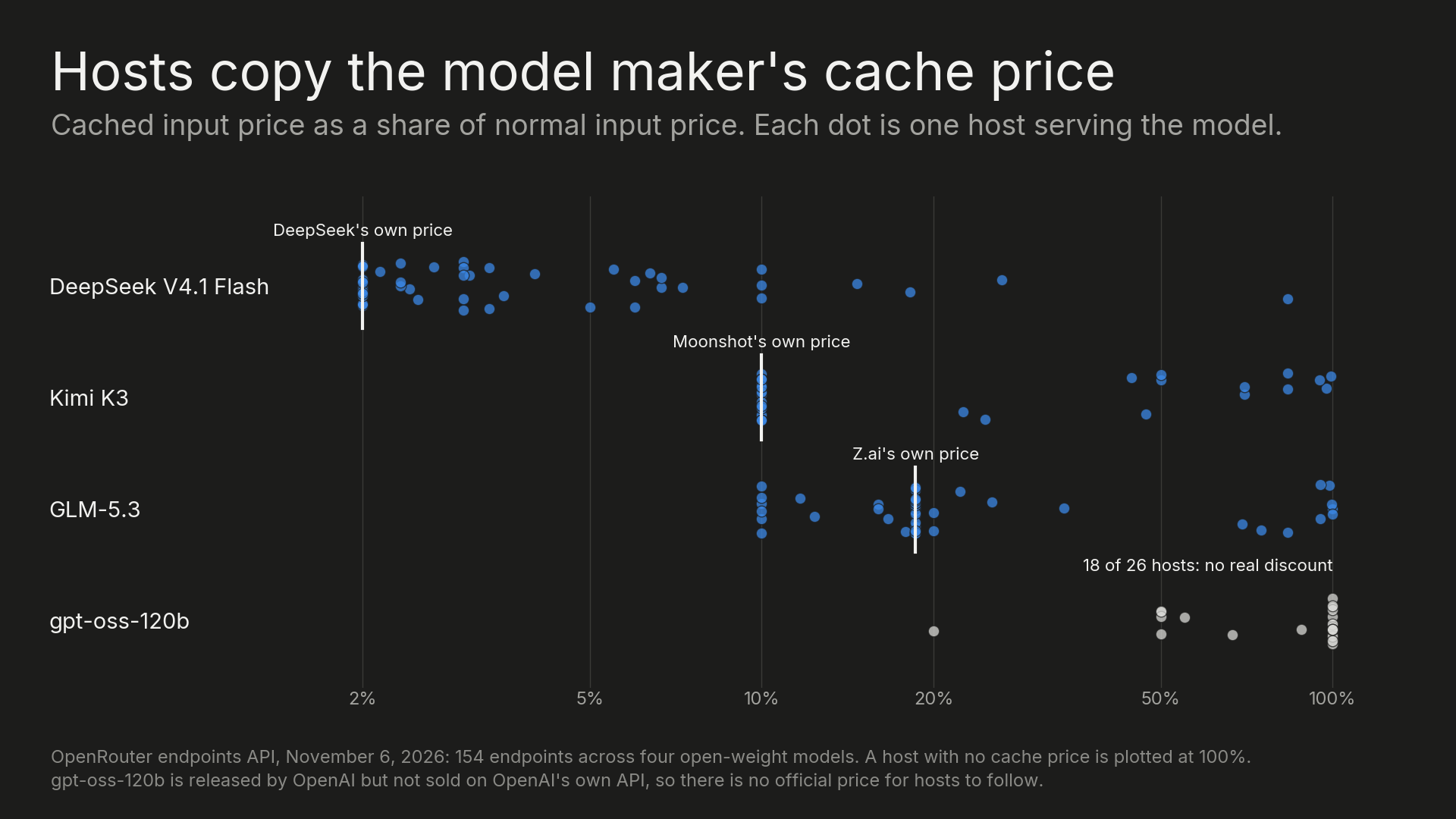
OpenAI doesn't sell gpt-oss-120b on its own API, so there is no maker's price to follow, and 18 of its 26 hosts give no real cache discount, even though caching works on it the same way it does on any other open model. If you run an open model through a host, check the cached rate per host before assuming there is one.
How to check for a prompt cache hit
Every provider reports cached tokens in the usage object of each response, so checking a hit means logging one or two fields per call:
- OpenAI -
cached_tokensunderprompt_tokens_details(Chat Completions) orinput_tokens_details(Responses API). - Anthropic -
cache_read_input_tokensfor reads andcache_creation_input_tokensfor writes. If both are 0, the prompt wasn't cached. - Google Gemini -
total_cached_tokensunderusage, orcachedContentTokenCountunderusageMetadataingenerateContentresponses. - Amazon Bedrock -
cacheReadInputTokensandcacheWriteInputTokenson the Converse API, whereinputTokenscounts only the uncached part. - OpenRouter -
cached_tokensandcache_write_tokens, plus acache_discountfield with the savings.
A healthy cache shows a write on the first call and mostly reads on the next call within the lifetime. With Anthropic, one top-level cache_control flag is enough to see it:
import anthropic

client = anthropic.Anthropic()
response = client.messages.create(
    model="claude-opus-5-5",
    max_tokens=1024,
    cache_control={"type": "ephemeral"},  # automatic caching
    system=LONG_SYSTEM_PROMPT,
    messages=[{"role": "user", "content": "Summarize the open issues."}],
)
print(response.usage.cache_creation_input_tokens, response.usage.cache_read_input_tokens)
Run it twice within five minutes, and the second call reports most of the prompt under cache_read_input_tokens. When a call misses that you expected to hit, Anthropic's and OpenAI's cache diagnostics tell you what broke the prefix. If your calls go through Respan's gateway, each logged request also shows cache read, cache write, and uncached tokens, with cost priced at the model's cache rates.
How to keep your cache hit rate high
Hit rate is the share of input tokens served from cache, and once caching is on, it's the number that decides how much of the discount you collect.
Know what hit rate to expect
Every request is part old and part new. The old part, meaning history or instructions the provider has already seen, can come from the cache, and the new part never can, so the ceiling on your hit rate depends on what you're building.
Agents resend a long, growing history and can reach around 90%, per OpenRouter's September 2026 agent traffic. Single-turn tasks that share instructions land around 70%, based on the grader example in OpenAI's caching guide, and chat sits around 55%, per DeepSeek's API figures and Kimi's Mooncake trace, because each new message is a bigger share of a shorter prompt. Prompts below the provider's minimum cache nothing.
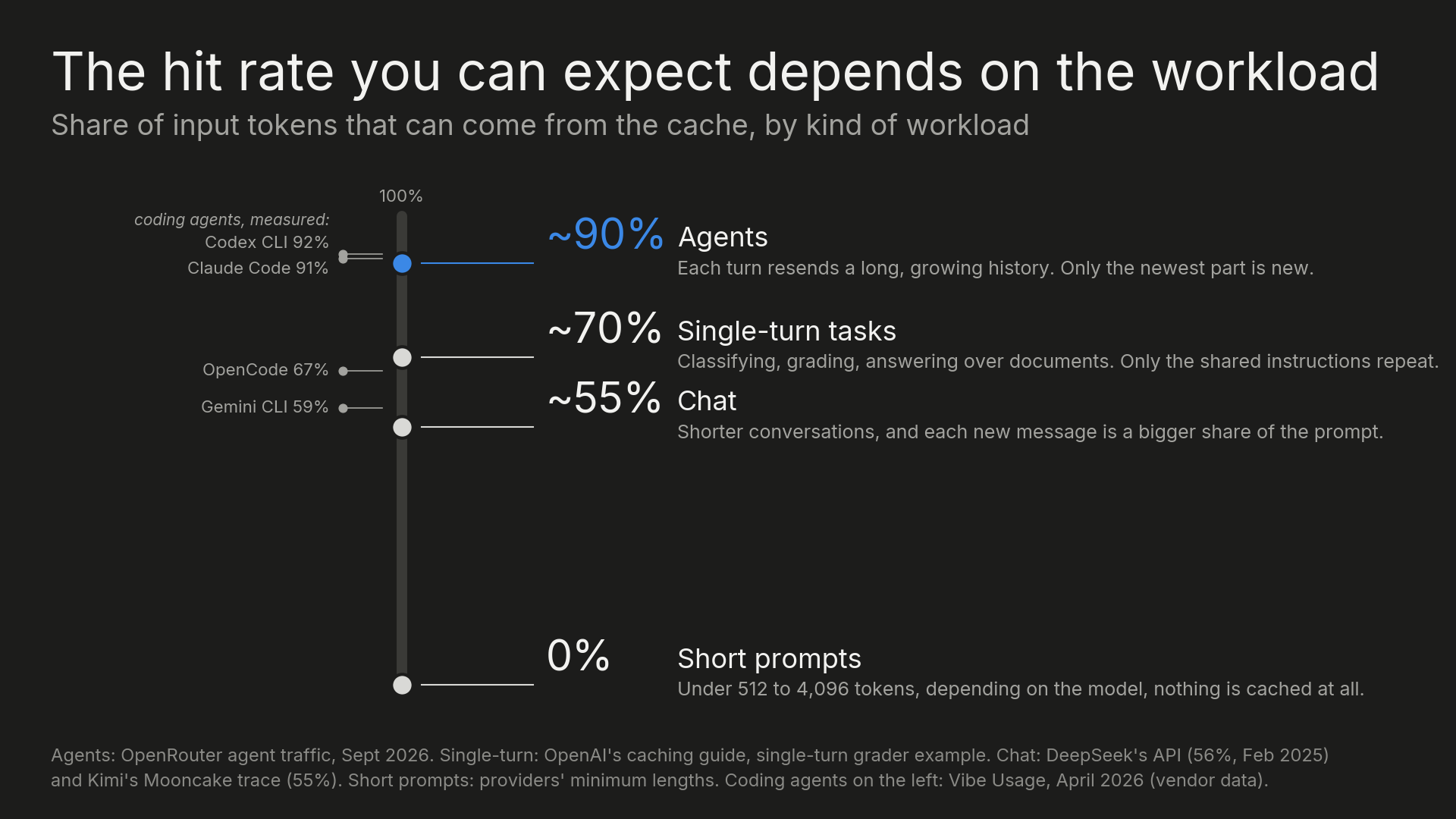
Coding agents vary even within the agent band. Per Vibe Usage's April 2026 vendor data, Codex CLI reached 92% and Claude Code 91%, while OpenCode sat at 67% and Gemini CLI at 59%. If you're well below what your kind of workload should get, something is breaking the cache.
Keep the cache warm
With reads this cheap, the biggest lever is not letting the cache go cold. If your sessions pause for longer than the cache lifetime, paying for a longer one, such as Anthropic's 1-hour cache or OpenAI's 12-hour option, can cost less than rewriting the history after every break.
Check your harness, not just your prompt
Many cache misses come from the harness, the tool that builds each request for you, such as Claude Code, Codex, or Cline. A change at any layer of the request invalidates that layer and everything after it, and each layer has broken a cache in a widely used tool:
- Tool definitions - Codex listed MCP tools in a random order on each request, reported in a Codex issue.
- System prompt - OpenCode put the current date in its system prompt, so every open session lost its cache at midnight, which an OpenCode issue tied to unexpected billing spikes. Per Cline's source code, Cline rebuilds its system prompt when you switch between Plan and Act.
- Project memory - Claude Code's auto-memory rewrote part of the prompt every turn.
- Conversation history - Claude Code dropped old thinking blocks on every turn, a bug described in Anthropic's April 2026 postmortem. It has also re-sent a pasted image as text on the next turn.
- The gateway - LiteLLM silently dropped cache markers for Claude on Bedrock.
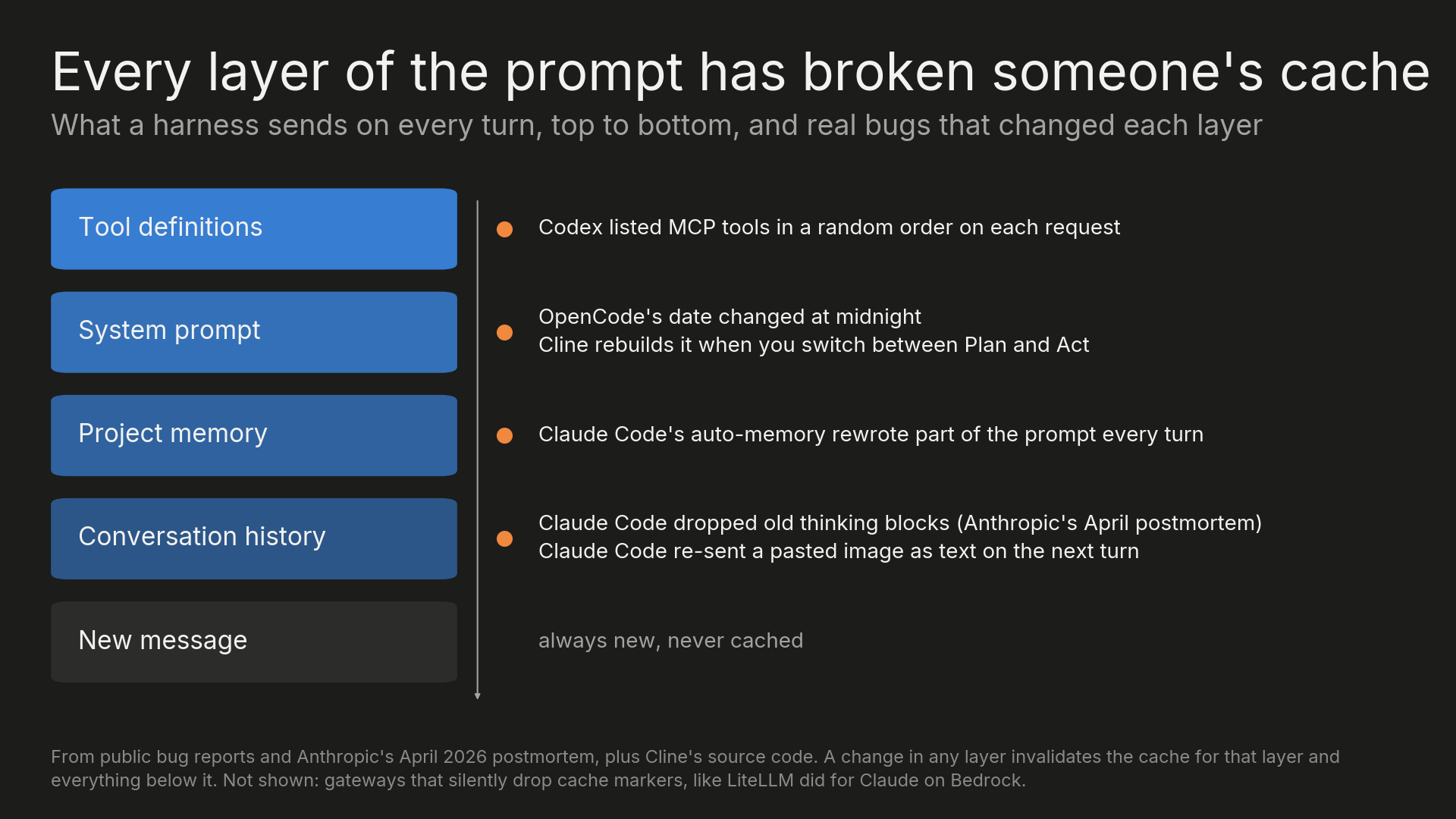
None of these raise an error, which is what makes LLM cache invalidation expensive: the only signal is a cache read count that drops on a request where nothing should have changed.
Think twice before switching models
Because a cache belongs to one model (step 2), a cheaper model has to earn the switch back before it saves anything. In a 112K-token coding session on Opus 5.5 at list prices, with the same per-call growth as the session above, switching to Sonnet 5.5 only pays back after about 10 calls, while switching to Haiku 5.5 pays back after 2. That math counts calls alone, not whether the cheaper model does the job as well.
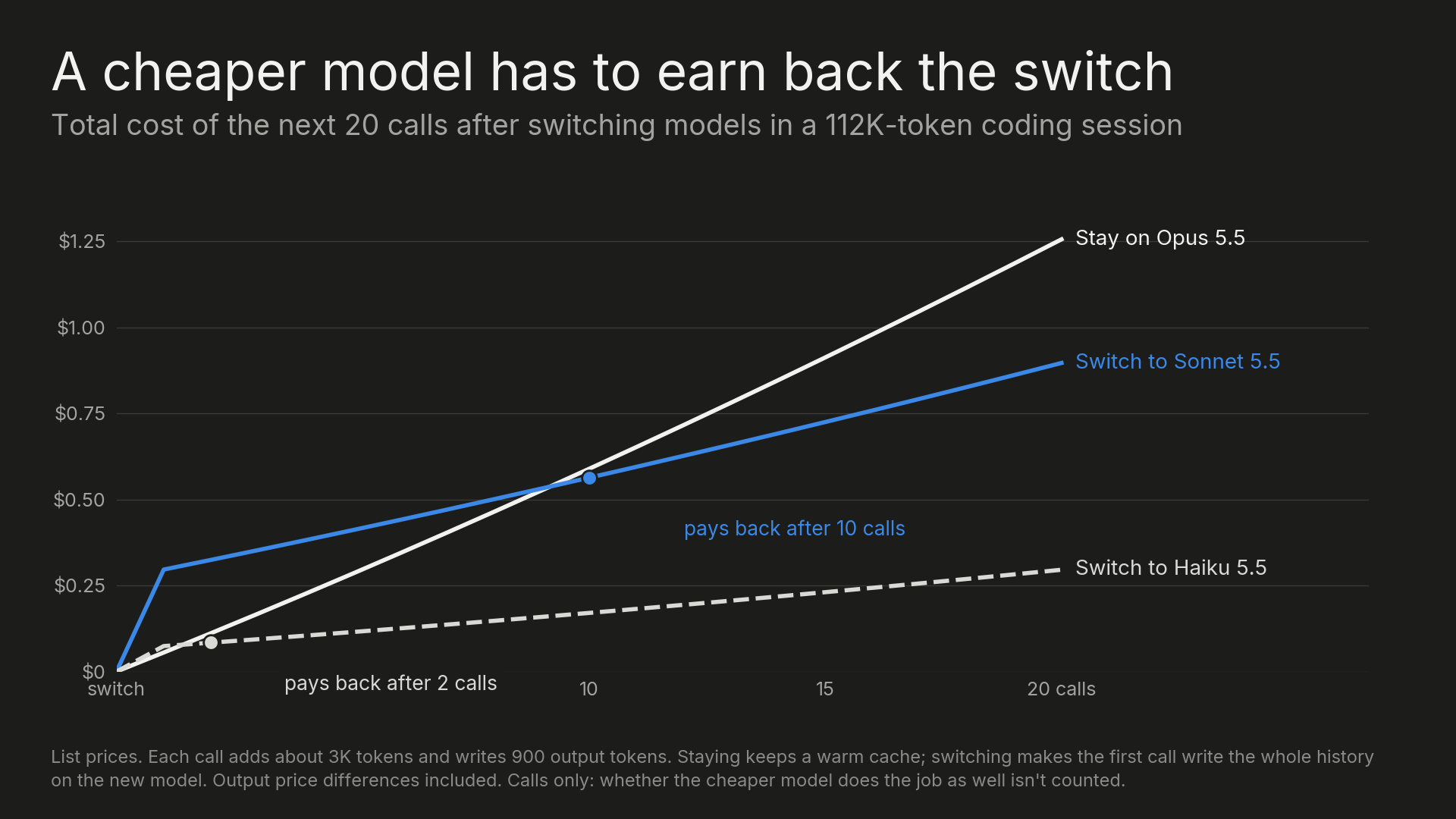
Cache-aware routing: when a model switch pays for itself
A model router used to have a simple job: pick the cheapest model that can finish the task. Caching complicates that, because the cheapest model for this request isn't always the cheapest for the session.
LLM routers handle this in three ways, per vendor docs and launch posts, as of November 2026. Some decide every request and ignore the cache, including Azure's model router, Bedrock's prompt routing, and LiteLLM's cost-based routing. Others decide every request but price the switch, moving to a cheaper model once it pays for the lost cache: Cloudflare, DigitalOcean, Cursor, Not Diamond, and Respan Router when its cost-aware switching policy is on. GitHub Copilot Auto only switches when there is no cache to lose, on the first turn and after compaction.
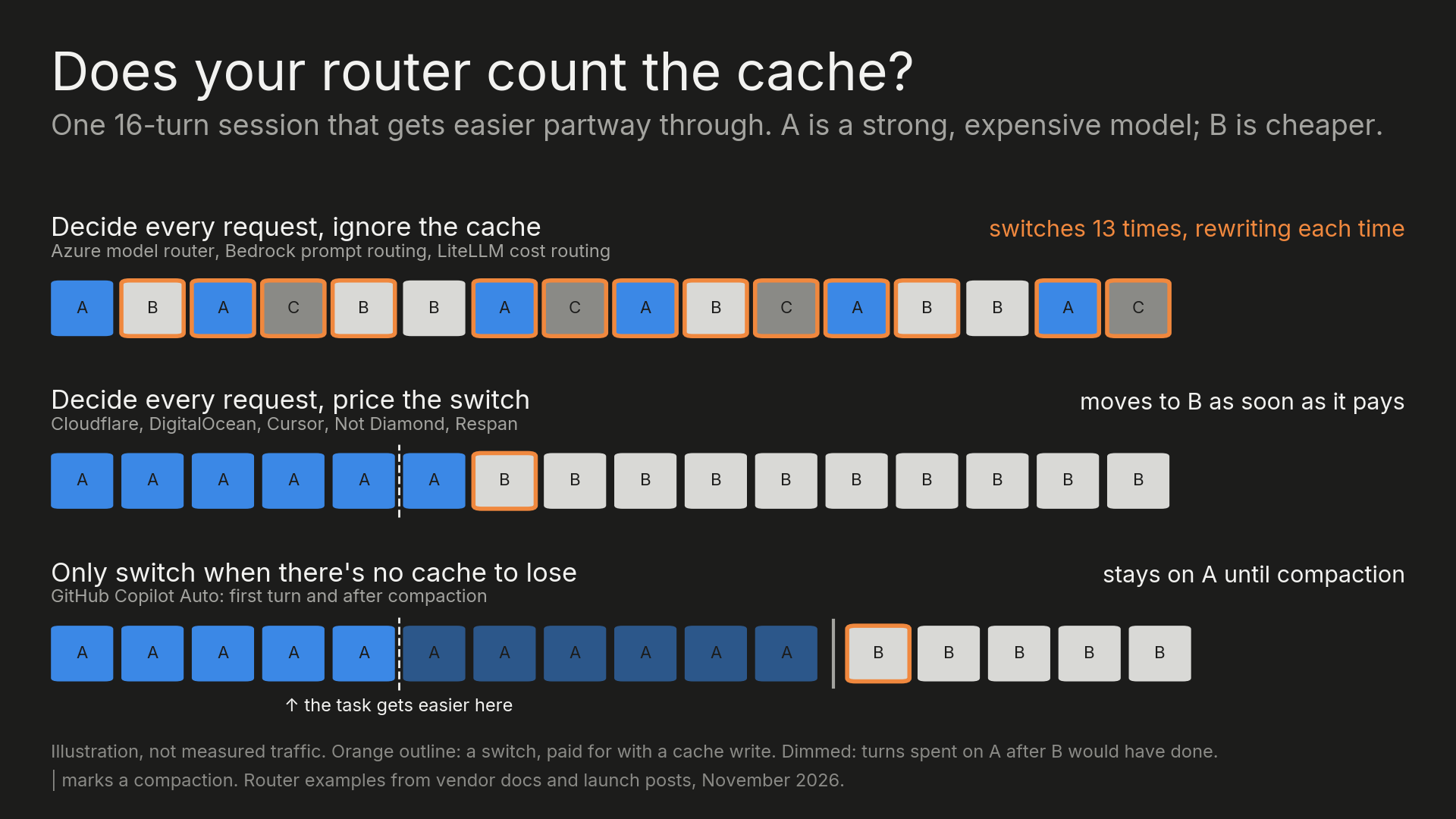
The best moments to switch are the ones with no cache at stake: the start of a session, right after compaction, or once the cache has gone cold. Anywhere else, a switch has to pay for the cache it throws away.
Respan Router sits in the Respan gateway. You send requests to one model name, span-router, and it picks a model for each task based on what the task needs, including context length, tools, and images. As long as each turn carries the full history under the same thread_identifier, it keeps that thread on the same model while the model can still do the job. With the cost-aware switching policy on, it weighs cached reads, cache writes, fresh input, and expected output before it moves a conversation, and you pay the serving model's rates, cache discounts included, with no markup. Respan Router is in beta and runs on Respan credits.
FAQ
Does Fireworks AI support prompt caching?
Yes. Fireworks AI has prompt caching on by default for all models and deployments. On serverless models, cached prompt tokens are discounted, 50% by default with the exact rate varying by model, and on dedicated deployments caching frees up capacity for higher throughput on the same hardware.
Does xAI's Grok API support prompt caching?
Yes. Grok models cache automatically, and cached tokens bill at a lower rate that varies by model.