LLM API spend rarely grows in a straight line with traffic. Once a feature reaches real users, agents call models several times per task, conversations carry more history with each turn, and output tokens, which cost more than input, pile up in places the original estimate didn't cover.
Most of the fixes are well known: send simple work to smaller models, cache what repeats, batch what can wait, and trim what the model doesn't need to read. The harder part is knowing whether the cheaper setup still gives good answers, because a cost cut that lowers quality shows up later as user complaints instead of a line on the invoice.
That's why LLM cost optimization works best as a loop: see where the money goes, cut it, and check that the output held. The 8 LLM cost optimization strategies that follow reduce LLM API costs, and each one comes with the quality risk to check before you ship it.
What are the biggest drivers of LLM API costs?
LLM APIs bill per token, split into two buckets. Input tokens are everything you send, including the system prompt, conversation history, retrieved documents, and tool definitions. Output tokens are everything the model generates, and they cost more per token than input.
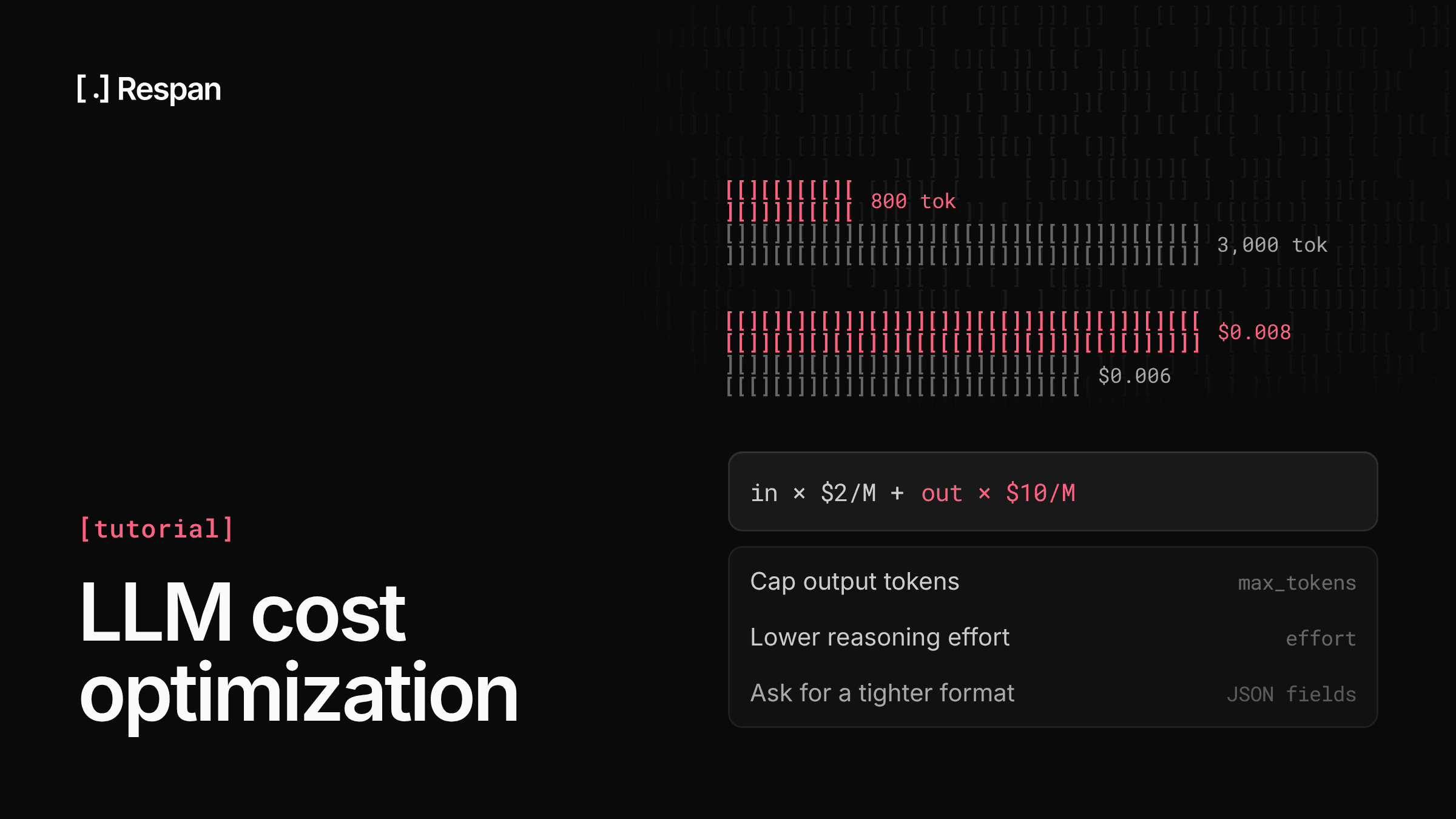
The cost of a single request comes down to one formula:
Cost per request = (input tokens × input price) + (output tokens × output price)
Take Claude Sonnet 5.5, which Anthropic's pricing lists at $2 per million input tokens and $10 per million output tokens. A request with 3,000 input tokens and 800 output tokens costs $0.006 for input and $0.008 for output, or $0.014 in total. Output is about a fifth of the tokens in that request but more than half of its cost, and at a million requests a month the same request shape comes to $14,000.
Across your traffic, the bill then depends on which model handles each request, how many tokens each request carries, and how many requests you send. Model choice usually has the largest effect. Within Anthropic's lineup alone, Haiku 5.5 input costs a twentieth of Sonnet 5.5 input on prompts up to 100,000 tokens, and pricing shifts again between providers, which an OpenAI vs Anthropic pricing comparison lays out tier by tier.
Why LLM API costs end up higher than you'd expect
Early estimates usually multiply one request's cost by expected traffic. Production rarely matches that math, because several multipliers stay invisible until the invoice arrives:
- Conversation history - Chat APIs are stateless, so each turn resends the full history. Without caching, a 20-turn conversation pays for the first message 20 times, and total input grows faster than the number of turns.
- Agent loops - An agent that plans, calls a tool, reads the result, and calls the model again repeats that cycle with a larger context each time, so one user task can turn into many model calls.
- Reasoning tokens - Reasoning models bill their thinking as output tokens, so a short visible answer can carry a long, expensive reasoning trace behind it.
- Retries - A response that fails JSON parsing, or times out after the provider already generated it, gets retried, and you pay for both attempts.
- Cache writes - Prompt caching isn't free on the first request. On Anthropic, cache writes cost more than base input: 1.25x for a 5-minute cache and 2x for a 1-hour cache, so a prefix that gets written and rarely reused raises the bill.
- Long-context pricing - Some models price the whole request higher once a prompt passes a length threshold. Claude Haiku 5.5, for example, bills a prompt over 100,000 tokens at $0.50 per million input tokens instead of $0.10.
None of these show up in a single test request, which is why tracking cost per request and per feature tells you more than any forecast.
8 LLM cost optimization strategies
Cost optimization works on three parts of the formula: the price per token, the number of tokens per request, and the number of calls. The strategies stack, so where to start depends on where your bill concentrates.
| Strategy | What it cuts | Effort | Quality risk | Best for |
|---|---|---|---|---|
| 1. Task-based routing | Price per token | Medium | Missed edge cases | Mixed task difficulty |
| 2. Provider prompt caching | Repeated prefix input | Low | None | Long, stable prompts |
| 3. Exact-match caching | Repeat calls | Low | Stale answers | Identical repeat requests |
| 4. Batch APIs | Price of async work | Low | None (slower results) | Evals, backfills, enrichment |
| 5. Prompt and context trimming | Input tokens | Medium | Lost context | Long prompts, RAG |
| 6. Output caps | Output tokens | Low | Truncated answers | Verbose responses |
| 7. Agent step limits | Calls per task | Medium | Unfinished tasks | Tool-calling agents |
| 8. Retry and parse fixes | Wasted calls | Low | Low | Structured output, flaky providers |
1. Route each task to the cheapest model that handles it
A common setup sends every request to one model, usually the one that handled the hardest case during prototyping. As a result, classification, extraction, short rewrites, and other simple steps pay frontier prices for work a small model could do.
Routing splits traffic by task. The simplest version maps each feature or endpoint to a model tier in config, while more advanced versions use a classifier or a router that picks a model per request. Comparing the best LLM APIs on price and context limits helps you choose the tiers, but your own traffic decides which requests can move down, since a smaller model that handles the typical case can still fail on harder inputs in the same feature.
Quality risk: a smaller model can miss edge cases the larger one handled, so score it on real requests before moving traffic over.
2. Use provider prompt caching for stable prefixes
When requests share a long, stable opening, such as a system prompt, tool definitions, or a reference document, providers can cache that prefix and bill repeats at a discount. OpenAI caches by default and advertises up to 90% off cached input, while Anthropic caches the blocks you mark with cache_control (or applies caching automatically with a top-level setting) and bills cache reads at a tenth of base input or less, depending on the model.
The cache matches on the prefix, so prompt order decides the hit rate. Put static content first and anything that changes per request, like the user message or retrieved documents, at the end.
Minimum cacheable lengths vary by model, and prompts below the minimum are processed without caching and without an error, so check your cached-token counts instead of assuming hits. The mechanics of prompt caching differ enough between OpenAI and Anthropic that it's worth setting up per provider.
Quality risk: none. The output is identical, and only the price of the cached prefix changes.
3. Cache exact repeat requests
Prompt caching discounts part of the input. A response cache goes further and skips the model call entirely when an identical request comes in again. That pays off for repeated inputs, like the same classification run on duplicate records, a summary regenerated for an unchanged document, or an eval suite rerun against the same cases.
Exact-match caching returns a stored answer only when the messages match exactly, which keeps it predictable. Semantic caching matches similar requests and raises hit rates, but it can serve an answer to a question that only looked the same, and how much that costs you decides which of the LLM cache layers fits your app.
If responses depend on who is asking, key the cache by customer. Set the TTL to how long the underlying data stays true, since a cached answer keeps getting served after the source changes.
Quality risk: stale answers when the TTL outlives the data behind them, which makes cache invalidation as important as the hit rate.
4. Move async work to batch APIs
Work that doesn't need an answer while a user waits can run through a batch endpoint at half the price. OpenAI's Batch API costs 50% less, returns results within a 24-hour window, and uses a separate rate-limit pool. Anthropic's Message Batches also bill at 50% of standard prices, with most batches finishing within an hour.
Good candidates include offline evals, backfills, data enrichment, nightly summaries, and embedding jobs. If OpenAI is your main provider, batching sits alongside a few OpenAI-specific ways to reduce OpenAI API costs, such as choosing between its smaller model tiers.
Quality risk: none on the output itself, though results arrive later, so batch work belongs off the request path.
5. Trim prompts and context
Prompts tend to grow over time. Instructions get added after each incident, retrieval returns more chunks than the answer uses, the full conversation history goes out on each turn, and tool definitions ship with requests that will never call those tools.
All of that is input you pay for on each call. Audit the system prompt and cut instructions that no longer change behavior, retrieve fewer chunks or rerank before sending them, summarize or drop older turns, and send only the tools relevant to the request. The risk is cutting something the model was relying on, which often shows up as quieter failures rather than errors.
Quality risk: cutting context the model needed, so compare outputs on the same test set before and after the trim.
6. Cap output tokens
Output is the expensive half of the formula, so a long answer can cost more than a much longer prompt. Set max_tokens per use case, ask for the format you need (a JSON object with defined fields, a one-paragraph answer), and lower the reasoning effort on reasoning models where the task allows, since reasoning tokens bill as output.
A cap that's too tight cuts the response off mid-answer, which costs you the call and the result.
Quality risk: truncated answers. Setting the cap from the length of good outputs you've already logged keeps it above what the task needs.
7. Limit agent steps and tool-call loops
Agents multiply cost because each step resends a context that keeps growing with tool results. An agent stuck retrying a failing tool or revisiting its own plan can run many steps on a task that should take a few.
Set a maximum step count per task, stop after repeated tool failures, and cap total tokens per run. Routine steps like choosing which tool to call can also run on a smaller model than the step that writes the final answer. The tradeoff is that a limit set too low ends runs that were on track to finish.
Quality risk: unfinished tasks. Tracking completion rate next to cost per task shows whether a limit is too tight.
8. Cut retries and parse failures
A retry after a parse failure pays for the whole response twice. Structured outputs, where the provider constrains generation to your JSON schema, can remove most of those failures at the source.
For errors, retry only what's retryable, like rate limits and server errors, with backoff, and fail fast on bad requests that will fail again. When a provider is rate-limiting or down, a fallback chain that sends the request to another model keeps it alive without a burst of retries against the same endpoint, although the fallback model may not answer the same way.
Quality risk: low. Including fallback models in your eval runs holds a rerouted request to the same bar as the primary.
How to monitor and control LLM costs
Cost cuts only stick if you can measure them. Without per-request cost data, you can't tell which feature or customer drives the bill, and without a quality score you can't tell whether the cheaper route broke something.
Respan's AI gateway routes model calls through one API across 1,000+ models, with observability and automated evals built in, so each request is traced, priced, and ready to score as soon as it's served:
- Task-aware routing (beta) - Set the model to
span-routerand Respan picks a model for each task. Cost-aware routing weighs cached reads, cache writes, fresh input, and expected output, and you pay the serving model's list price with no markup. - Fallback chains - Define the models to fall back to once, and traffic moves to the next one automatically when a provider errors or rate-limits.
- Exact-match caching - Serve identical repeat requests from cache with a configurable TTL, keyed per customer or per model when responses differ.
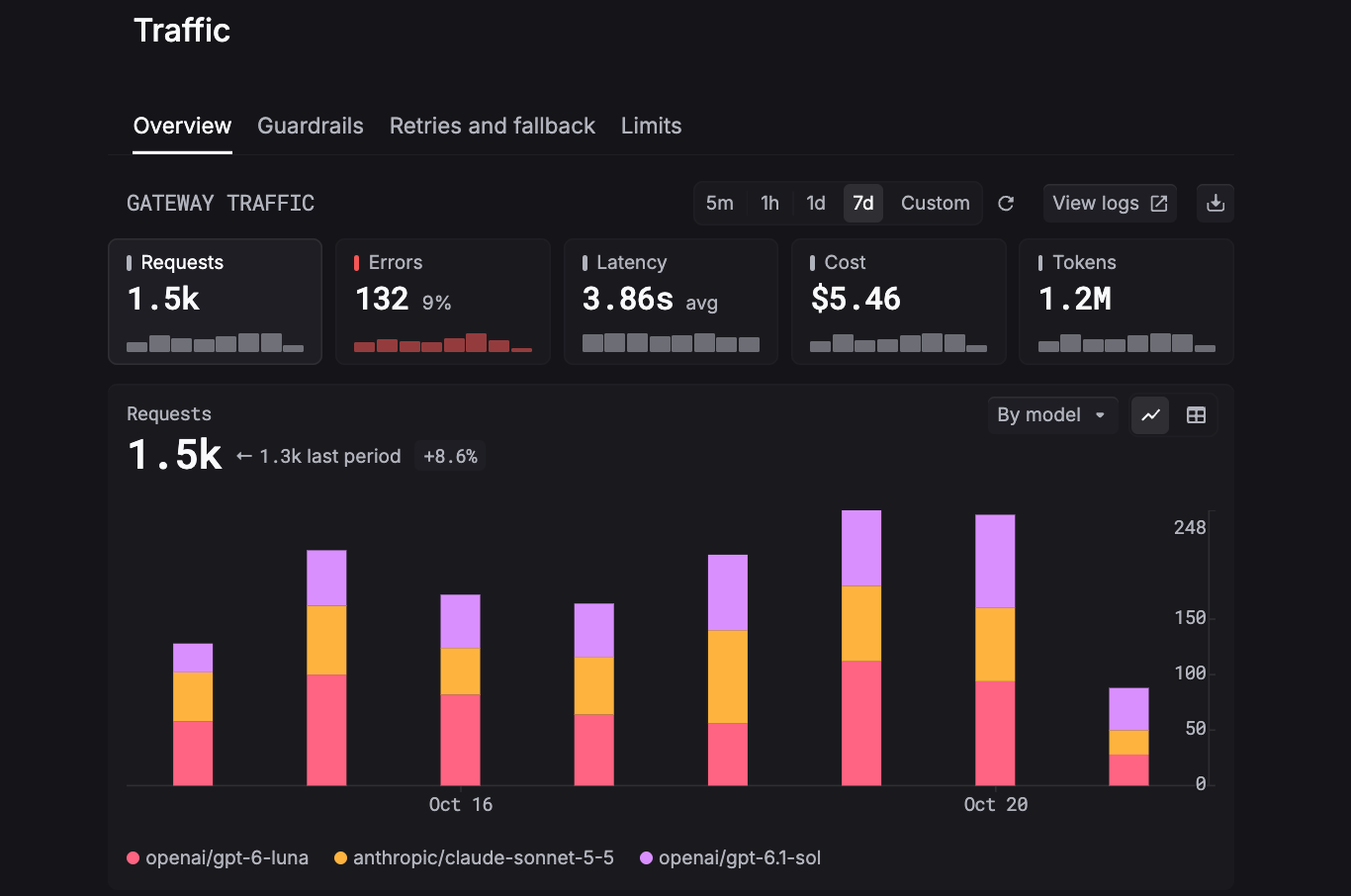
- Cost on each request - Each request is logged as a span with latency and cost attached, and traces nest LLM calls, tool runs, and agent steps so you can see which step ran up the bill.
- Cost per customer - Attach a
customer_identifierand get spend, requests, and tokens broken down by end user. - Live dashboards - Watch requests, errors, cost, latency, and tokens on one dashboard, sliced by model, key, or user.
- Monitors - Track cost, errors, latency, or tokens over any window, with alerts sent to Slack, email, or a webhook the moment a threshold breaches.
- Spend limits - Set soft caps that warn and hard caps that block, per API key, per customer, or org-wide.
- Evals - Score a cheaper model or shorter prompt on a dataset built from production requests before shipping, then run the same evaluator on live traffic.
Because routing, cost data, and evals share one record, a cheaper route and its quality score show up side by side, and any score clicks through to the trace that produced it.
Best practices for optimizing LLM costs in production
Instrument before you optimize
Log the model, token counts, cost, and feature for each request before changing anything. Without that baseline, you can't tell which strategy saved money, and a saving that happens to coincide with a traffic dip can look like a win.
Set a cost baseline per feature and customer
Total spend grows with usage, so it's a weak signal on its own. Track cost per request, per feature, and per customer instead, tagging each request with a feature name and customer ID so the numbers split cleanly.
A rising cost per request usually points to a prompt or model change, while a rising cost for one customer points to an account using the product differently.
Run evals before shipping a cost change
Treat a model swap or prompt trim like a code change. Build a test set from real production requests, score the current setup and the cheaper one with the same evaluator, and ship only if the score holds.
Keep that evaluator running on a sample of live traffic afterward, since production inputs drift away from any fixed test set.
Set hard spend limits, not just alerts
An alert tells someone the budget is close, while a hard limit stops spend at the ceiling. That difference is what protects you from a leaked API key or an agent stuck in a loop overnight.
Setting limits per key and per customer at the LLM gateway applies them before a request reaches the provider, regardless of which part of your code sent it.
FAQ
How do LLM routers help control costs?
An LLM router sends each request to a model that fits the task, so simple steps stop paying frontier prices while hard ones still get a capable model. Some routers also handle fallbacks, which keeps requests alive during provider outages instead of paying for repeated failed attempts.
Respan Router, currently in beta, picks a model per task from the system prompt and the latest exchange, and its cost-aware policy weighs cached reads, cache writes, fresh input, and expected output before switching. Other routers make that decision differently, and a comparison of the best LLM routers shows how they split on model selection and pricing.
Does LLM cost optimization reduce output quality?
It can, depending on the strategy. Prompt caching and batch processing leave output unchanged, while routing to smaller models, trimming context, and capping output can all lower quality if they go too far, and the same is true of AI model optimization techniques like quantization and distillation.
Evals are how you tell the difference. With Respan, you score a cheaper configuration against a dataset built from production requests before shipping, then run the same evaluator on live traffic, and each score links to the trace behind it.
Is a cheaper model always cheaper?
No. Per-token price is one input to the bill. A smaller model can write longer answers, fail parsing more often, or take more agent steps to finish a task, and switching models mid-conversation loses a warm prompt cache, so the next turn pays full input price on the whole history.
With cost-aware switching enabled, Respan Router factors cached reads and writes into the routing decision, so a warm cache can keep a conversation on its current model when staying is the cheaper choice.
How much can LLM cost optimization save?
It depends on your workload. Batch pricing halves the cost of async work, OpenAI discounts cached input by up to 90%, and routing saves in proportion to how much of your traffic a smaller model can handle.
For routing, the Respan Router benchmark on 557 held-out requests reached a 94.1% pass rate against 94.3% for the most accurate single model, at 37% lower cost ($0.46 vs. $0.73). Respan ran that benchmark, so test against your own traffic before planning around a number.