

AI Gateway quickstart
Route your app through Respan’s AI gateway. Call 1000+ LLMs through one unified API with automatic tracing, prompts, fallbacks, and caching.
What is Respan’s AI Gateway?
An AI gateway is a single API endpoint between your application and multiple LLM providers. Respan’s routes to 1000+ models across every major provider (OpenAI, Anthropic, Google, Bedrock, Azure, and more). Point any LLM SDK at Respan and you get automatic tracing, prompt management, fallbacks, load balancing, and caching, without changing how you call the model.
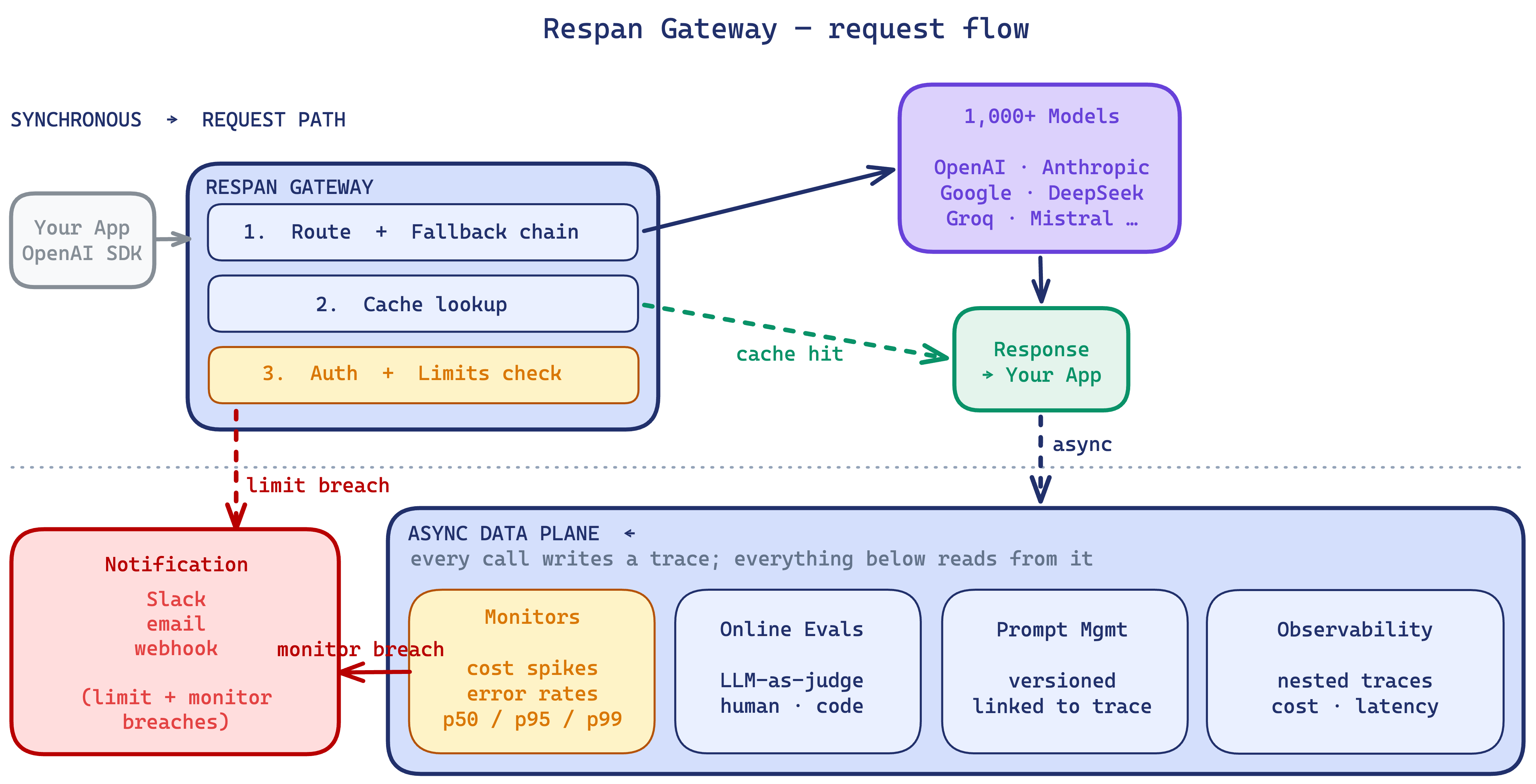
Considerations:
- May not suit products with strict latency requirements (30 to 40ms added).
- May not be ideal for those who don’t want to integrate a third-party service into the core of their application.
Setup
1. Get your Respan API key
Create an account on Respan, then generate a key on the API keys page.
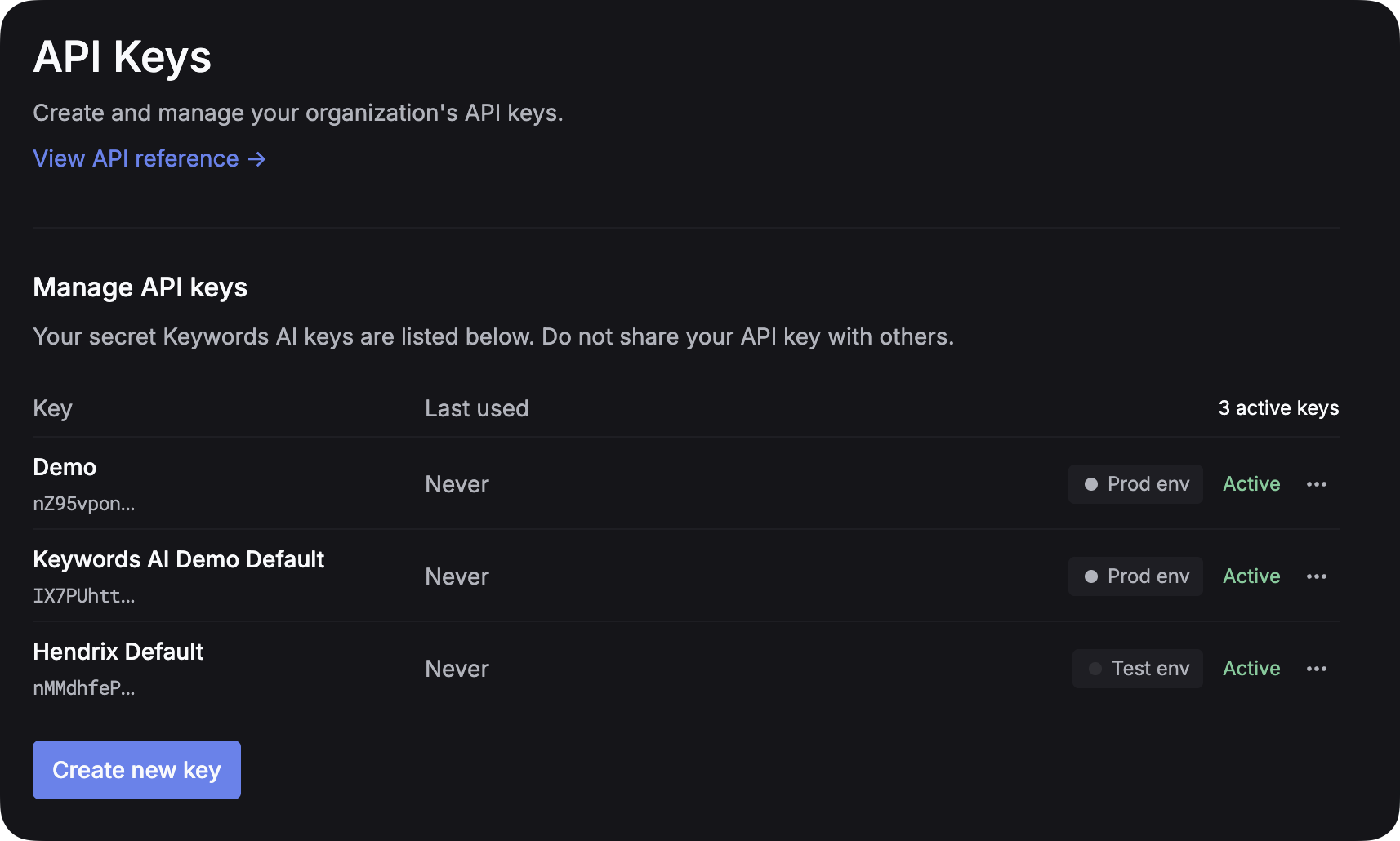
Environment management: create separate API keys for test and production instead of toggling an env parameter. Cleaner separation, better security.
2. Choose how Gateway requests are funded
Every Gateway request uses your Respan API key. For access to the upstream model, choose the funding path available for the model you want to call:
- Use Respan credits. Add credits and configure balance controls on the Billing page. See Billing and credits.
- Bring your own provider key. Connect credentials from your own provider account on the Providers page. See Provider keys and the OpenAI provider guide.
3. Point your app at the Respan endpoint
Route any LLM SDK to https://api.respan.ai/api/ using your Respan API key. Pick the path that fits your workflow.
AI (CLI)
Manually
The fastest way. The Respan CLI hands off to your coding agent (Claude Code, Cursor, Codex, and others), which detects your project’s LLM provider and rewrites your existing calls to point at the gateway.
It also creates a Respan API key for you and saves it to .env if one isn’t already set.
4. Use prompts (Optional)
Manage prompt templates centrally instead of hardcoding them. Create and version a prompt in Respan, then reference it by prompt_id in your gateway calls to ship new versions without changing code.
Create a prompt
Go to the Prompts page and create a new prompt. Write your system message and user template with {{variables}}:
Save and deploy. Copy the prompt ID.
For versioning, deployment, and testing see Prompt management.
What the gateway provides
You’re routing traffic through the gateway. Here’s what else it gives you.
- One endpoint, 1000+ models A single OpenAI-compatible endpoint routes to every major provider: OpenAI, Anthropic, Google, Bedrock, Azure, and more.
- A platform, not just a proxy Observability, evals, prompt management, monitors, and spend limits share the gateway’s data plane, with no second SDK or vendor.
- Reliability Ordered model fallback, load balancing across deployments and providers, and configurable auto-retries with backoff.
- Custom attributes Tag requests with
customer_identifierandmetadata, then break down latency, errors, and eval scores by them. - Caching Response caching with configurable TTL and per-customer scoping.
- Observability Every call is traced end-to-end: model attempted, fallback fired, cache hit/miss, tokens, latency.
- Evals & prompt management Run online and offline eval pipelines against production traffic, and manage versioned prompts referenced by ID.
- Limits & monitors Soft and hard caps on requests or tokens, scoped per key, model, or customer, with Slack, email, or webhook alerts.
Examples
Streaming
Stream tokens as they’re generated by passing stream=True.
Function calling
Let the model call your functions by passing a tools array.
Enable thinking
Have supported models return their reasoning before the final answer by passing a thinking config.
Choose models that support thinking like gpt-5, claude-sonnet-4-5-20250929. See Log content types for details on the response structure.
Upload PDF
Send PDFs as file content blocks for the model to read.
Upload image
Pass images using image_url content blocks or via prompt variables.