Load balancing
Split traffic across your own provider keys, or across models, by weight.
Load balancing decides which key or model a request tries first. Use key weights to spread traffic across several keys for one provider, for example to stay under each key’s rate limit. Use a split route to divide traffic between models, for example to send a quarter of requests to a model you’re evaluating.
Both work the same way. A LoadBalance node picks one member by weight. If that member fails, it picks again from the remaining members, by their weights, until one answers or none are left.
| What to balance | Where you set it | How a request picks |
|---|---|---|
| Your provider keys | Load balance weight on each deployment | One key per request by weight; on failure, the next pick from the rest. |
| Models | A route with mode: "split" | One entry per request by weight; on failure, the next pick from the rest. |
Balance across your own keys
Each provider key you add is a deployment. When more than one of your active deployments can serve a model, the gateway picks one per request by its weight.
Open the provider
Go to Gateway › API keys, click Bring your own key, and click the provider, for example OpenAI. See Bring your own key for adding the first key.
Add or open a deployment
Click Add deployment and confirm with I understand to add another key, or click an existing deployment to edit it.
Set the weight
Enter a whole number in Load balance weight and click Save. The hint under it shows this deployment’s share of traffic.
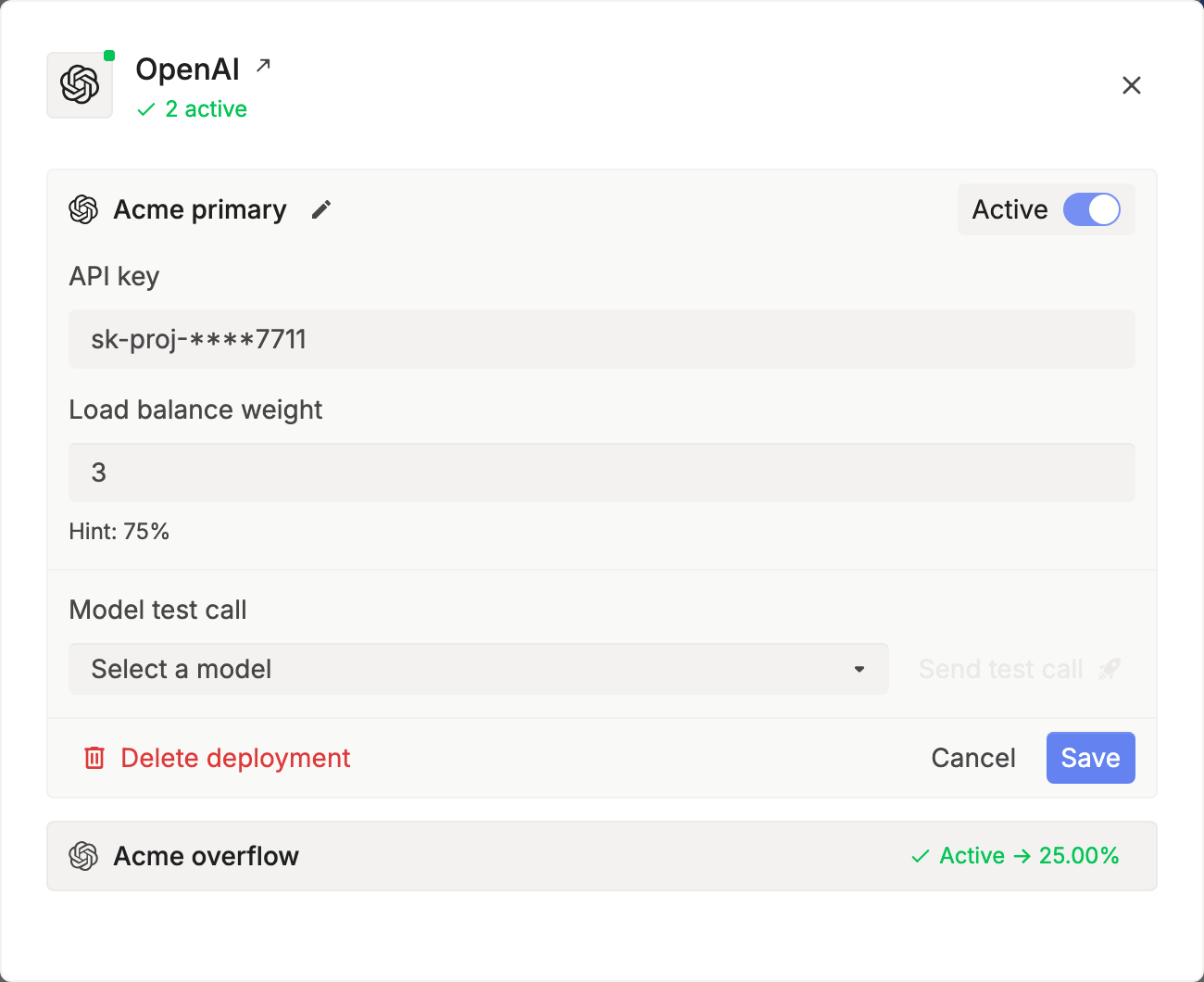
- A deployment’s share is its weight divided by the total weight of the deployments that serve the model. The default weight is 1.
- Turn off Active, or set the weight to 0, to stop sending it traffic.
- If the picked key fails, the gateway picks again from the remaining keys by weight, so every key gets a turn before the request moves to another provider or model.
- For deployments such as Azure OpenAI, Advanced options has Available models and Exclude models, so a deployment only serves the models it has.
Weights split traffic within one pool. Your project’s own keys always come before keys your workspace shares, and both come before Respan’s keys. If your keys are rate limited, managed fallback lets Respan’s keys take over. See Provider order.
Balance across models
Create a route with mode: "split". It’s a LoadBalance node over its entries: each request picks one entry by weight, and if it fails, the gateway picks again from the rest.
curl -X POST https://api.respan.ai/api/routes/ \
  -H "Authorization: Bearer $RESPAN_API_KEY" \
  -H "Content-Type: application/json" \
  -d '{
    "name": "chat-split",
    "mode": "split",
    "entries": [
      {"name": "gpt-5.5", "weight": 3},
      {"name": "claude-sonnet-4-5-20250929", "weight": 1}
    ]
  }'
Then send the route’s name as model:
curl https://gateway.respan.ai/v1/chat/completions \
  -H "Authorization: Bearer $RESPAN_API_KEY" \
  -H "Content-Type: application/json" \
-d '{"model": "chat-split", "messages": [{"role": "user", "content": "Hello!"}]}'About 75% of requests start on gpt-5.5 and 25% on claude-sonnet-4-5-20250929. If the first pick fails, the other entry runs.
- A split route needs a positive total weight. An entry with weight 0 never runs.
- To change the split, send
PATCH /api/routes/chat-split/with newentries. No deploy is needed. - To compare the models’ quality and cost after a split, filter Gateway › Logs by model.
Routes are covered in full in Routes and aliases.
Nest load balancing and fallback
A request’s plan is a tree of Fallback nodes (try in order) and LoadBalance nodes (pick by weight, on failure pick again from the rest). The gateway builds it from your route and your keys:
- A split route is a LoadBalance node. Each entry it picks is a model, and a model is a Fallback node over its offerings and keys. So when
gpt-5.5is picked, all of its attempts run before the split moves on toclaude-sonnet-4-5-20250929. - A fallback route is a Fallback node. Each model entry in it includes a LoadBalance node across your own keys for that provider, picked by Load balance weight.
- Either route can list a Respan alias as an entry, which brings in that alias’s own node.
For a split route chat-split with two OpenAI keys weighted 3 and 1, a request runs as LoadBalance[ Fallback[ LoadBalance[key A, key B], ... ], claude-sonnet-4-5-20250929 ]: first the split picks a model, then that model’s own keys are picked by weight.
See where a request went
Open the request’s X-Respan-Log-Id in Gateway › Logs. The log names the model, the provider, and the deployment that served it. To see every request one key served, filter Logs by Deployment.
Next steps
- Routes and aliases: manage split and fallback routes.
- Fallbacks: what happens when the picked key or model fails.
- Bring your own key: add provider keys.
- Provider routing