Caching
Cut input cost and latency with provider prompt caching.
Prompt caching
Prompt caching is done by the provider. When a request starts with the same long prefix as a recent one, such as a system prompt, a document, or a tool list, the provider reuses its processed copy of that prefix. The model still writes a new answer, but the cached input tokens cost less and the answer starts sooner.
The gateway passes your cache markers to the provider, reads the cached token counts the provider reports, and prices them at the model’s cache rates. Some providers cache automatically; Anthropic needs a cache_control marker.
curl https://gateway.respan.ai/v1/chat/completions \
  -H "Authorization: Bearer $RESPAN_API_KEY" \
  -H "Content-Type: application/json" \
  -d '{
    "model": "claude-sonnet-4-5-20250929",
    "messages": [
      {"role": "system", "content": [
        {"type": "text", "text": "<the full product handbook>", "cache_control": {"type": "ephemeral"}}
      ]},
      {"role": "user", "content": "Which plan includes SSO?"}
    ]
}'The first call writes the handbook to Anthropic’s cache. Calls in the next few minutes that start with the same handbook read it from the cache.
By provider
| Provider | How caching starts | What you send | Cached tokens reported as |
|---|---|---|---|
| Anthropic | Marker | cache_control on a block, message, or tool | cache_read_input_tokens, cache_creation_input_tokens |
| OpenAI and Azure OpenAI | Automatic | Nothing; prompt_cache_key is optional | prompt_tokens_details.cached_tokens |
| Google Gemini | Automatic; or a cache you create | Nothing; or cachedContent in Gemini format | cachedContentTokenCount |
| DeepSeek | Automatic | Nothing | prompt_cache_hit_tokens |
Every provider caches only prompts above a minimum length, which varies by model. A short prompt shows no cached tokens.
Anthropic
Anthropic caches the prompt up to the last block marked with cache_control. Put the parts that stay the same (tools, system prompt, long documents) first, and mark the end of them.
- In Chat Completions (
/v1/chat/completions), putcache_controlon a content part, on a message (the gateway moves it onto the message’s last block), or on a tool. The gateway carries it to Anthropic as Anthropic’s own marker. - In Anthropic Messages (
/v1/messages), sendcache_controlas in Anthropic’s API. It reaches Anthropic as sent. See Anthropic Messages.
import os
import anthropic

client = anthropic.Anthropic(
    base_url="https://gateway.respan.ai",
    api_key=os.environ["RESPAN_API_KEY"],
)

message = client.messages.create(
    model="claude-sonnet-4-5-20250929",
    max_tokens=1024,
    system=[
        {"type": "text", "text": "You answer questions using the product handbook below."},
        {"type": "text", "text": "<the full product handbook>", "cache_control": {"type": "ephemeral"}},
    ],
    messages=[{"role": "user", "content": "Which plan includes SSO?"}],
)
print(message.usage)
{"type": "ephemeral"} keeps the entry for Anthropic’s default lifetime. Add "ttl": "1h" for Anthropic’s one-hour cache, which Anthropic prices higher to write.
Reported as: in Anthropic format, usage.cache_read_input_tokens (read from the cache) and usage.cache_creation_input_tokens (written to it). In Chat Completions, the same counts arrive as usage.prompt_tokens_details.cached_tokens and usage.prompt_tokens_details.cache_write_tokens.
Priced: cache reads at the model’s cache read rate, cache writes at its cache write rate, with one-hour writes at the one-hour rate.
A cache_control marker sent to a model that isn’t served by Anthropic’s format is dropped from content parts, so the request still works but nothing is cached. On a message, a tool, or the whole request, such a marker is refused with 400, so you know it had no effect.
OpenAI
OpenAI caches long prompts automatically. There’s nothing to add, and the same holds for OpenAI models on Azure.
To improve hit rates when many requests share a prefix, you can send OpenAI’s prompt_cache_key. The gateway sends it to OpenAI and drops it for other providers.
{
  "model": "gpt-5.5",
  "messages": [
    {"role": "system", "content": "<the full product handbook>"},
    {"role": "user", "content": "Which plan includes SSO?"}
  ],
  "prompt_cache_key": "handbook-v12"
}
Reported as: usage.prompt_tokens_details.cached_tokens. In Responses format, usage.input_tokens_details.cached_tokens.
Priced: cached tokens at the model’s cache read rate, the rest at its input rate.
Gemini
Gemini models cache repeated prefixes on their own (implicit caching), with nothing to send.
To use a cache you created with Google’s caching API, send its name in cachedContent in a Gemini-format request (/v1beta/models/{model}:generateContent). It reaches Gemini as sent. cachedContent has no equivalent in other formats, so a Chat Completions or Messages request that carries it is refused. See Gemini.
Reported as: usageMetadata.cachedContentTokenCount in Gemini format, and usage.prompt_tokens_details.cached_tokens in Chat Completions.
Priced: cached tokens at the model’s cache read rate.
DeepSeek
DeepSeek caches repeated prefixes automatically, with nothing to send.
Reported as: usage.prompt_cache_hit_tokens, which the gateway reads as cache read tokens.
Priced: cached tokens at the model’s cache read rate.
Cached tokens in Logs
Open the request in Gateway › Logs, go to the Metrics tab, and expand Tokens:
- Cache read: the part of the prompt served from the provider’s cache.
- Cache write: the part stored for later calls.
- Uncached: the rest of the prompt.
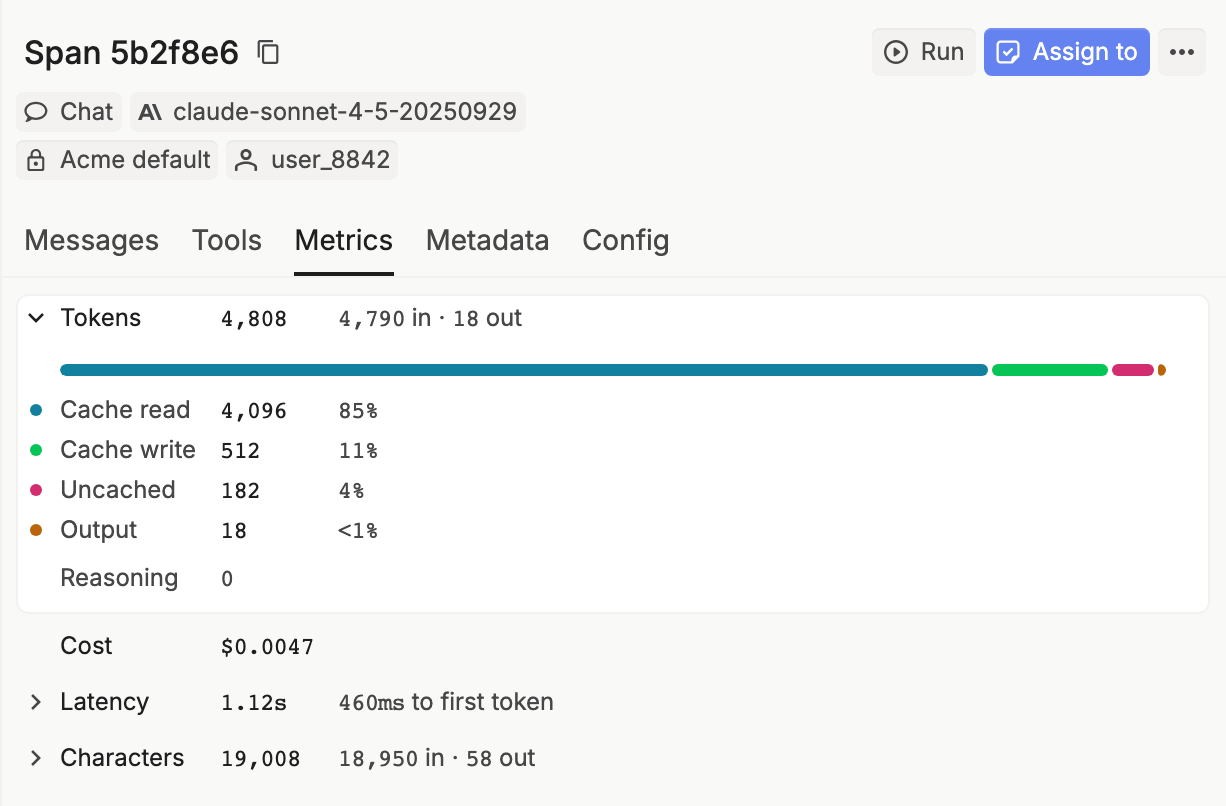
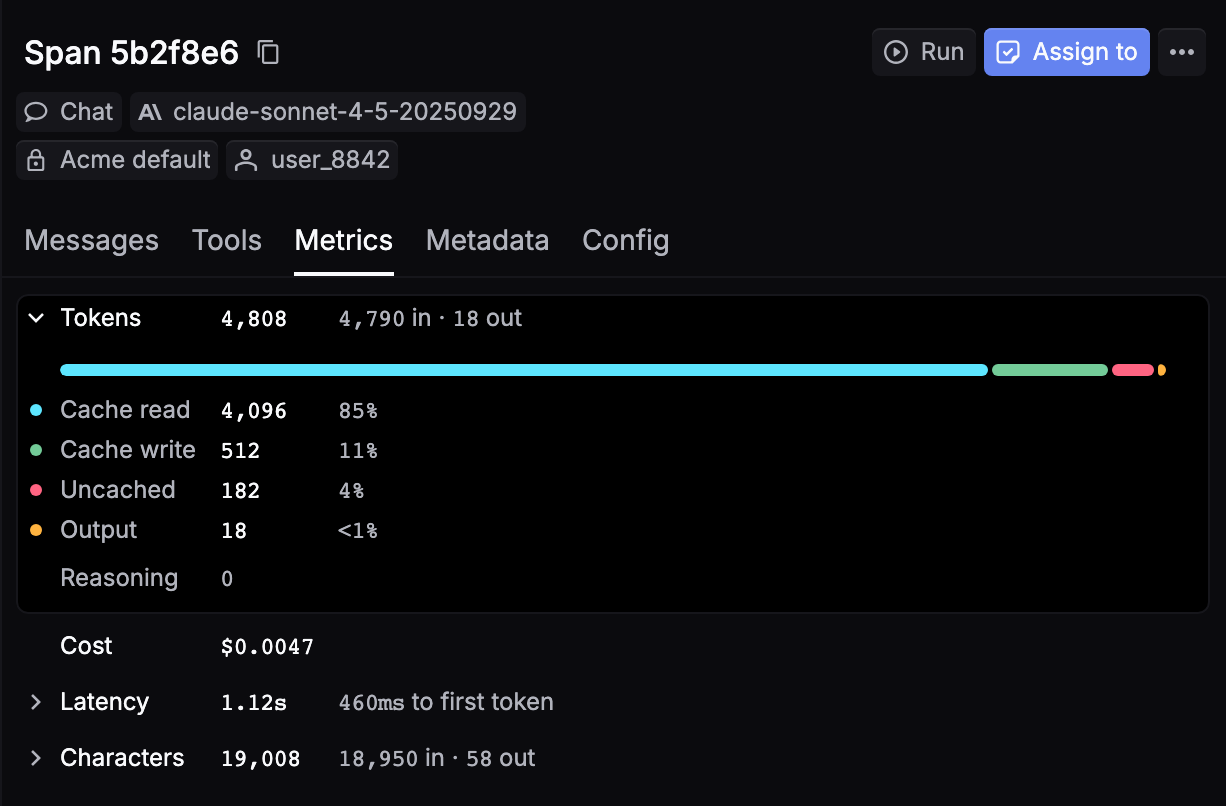
When the provider’s cache was read, the Metadata tab shows Cache hit as Yes (Provider), and the Provider cache column in the Logs table shows Cache hit.
Pricing
The log’s Cost prices each part of the prompt separately: uncached tokens at the model’s input rate, cache reads at its cache read rate, and cache writes at its cache write rate (by TTL where the provider prices TTLs differently). The rates come from the model’s catalog entry; see Models for each model’s prices.
On Respan credits you’re charged that cost. On your own provider key, the provider bills you and Respan records the same breakdown. See Pricing.
Keep the cache warm
- Put what stays the same first: tools, then the system prompt, then long documents. Put what changes (the user’s message) last.
- Keep the cached part byte-for-byte identical. A changed timestamp or reordered tools start a new entry.
- Send related requests to the same provider. A fallback in a route to another provider starts cold there.
Related
- Credits vs BYOK: how cached tokens are billed.
- Logs: find cached tokens in Logs.