Prompt composition
Reuse one prompt's text inside another through a variable.
Composition lets a variable in one prompt pull in the text of another prompt. Use it for text that several prompts share, such as a brand voice or a policy block: edit the child prompt once, and every parent that embeds it picks up the change.
At request time, Respan fills in the child’s variables, joins its messages into plain text, and inserts that text into the parent’s variable. The child isn’t sent to a model on its own.
Embed a prompt in the editor
Commit the child prompt
Create the prompt you want to reuse, for example Brand voice, and commit it. The parent’s version menu lists the child’s committed versions.
Add a variable to the parent
In the parent prompt, put a variable where the child’s text should go, for example {{brand_voice}}.
Set the variable's type to Prompt
In the side panel’s Variables tab, change the variable’s type from Text to Prompt. Click Select a prompt and pick the child. Then choose a version and fill in the child’s own variables.
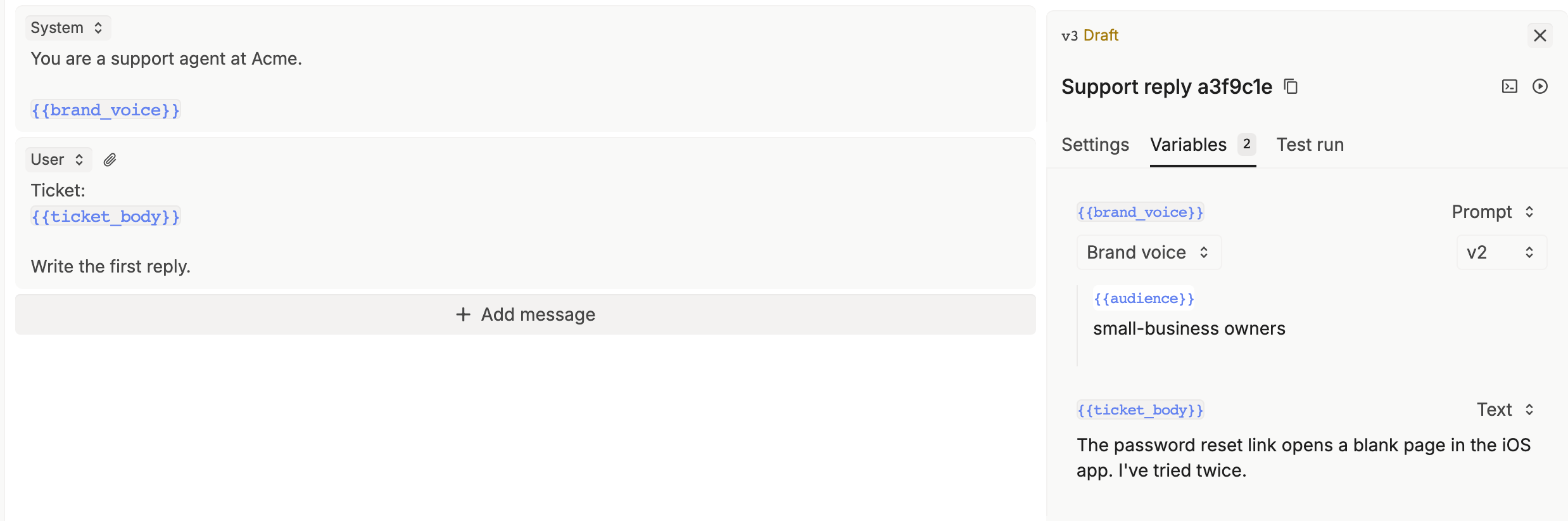
When you pick a child, the version starts on its deployed version.
Test, commit, and deploy
Click Run to check the result. Then commit and deploy the parent, as in the Quickstart.
Embed a prompt in code
Set the parent variable to a prompt object instead of a string:
import os
from openai import OpenAI

client = OpenAI(
    base_url="https://api.respan.ai/api/",
    api_key=os.environ["RESPAN_API_KEY"],
)

response = client.chat.completions.create(
    model="gpt-5.5",  # the prompt's saved model is used
    messages=[],
    extra_body={
        "prompt": {
            "prompt_id": "PARENT_PROMPT_ID",
            "schema_version": 2,
            "variables": {
                "brand_voice": {
                    "_type": "prompt",
                    "prompt_id": "CHILD_PROMPT_ID",
                    "version": 2,
                    "variables": {"audience": "small-business owners"},
                },
                "ticket_body": "The password reset link opens a blank page in the iOS app.",
            },
        }
    },
)
print(response.choices[0].message.content)| Field | Required | Description |
|---|---|---|
_type | Yes | Always "prompt". |
prompt_id | Yes | The child prompt’s ID. |
version | No | A version number, or "latest" for the newest version. Omit it to use the deployed version. |
variables | No | The child’s variables. Any the child needs but you don’t set here fall back to the parent’s variable of the same name. |
Limits
- Nesting stops at two levels: a parent, its child, and the child’s child. For a deeper chain, Respan sends the messages with their variables unfilled and adds a warning to the log.
- The editor takes only text for a child’s variables, so a second level can only be set from code.
- In the editor, a prompt can’t embed itself.
Check what was inserted
Open the request in Logs. The logged variables keep each prompt object and add _rendered_result, the text that was inserted into the parent.