API keys
Create, scope, limit, and revoke the keys that authenticate gateway requests.
Every gateway request carries a Respan API key. The key decides which project the request is logged in, whether it counts as test or production traffic, what it’s allowed to do, and which limits apply. Use one key per app and environment so you can limit or revoke each one on its own.
curl https://gateway.respan.ai/v1/chat/completions \
  -H "Authorization: Bearer $RESPAN_API_KEY" \
  -H "Content-Type: application/json" \
  -d '{
    "model": "gpt-5.5",
    "messages": [{"role": "user", "content": "Hello!"}]
}'| Setting | Description |
|---|---|
| Environment | Production or Test. Keeps data apart in Logs and dashboards. |
| Permissions | Read, Write, Gateway, Admin. |
| Expiry | The date after which the key is refused. |
| IP ranges | allowed_ip_ranges: the addresses the key may be used from. |
| Limits | Monthly spend limit, usage cap, requests and tokens per minute. |
Create a key
Open API keys
Go to Gateway › API keys and click New key. The same page is at Settings › API Keys.
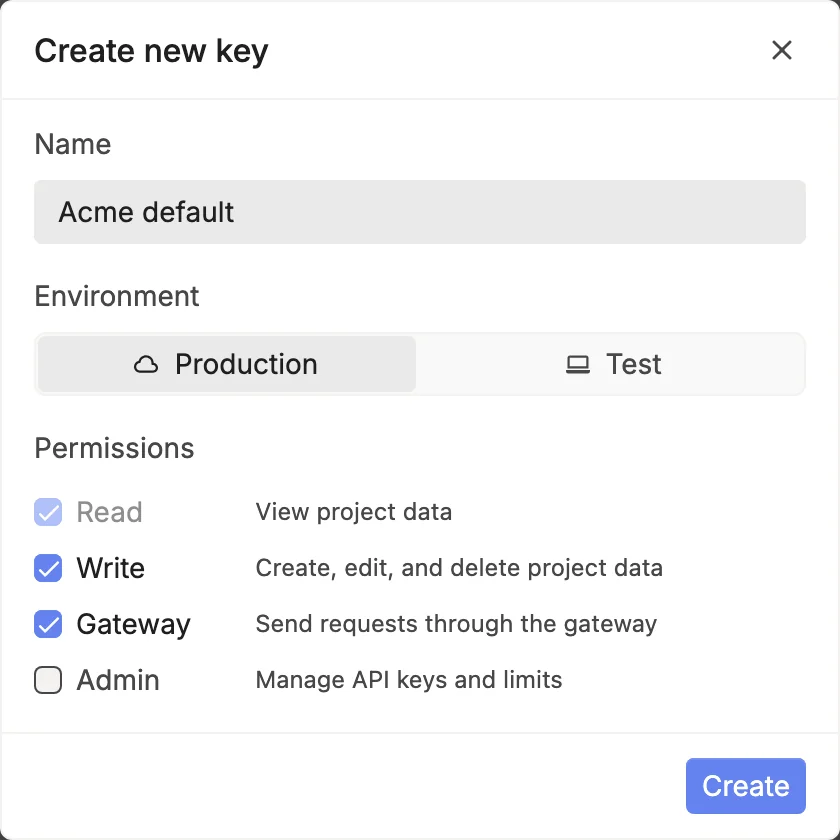
Choose the environment and permissions
Name the key, pick Production or Test, and choose its permissions. Then click Create.
Copy the key
Click Copy, then Done. You won’t see the key again, so save it now:
export RESPAN_API_KEY="your-respan-api-key"Treat a key like a password. Keep it out of source control and client-side code, and call the gateway from your server. If a key leaks, revoke it and create a new one.
Environment
Production and Test keep data apart. Logs and dashboards have an environment switch that shows Production, Test, or All environments. Requests sent with a test key, and Playground runs, show under Test. With environment-scoped provider keys, a request that sends the x-respan-beta: env-scoped-integrations-2026-03-28 header uses only the provider keys saved for its key’s environment. See Bring your own key.
Permissions
| Permission | Allows |
|---|---|
| Read | Viewing project data. |
| Write | Creating, editing, and deleting project data. Includes Read. |
| Gateway | Sending requests through the gateway. |
| Admin | Managing API keys and limits. |
New keys get Read, Write, and Gateway. A key that only calls models needs Gateway alone, so give it nothing more. A key created by another key can’t get more permissions than the key that created it.
Expiry
Set an expiry date when you create or edit a key. After it, requests with the key are refused. For short-lived keys, such as one per contractor or demo, create them with the API (see Create keys with the API).
IP ranges
A key’s allowed_ip_ranges lists the IP addresses or CIDR ranges it may be used from, such as 203.0.113.0/24. Requests from any other address are refused before they reach a provider. An empty list means any address. A key created by a key that has IP ranges can only narrow them.
Limits
Each key can have a monthly spending_limit, a lifetime max_usage, a requests-per-minute rate_limit, and a tokens-per-minute tpm_rate_limit. Set them on the key’s page below Permissions. Over the spend limit, requests get 402 plan_permission_denied. See Budgets and limits.
Find, tag, and edit keys
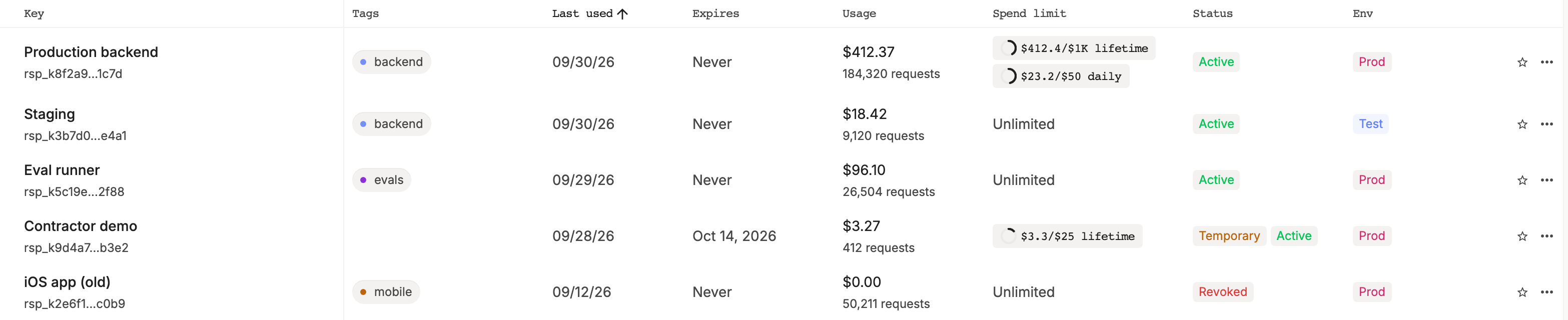
The list shows each key’s prefix, tags, last use, expiry, spend, limits, status, and environment. Hover a row and click Add tag to tag it. Click a key to open it, change what you need, click Save, and confirm.
Revoke a key
Open the key and click Revoke key, or open the row’s ⋯ menu and click Revoke key. Click Confirm. Requests that use the key are refused right away.
To rotate a key without downtime, create the new key first, deploy it, and check that new requests show up in Logs. Then revoke the old key.
Create keys with the API
Use the Temporary API keys endpoint to create short-lived keys. The key you call it with needs the Admin permission. Each new key gets the calling key’s permissions unless you set permissions_override, and it can’t get more than the calling key has.
curl https://api.respan.ai/api/temporary-keys/ \
  -H "Authorization: Bearer $RESPAN_API_KEY" \
  -H "Content-Type: application/json" \
  -d '{
    "name": "Contractor demo",
    "is_test": true,
    "expiry_date": "2026-12-31T00:00:00Z",
    "spending_limit": 25,
    "limit_policies": [{"metric": "cost", "period": "day", "max_value": 5}]
  }'
The response’s api_key is the only time you see the key. Manage its caps later with the Limit policies API.
Send the key
| Where | How |
|---|---|
| HTTP requests | Authorization: Bearer <key> |
Anthropic SDK on /v1/messages | Pass the Respan key as the SDK’s API key and point its base URL at the gateway |
Gemini SDK on /v1beta/... | Pass the Respan key as the SDK’s API key |
| OpenAI Realtime WebSocket | Authorization header, or the openai-insecure-api-key.<key> subprotocol |
| Gemini Live WebSocket | x-goog-api-key header or ?key= |
When you’re signed in to the platform, the Playground calls the gateway with your session instead of an API key, as the project’s Playground key, so those requests show under Test.