

Data webhooks
Data webhooks forward Respan log data to an endpoint you control. The current webhook editor supports the span event type.
This page covers data-event webhooks. A webhook selected inside a Monitor is a notification destination for that monitor and has a different purpose.
Create a webhook
- Select Create webhook.
- Enter a descriptive Name that identifies the receiving system and environment.
- Enter the full endpoint URL.
- Choose the span event type.
- Select the API key whose traffic should be sent to the endpoint.
- Review the configuration, then select Create.
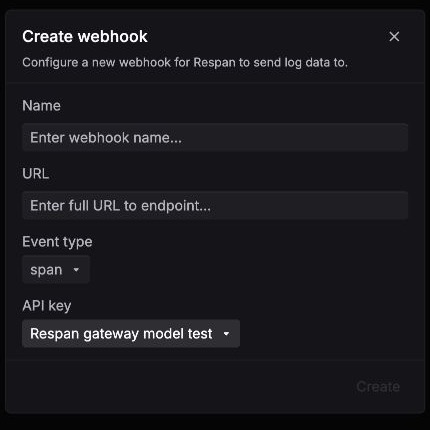
Using a separate API key per application or environment makes webhook scope easier to reason about. Send only the traffic the destination is authorized to process.
Prepare the receiver
- Use an HTTPS endpoint and keep any credentials out of the URL.
- Return a successful response only after the event has been accepted for processing.
- Make event handling idempotent so a repeated delivery cannot create duplicate side effects.
- Protect span inputs, outputs, metadata, and customer identifiers according to your data-handling policy.
- Test with non-sensitive traffic before enabling a production integration.
The current product view does not publish the data-webhook payload schema, signature or authentication contract, retry and backoff policy, timeout, ordering, deduplication behavior, or failure retention. Confirm those delivery details with Respan before using this integration for automated remediation, billing, compliance, or another workflow that requires guaranteed delivery.