The techniques that make an AI model faster and cheaper depend on how much of the model you control. If you serve open-weight models on your own GPUs, you can compress the weights, change how the server batches requests, or train a smaller copy. If your product calls a hosted model through an API, the weights are off the table, and your levers are the model you pick, what you send it, and what you avoid sending twice.
Every one of those changes trades something. A 4-bit model needs a fraction of the memory, a smaller model answers faster, and a shorter prompt costs less, but each one can also change the answers your users get, and latency and token counts won't tell you when that happens.
Because of that, an optimization is only finished once you've checked output quality against the version it replaced, on the requests your product actually serves.
If you're working out how to optimize AI models to cut cost and latency, the 9 strategies below are split by what you control, with a way to choose between them and a way to check that a change held up.
Levers you can pull to optimize AI models
Optimizing an AI model comes down to changing one of the following, and each one moves cost, latency, and output quality, usually by gaining on one and giving a little on another:
- Which model handles the request - Sending a step to a smaller or faster model instead of the largest one. This works on any model you call through an API.
- What goes into the request - The prompt, the retrieved context, and anything you can cache instead of sending again. This also works through an API.
- How the model is built - Quantization and pruning change the weights directly, while fine-tuning and distillation retrain them. All of these need the weights in practice, since hosted providers are narrowing the tuning options they offer.
- How the model is served - Speculative decoding, batching, and KV cache settings change how LLM inference runs on your GPUs, from the prefill pass over the prompt to the decode loop that produces each token. These need a serving stack you control.
The serving levers, along with quantization and pruning, are what people usually mean by inference optimization. Whichever lever you pull, decide which outcome you're optimizing for first, since the same change can cut cost while adding latency, or cut latency at some cost to quality.
How to optimize AI models: 9 strategies
Strategies 1 through 3 work on any model you call through an API. Strategies 4 through 9 need access to the weights, the serving stack, or both.
1. Match the model to the task
Sending every request to one frontier model is the simplest setup to build, and it's usually the slowest and most expensive one to run. A classification step pays the same per-token rate as a multi-step reasoning task, even though a smaller model in the same family would typically return its answer faster.
Take a document Q&A agent. Only one of its steps needs the large model:
| Step | What it needs | Model tier |
|---|---|---|
| Classify the request | A short label | Small |
| Rewrite the query for search | Light rewording | Small |
| Draft the answer from sources | Reasoning across documents | Large |
| Check the answer's format | Pattern matching | Small or code |
Choosing a model per step by hand means writing and maintaining that routing logic yourself. LLM routers move it out of your code by picking a model per request based on rules, cost, or the task itself. Respan Router, currently in beta, does the task-aware version. It classifies each request from the system prompt and the latest exchange, checks candidate models against the context length and capabilities the request needs, like tools or images, and with cost-aware routing turned on, weighs cached-token cost before switching models mid-conversation.
Whichever way you route, score a smaller model against the larger one on your own requests before it takes production traffic.
2. Optimize prompts and context
The prompt is the cheapest thing in the stack to change, and it often has the most room. Long system prompts and large blocks of retrieved context add prefill work to every request, which raises cost and the wait before the first token, and padding a prompt with loosely relevant text can lower answer quality too.
Here's a pull request summarizer before:
You are a helpful, friendly, and highly knowledgeable assistant. Your job is to read the
pull request below and write a good summary. Please be thorough but concise, and make sure
to include anything important. Here is some background on our company and engineering
culture: [1,200 tokens of handbook text]
And after:
Summarize the pull request for a reviewer.

Return JSON with exactly these keys:
- "summary": 1-2 sentences on what changed
- "risk": "low" | "medium" | "high"
- "files_to_review": up to 3 file paths

If the diff only changes tests or docs, set "risk" to "low".
The second version drops 1,200 tokens the task never used, defines the output so the response parses on the first try, and tells the model what to do in a common edge case. When manual edits like these stall, prompt optimization frameworks like DSPy tune instructions and examples against a metric you define, which turns prompt work into something you can measure.
3. Cache repeated requests and prompt prefixes
Provider prompt caching stores the processed prefix of a prompt, so a long system prompt or a set of tool definitions isn't reprocessed on every call. OpenAI, Anthropic, and Google all discount cached input by around 90% on most of their current models. OpenAI and Gemini cache eligible prefixes automatically, while Anthropic charges 1.25x the normal input rate to write a cache with its default 5-minute lifetime.
A cache only hits when the prefix matches exactly, so the order of your prompt decides whether you get the discount. This system prompt never caches, because its first line changes on every request:
Current time: 2026-10-22T09:47:13Z
User ID: u_48213
You are a code review assistant. [2,000 tokens of instructions and tool definitions]
Moving the per-request values below the stable block makes the first 2,000 tokens identical across calls:
You are a code review assistant. [2,000 tokens of instructions and tool definitions]
---
Current time: 2026-10-22T09:47:13Z
User ID: u_48213
Because a cached prefix skips most of the prefill work, the fix also cuts time to first token on long prompts.
Response caching sits one layer up. A gateway or application cache serves an exact repeat of a request from storage, so the model isn't called at all. That suits deterministic calls, like classification over a fixed set of inputs, and it's a weak fit for conversational traffic, where requests rarely repeat word for word.
4. Quantize the model weights
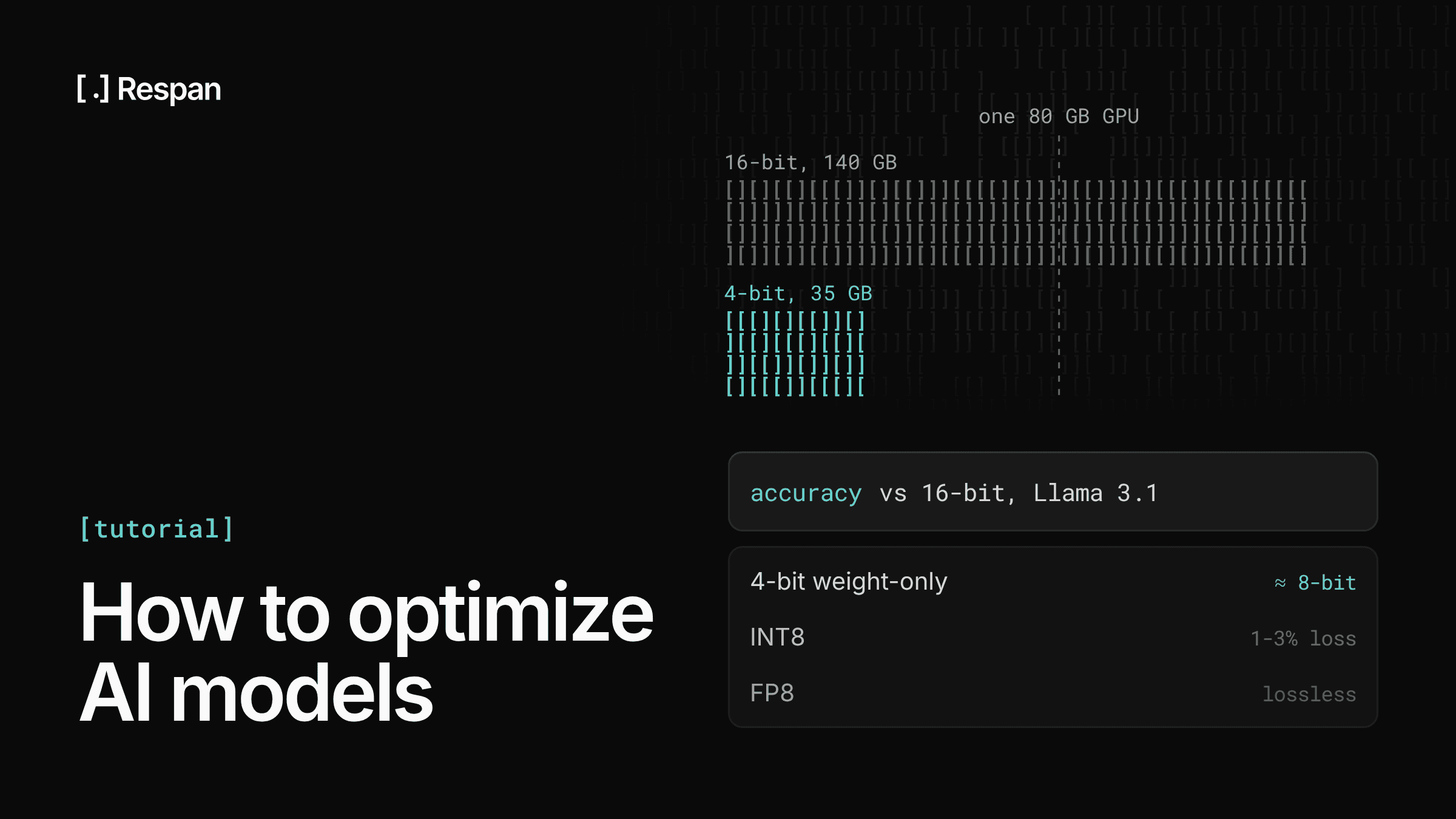
Quantization stores weights, and sometimes activations and the KV cache, at lower precision than the 16-bit formats models are usually trained in. The memory math explains why it matters. A 70B-parameter model at 16 bits needs about 140 GB for its weights alone, at two bytes per parameter, which means at least two 80 GB GPUs before any KV cache. At 4 bits, the weights drop to about 35 GB and fit on one.
Lower precision also speeds up decode, which spends most of its time moving weights out of memory rather than doing math. The accuracy cost depends on the format, and a study of 500,000+ evaluations on Llama 3.1 gives a useful map:
| Format | Accuracy on Llama 3.1 | Notes |
|---|---|---|
| FP8 weights and activations | Effectively lossless | Ada, Hopper, or newer; batched serving |
| INT8 weights and activations | About 1-3% loss, tuned | Suits heavily batched serving |
| 4-bit weight-only (GPTQ, AWQ) | Roughly on par with 8-bit | Suits latency-sensitive serving |
Below 4 bits, quality drops faster, so 2- and 3-bit models need careful testing before they serve anything. Serving engines like vLLM and TensorRT-LLM load pre-quantized checkpoints directly, and many open-weight models are published with quantized versions alongside the original.
5. Fine-tune for narrow, repeated tasks
Fine-tuning trains a model further on your own examples, so it learns a format, tone, or narrow task that prompting can't pin down reliably. Extracting fields from contracts into a fixed JSON schema is a good fit: the task doesn't change, the output format is strict, and past documents give you labeled examples. A fine-tuned small model can match a larger one on a task like that at the small model's speed and price, and it no longer needs long instructions in every prompt.
The sign that a prompt would do instead is when a few examples in the prompt already get the format right and the misses come from missing context. Fine-tuning won't fix those; better retrieval will.
On hosted models, the options are narrowing. OpenAI's fine-tuning docs say the platform is closed to new users, with existing customers able to start training jobs until January 6, 2027, and Anthropic doesn't offer Claude fine-tuning through its API. Google still offers supervised tuning for its Gemini 2.5 models.
Open weights are the durable route. Parameter-efficient methods like LoRA train a small set of added parameters instead of the full model, which cuts the memory and compute fine-tuning needs, and Hugging Face PEFT implements LoRA and its variants.
6. Distill a smaller model
Distillation trains a small model, the student, to reproduce the outputs of a larger one, the teacher. The idea goes back to Hinton, Vinyals, and Dean in 2015, and for an LLM step the workflow usually runs like this:
- Collect a large, representative set of real inputs for the step you want to distill.
- Run the teacher model on them.
- Score each output with your evaluator and keep only the ones that pass.
- Fine-tune the student on the filtered input and output pairs.
- Run the student and the teacher on a held-out set and compare scores before switching traffic.
Done well, this gets you much of the teacher's quality on one task at the student's latency, which suits high-volume steps where the teacher's answers are consistently good. What you give up is simplicity, since distillation is a fine-tuning job and needs open weights or a provider that still offers tuning.
7. Prune what the model doesn't use
Pruning removes weights, or whole structures like attention heads and layers, that contribute little to the output. Unstructured pruning zeroes individual weights anywhere in a matrix, while structured pruning removes entire components, which shrinks the model in ways hardware can take advantage of.
SparseGPT showed that large models can be pruned to 50-60% unstructured sparsity in one shot, without retraining and with a small increase in perplexity, and Wanda reaches similar results with a simpler score based on weights and activations. However, zeroed weights only save time if the kernels skip them. NVIDIA GPUs from Ampere onward accelerate 2:4 semi-structured sparsity, where two of every four consecutive weights are zero:
Dense:  0.42  -0.07   1.13   0.02 | -0.88   0.05   0.31  -0.01
2:4:    0.42   0      1.13   0    | -0.88   0      0.31   0
Without that kind of support, the zeros still pass through dense kernels and save little. Pushing sparsity higher, or using plain magnitude pruning, usually needs a recovery fine-tune to win back accuracy.
8. Use speculative decoding
Decoding produces one token per forward pass, and for a large model each pass is limited by how fast its weights move through memory. Speculative decoding has a small draft model propose several tokens ahead, then has the large model check them all in a single pass:
Draft proposes:   Thursday | at | 3 | pm
Target verifies:  ✓        | ✓  | ✓ | ✗ → p.m.
Output:           Thursday at 3 p.m.   (4 tokens from 1 large-model pass)
The target keeps every token it agrees with and replaces the first one it doesn't, so the output matches what it would have produced alone. The original speculative decoding paper shows the output distribution is unchanged under sampling, and greedy decoding returns the same tokens, up to floating-point precision.
The speedup depends on how often the draft's guesses are accepted, so it tends to help more when the output is predictable. Newer methods like EAGLE draft from the target model's own internal features instead of running a separate model, and vLLM supports several variants.
9. Batch requests and manage the KV cache
A GPU serving one request at a time spends most of decode waiting on memory, which is why serving engines like vLLM and TensorRT-LLM batch requests together. Continuous batching lets requests join and leave the batch at every generation step instead of waiting for the slowest request in a fixed batch to finish.
Batch size is usually limited by KV cache memory, since every in-flight request holds keys and values for its whole context. PagedAttention, the technique behind vLLM, allocates that cache in fixed-size blocks to cut fragmentation, so more requests fit on the same GPU. In vLLM, the remaining KV cache and batching settings are launch flags:
vllm serve meta-llama/Llama-3.1-8B-Instruct \
  --enable-prefix-caching \
  --kv-cache-dtype fp8 \
  --max-num-seqs 128 \
  --max-num-batched-tokens 8192
Prefix caching reuses KV blocks across requests that share a system prompt or document, and an FP8 KV cache takes half the memory of a 16-bit one, so you can fit longer contexts or more requests. The last two flags cap concurrent requests and tokens per scheduling step. vLLM's tuning docs note that smaller token budgets improve latency between tokens, while larger ones improve time to first token and throughput, so treat the values above as a starting point and tune them against a latency target rather than GPU utilization alone.
How to choose the right optimization for your setup
Start from what you control and what you're short on. If you call hosted models, strategies 1 through 3 are your toolkit, and none of them require touching the weights.
| Strategy | What you need | What it mostly moves |
|---|---|---|
| 1. Match the model to the task | API access | Cost, latency |
| 2. Optimize prompts and context | API access | Quality, cost |
| 3. Cache requests and prefixes | API access | Cost, latency |
| 4. Quantize the model weights | Weights, supported GPUs | Memory, latency |
| 5. Fine-tune | Weights or tuning API, data | Quality, cost |
| 6. Distill a smaller model | Teacher outputs, tuning access | Latency, cost |
| 7. Prune | Weights, sparse kernels | Memory, latency |
| 8. Speculative decoding | Serving stack, draft model | Latency |
| 9. Batching and KV cache | Serving stack | Throughput |
If you run your own weights, quantization and batching settings are usually the first to try, since neither needs a training run and the serving engine handles most of the work. Fine-tuning, distillation, and pruning take data and compute, so they make sense once you know which step in your app is worth that investment. If cost is the main pressure on either side, LLM cost optimization goes further into the API-side levers, from batch APIs to output caps.
Common optimization mistakes
The mistakes that cost the most with any of these strategies tend to happen in how a change is tested and shipped:
- Trusting someone else's speedup - Published speedups come from specific hardware, batch sizes, and prompts. Your results can land well above or below them, so benchmark on your own traffic before planning capacity around a number.
- Stacking changes - Quantizing, switching models, and editing the prompt in the same release leaves you no way to tell which change moved quality. Test them separately, even if they ship together.
- Optimizing the wrong part of the request - A slow first token often points to a long prompt, which speculative decoding won't fix. A slow full response points to output length and decode speed instead.
- Shipping on spot checks - A cheaper model that looks fine on ten hand-picked prompts can still fail on the long tail of real traffic, and latency and token metrics won't show the drop. Without a baseline and a test set, the first signal is usually a user complaint.
That last mistake does the most damage, because a quality regression that ships quietly keeps costing you until someone notices.
How to tell if an optimization actually worked
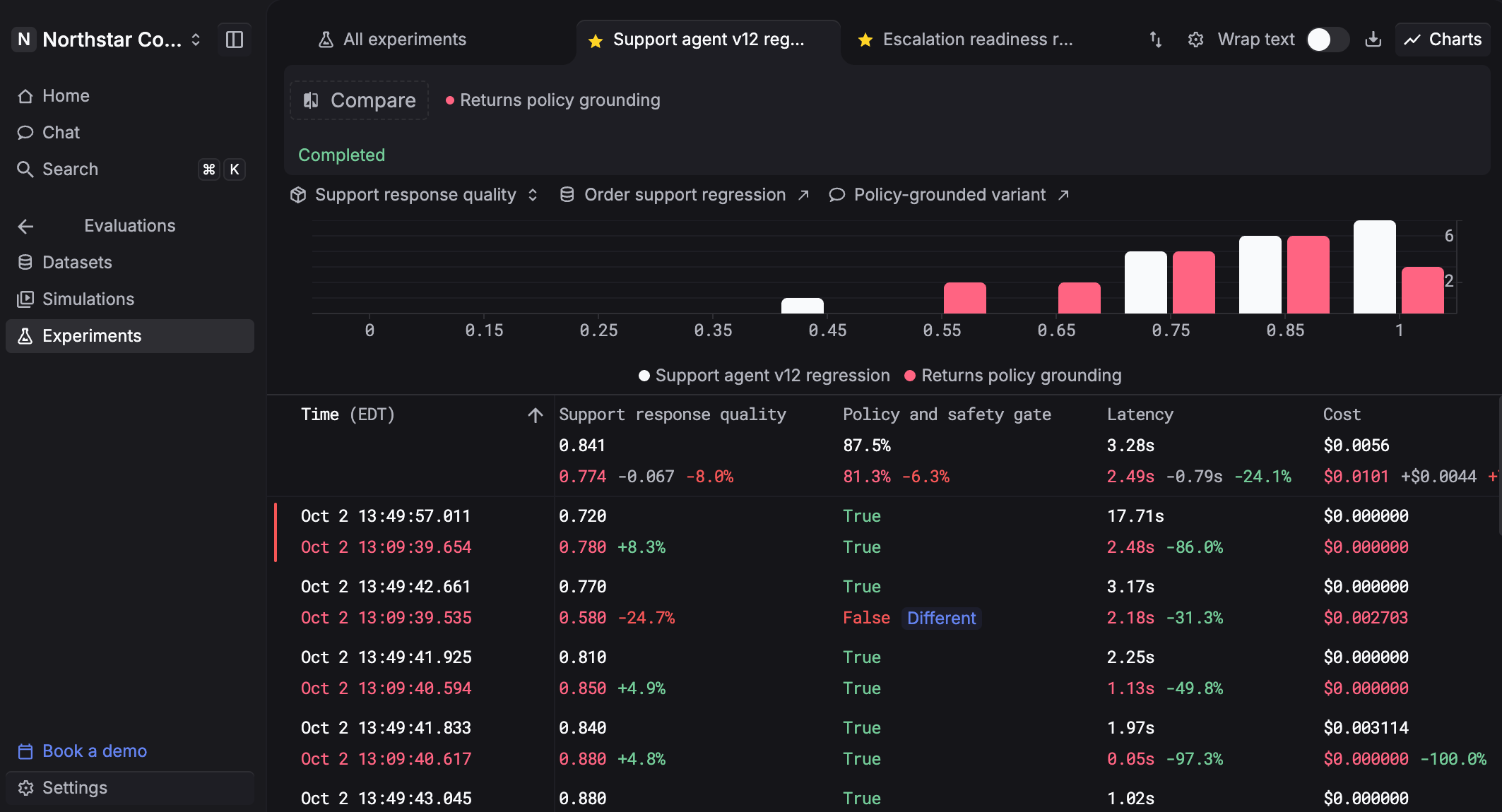
An optimization worked if cost or latency dropped and the answers held up on real production requests. Checking that takes a baseline from production, an eval run on the change before it ships, and monitoring on live traffic once it does.
Respan puts all of that behind the same API your model calls already go through. Route, observe, and evaluate every LLM call: each request through the gateway becomes a trace with latency and cost attached, and AI evals score the output, so the before-and-after numbers and the quality scores come from the same place. Instead of reading logs after the fact, use Respan to run AI observability in production, know when production shifts, and act before it spreads.
- One API for 1,000+ models - Switch models by changing a single string, so testing a smaller model or a new provider takes no integration work.
- Cost and latency per request - Every call is logged as a span with its latency and cost, broken down by model and by end customer, so you can see what an optimization saved.
- Test sets from real traffic - Build datasets by filtering and sampling production logs, or upload a CSV, so your eval cases are requests your users sent.
- Scores before you ship - Combine LLM judges, code checks, and human review into one evaluator, then run experiments that compare prompts, models, or datasets side by side.
- Scores after you ship - Run the same evaluators on sampled live traffic, so a quality drop shows up in a score before it shows up in a complaint.
- Alerts when something shifts - Monitors on cost, errors, latency, or tokens alert you in Slack, email, Microsoft Teams, or a webhook the moment a threshold breaks.
- Fallbacks and caching - Set a fallback chain once and traffic moves to the next model when a provider errors or rate-limits, while exact repeat requests are served from cache.
Respan's Free plan needs no credit card, so you can route a slice of traffic, build a baseline, and score your first optimization before committing to a paid plan.
FAQ
How do you improve the performance of an AI model?
Start by deciding which kind of performance you mean. For output quality, clearer prompts, more relevant context, a stronger model, or fine-tuning on your own examples usually help most. For speed and cost, the main levers are routing simple tasks to smaller models, caching repeated prompts, and, if you host the weights, quantization and speculative decoding. Whatever you change, compare it against the current version on real requests. Respan traces every call through its gateway and scores sampled traffic with evals, so you can run that comparison on production data.
What is inference optimization?
Inference optimization is any change that makes a trained model cheaper or faster to run without retraining it. On self-hosted models, that covers quantization, speculative decoding, continuous batching, and KV cache management. On hosted APIs, the provider handles that layer, so the closest levers you control are model choice, prompt length, and caching. Routing your calls through a gateway like Respan lets you apply those API-side levers and track their effect on cost and latency per request.
Does optimizing an AI model reduce its accuracy?
It can, depending on the technique. Speculative decoding and prompt caching leave output unchanged, and 8-bit quantization usually costs little, but 2- and 3-bit quantization, aggressive pruning, a smaller model, or a trimmed prompt can all lower quality in ways latency and token counts won't show. The dependable check is an eval on your own requests before and after the change, which Respan runs on both test sets and sampled live traffic.