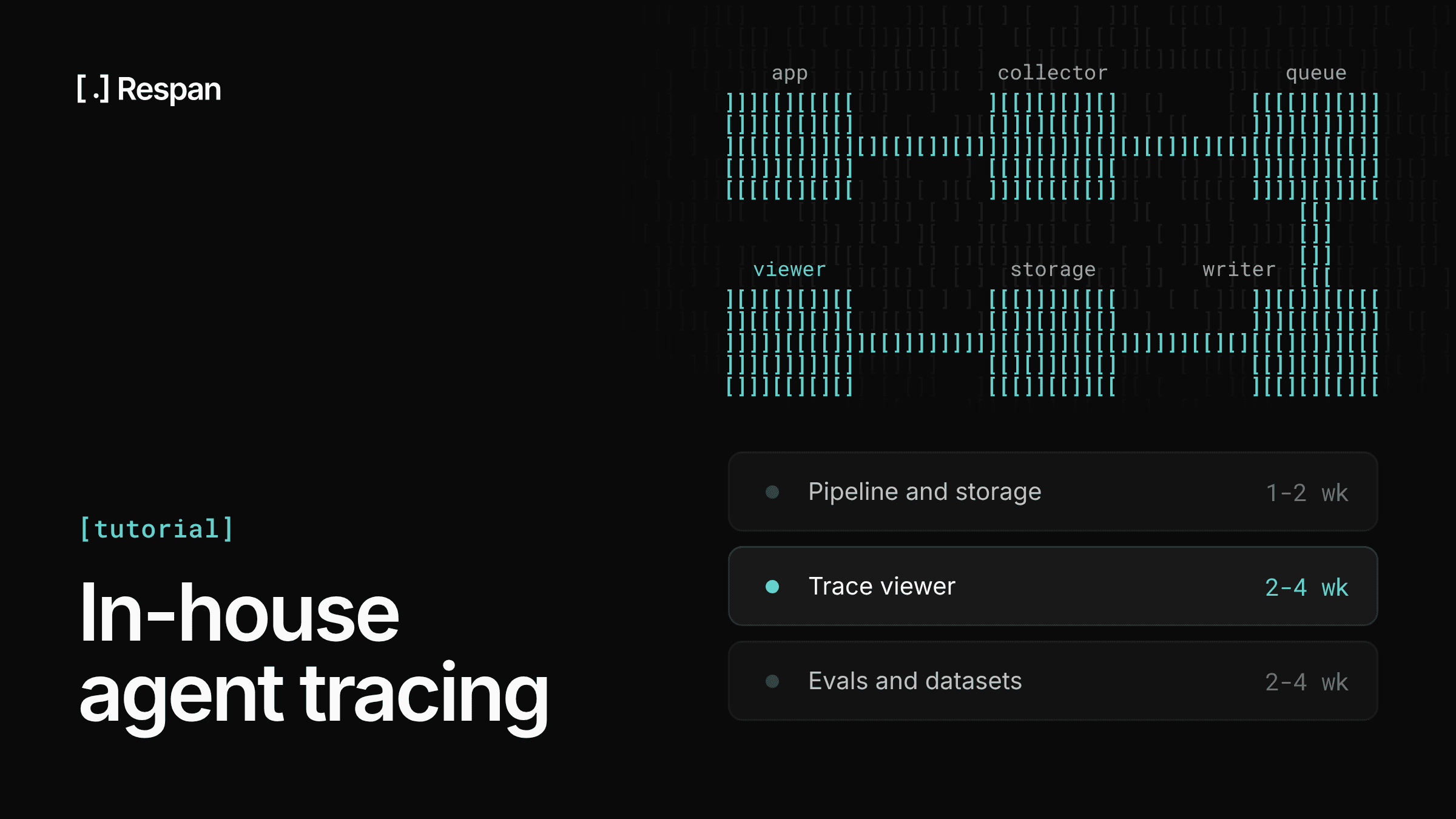
You can build a solid agent tracing system in-house with OpenTelemetry, a columnar database, and a few weeks of focused work. The first version comes together quickly, while the trace viewer, evals, and upkeep are where most of the time goes.
Agents need their own tracing because a single user request can fan out into a dozen model calls, tool executions, retries, and sub-agent handoffs. Request logs show you that something failed. They don't show you that the planner picked the wrong tool on step 4 because a retrieval step on step 2 returned stale context.
A good tracing system answers three questions fast:
- What happened? The full tree of steps for one run, with inputs, outputs, timing, and cost.
- Why did it happen? The exact prompt, model, parameters, and context each decision was made with.
- Is it getting worse? Patterns across thousands of runs: error rates, latency, cost, and quality over time.
Design the trace model
1. Start with the data model
Model every agent run as a trace: a tree of spans, where each span is one unit of work with a start, an end, a parent, and a set of attributes. Get this right first, since storage, the UI, and evals all depend on it.
Use a small, fixed set of span kinds so the UI and queries can treat them differently:
| Span kind | Represents | Key attributes |
|---|---|---|
agent | One agent run or sub-agent invocation | agent name, version, user ID, session ID, final status |
llm | A single model call | provider, model, prompt messages, completion, temperature, input/output tokens, cost |
tool | A tool or function execution | tool name, arguments, result, error |
retrieval | A search or vector lookup | query, top-k, returned document IDs and scores |
step | Any other logical unit (planning, parsing, guardrails) | name, input, output |
Two rules save a lot of pain later:
- Follow the OpenTelemetry GenAI semantic conventions - Use
gen_ai.request.model,gen_ai.usage.input_tokens, and so on instead of inventing names. You get compatibility with existing instrumentation libraries for free, though the conventions still have gaps for agent and CLI workloads that you'll fill with your own attributes. - Separate identity from content - IDs, timing, status, tokens, and cost are small and always queried. Prompts and completions are large, sensitive, and read one trace at a time, so you'll store them differently (section 4).
Also carry three IDs on every span: trace_id (one run), session_id (a multi-turn conversation), and user_id. Most debugging starts from a user complaint, so being able to jump from a user to their sessions to a single run matters more than any chart.
2. Instrument with OpenTelemetry
Use the OpenTelemetry SDK as your instrumentation layer, even if everything else is custom. It handles context propagation, batching, and export, and it keeps you vendor-neutral if you change backends later.
A thin wrapper gives your team one consistent way to create agent spans:
# tracing.py
import json, functools
from opentelemetry import trace
from opentelemetry.sdk.trace import TracerProvider
from opentelemetry.sdk.trace.export import BatchSpanProcessor
from opentelemetry.exporter.otlp.proto.http.trace_exporter import OTLPSpanExporter

provider = TracerProvider()
provider.add_span_processor(
    BatchSpanProcessor(OTLPSpanExporter(endpoint="http://collector:4318/v1/traces"))
)
trace.set_tracer_provider(provider)
tracer = trace.get_tracer("agent-tracing")

def traced(kind: str, name: str | None = None):
    def decorator(fn):
        @functools.wraps(fn)
        def wrapper(*args, **kwargs):
            with tracer.start_as_current_span(name or fn.__name__) as span:
                span.set_attribute("span.kind", kind)
                span.set_attribute("input", json.dumps(kwargs, default=str)[:10_000])
                try:
                    result = fn(*args, **kwargs)
                    span.set_attribute("output", json.dumps(result, default=str)[:10_000])
                    return result
                except Exception as e:
                    span.record_exception(e)
                    span.set_status(trace.Status(trace.StatusCode.ERROR))
                    raise
        return wrapper
    return decorator
The input and output attributes ride along with the span for convenience, and the writer moves them to object storage before anything is stored (section 3).
Then wrap model calls so tokens land on every llm span:
@traced("llm")
def call_model(messages, model: str, **params):
    span = trace.get_current_span()
    span.set_attribute("gen_ai.request.model", model)
    resp = client.chat.completions.create(model=model, messages=messages, **params)
    usage = resp.usage
    span.set_attribute("gen_ai.usage.input_tokens", usage.prompt_tokens)
    span.set_attribute("gen_ai.usage.output_tokens", usage.completion_tokens)
    return resp.choices[0].message.content

@traced("tool")
def search_docs(query: str): ...

@traced("agent", name="support-agent")
def run_agent(user_id: str, question: str): ...
A few things to get right early:
- Async and threads - OpenTelemetry context follows
asynciotasks, but not work you hand to thread pools or queues. Pass context explicitly across those boundaries, or spans will appear as orphaned roots. - Streaming - For streamed responses, end the span when the stream closes, not when the call returns, and accumulate tokens as chunks arrive.
- Truncation - Cap attribute sizes in the SDK, because one 2 MB tool result can stall a batch exporter.
- Framework coverage - If you use LangChain, LlamaIndex, the OpenAI Agents SDK, or Pydantic AI, start from their existing OpenTelemetry instrumentations rather than wrapping internals yourself.
For thread pools, capture the current context when you submit work and attach it inside the worker, so spans created there stay under the right parent:
from concurrent.futures import ThreadPoolExecutor
from opentelemetry import context

executor = ThreadPoolExecutor(max_workers=8)

def submit_traced(fn, *args, **kwargs):
    ctx = context.get_current()
    def run():
        token = context.attach(ctx)
        try:
            return fn(*args, **kwargs)
        finally:
            context.detach(token)
    return executor.submit(run)
Build the pipeline and storage
3. Build the ingestion pipeline
Never write spans straight from your app to the database. Put an OpenTelemetry Collector in between and a queue behind it, so a slow database never slows down an agent.
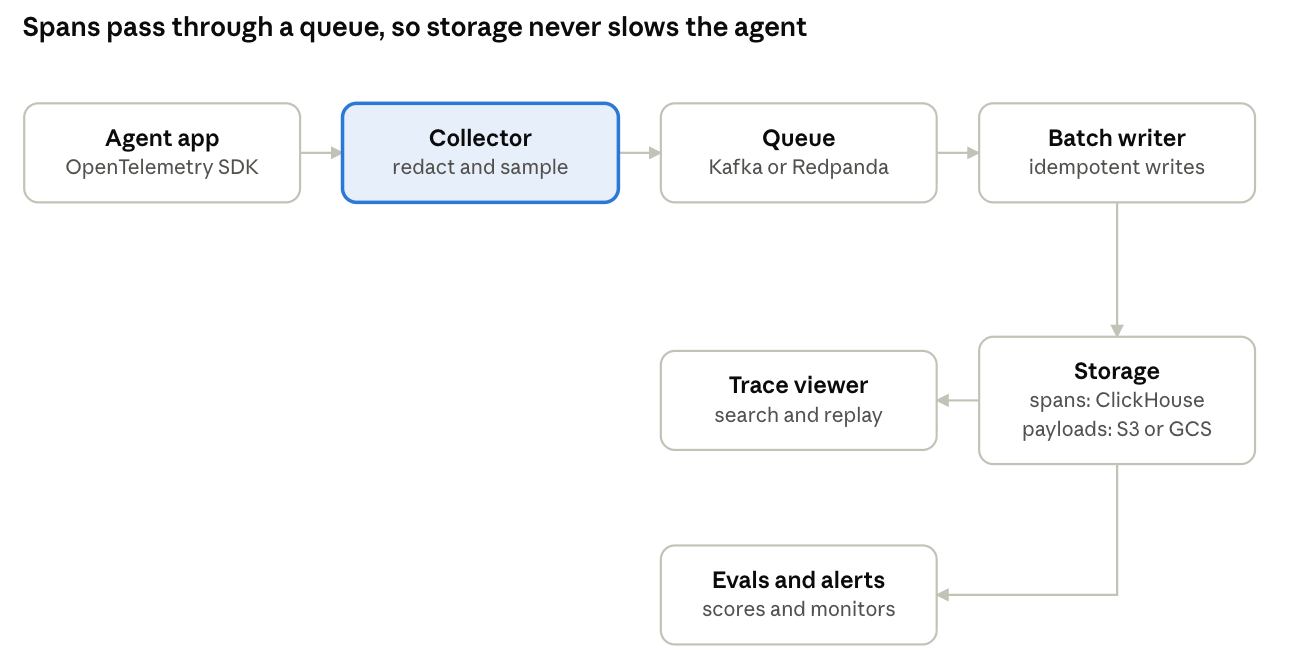
The collector is where policy lives: redaction and sampling happen there, before anything is stored, and the writer adds cost on the way into the database.
Collector. Run the OpenTelemetry Collector as a sidecar or a small service. It receives OTLP, batches spans, and is where you apply the processing below. Its config is declarative, so most of this is YAML, not code.
Queue. Export from the collector to Kafka, Redpanda, or a managed queue, keyed by trace_id so every span of a trace lands on the same partition in order. The queue absorbs traffic spikes and lets you replay data when a downstream writer breaks.
Redaction. Agents see emails, account numbers, and pasted secrets. Scrub PII before anything is stored: the collector's transform and redaction processors handle regex-based masking, and you can add a small service for model-based detection. Decide now who can view raw prompts, since it's much harder to restrict access after the fact.
Sampling. Keep 100% of traces at first. When volume grows, use tail-based sampling: wait until a trace finishes, then keep every trace with an error, high latency, very large model calls, or negative user feedback, plus a fixed percentage of the rest. Tail sampling only works when every span of a trace reaches the same collector instance, so once you run more than one, put a load-balancing exporter keyed on trace_id in front of them. Head-based sampling (deciding at the first span) is cheaper but drops exactly the rare failures you need.
Enrichment. Compute cost in the writer from token counts and a versioned price table, not at query time and not inside each service. Model prices change, and you want historical costs to reflect what you actually paid. Doing it in one place also covers spans from framework instrumentation, which carry token counts but not a cost attribute your own wrapper would set.
Writer. A consumer reads from the queue, moves each span's input and output to object storage, adds cost, and writes to ClickHouse in large batches, typically every few seconds or every few thousand spans. It commits queue offsets only after an insert succeeds, so a crash replays the batch instead of losing it, which makes duplicates a normal event rather than an edge case. Two guards handle them: an insert_deduplication_token built from the batch's partition offsets lets ClickHouse reject a retried insert of the same batch (non-replicated tables need non_replicated_deduplication_window set for this), and the ReplacingMergeTree engine in section 4 collapses whatever slips through, such as a batch regrouped after a restart.
Put together, a collector config for this pipeline looks roughly like this. It uses the contrib distribution (otelcol-contrib), which ships the redaction and tail-sampling processors, and exact field names shift between Collector versions, so check them against the version you run:
receivers:
  otlp:
    protocols:
      http:
        endpoint: 0.0.0.0:4318

processors:
  memory_limiter:
    check_interval: 1s
    limit_percentage: 80
  redaction:
    allow_all_keys: true
    blocked_values:
      - "[a-zA-Z0-9._%+-]+@[a-zA-Z0-9.-]+\\.[a-zA-Z]{2,}"  # email addresses
      - "sk-[A-Za-z0-9]{20,}"                              # API keys
  tail_sampling:
    decision_wait: 30s
    policies:
      - name: errors
        type: status_code
        status_code: { status_codes: [ERROR] }
      - name: slow
        type: latency
        latency: { threshold_ms: 10000 }
      - name: large-calls
        type: ottl_condition
        ottl_condition:
          error_mode: ignore
          span: ['span.attributes["gen_ai.usage.input_tokens"] > 100000']
      - name: baseline
        type: probabilistic
        probabilistic: { sampling_percentage: 10 }
  batch: {}

exporters:
  kafka:
    brokers: ["kafka:9092"]
    traces:
      topic: agent-spans
      encoding: otlp_proto
    partition_traces_by_id: true

service:
  pipelines:
    traces:
      receivers: [otlp]
      processors: [memory_limiter, redaction, tail_sampling, batch]
      exporters: [kafka]
The writer is where most of the custom code lives. A minimal version with confluent-kafka, boto3, and clickhouse-connect decodes each OTLP batch, splits payloads from metadata, and inserts with a token so a retried batch can't land twice:
# writer.py
import json, time
from datetime import datetime, timezone
import boto3, clickhouse_connect
from confluent_kafka import Consumer
from opentelemetry.proto.collector.trace.v1.trace_service_pb2 import ExportTraceServiceRequest

consumer = Consumer({
    "bootstrap.servers": "kafka:9092",
    "group.id": "span-writer",
    "enable.auto.commit": False,
    "auto.offset.reset": "earliest",
})
consumer.subscribe(["agent-spans"])
ch = clickhouse_connect.get_client(host="clickhouse")
s3 = boto3.client("s3")

COLUMNS = ["trace_id", "span_id", "parent_id", "session_id", "user_id", "kind", "name",
           "model", "status", "start_time", "duration_ms", "input_tokens", "output_tokens",
           "cost_usd", "attributes", "payload_key"]

def value(v):
    kind = v.WhichOneof("value")
    return getattr(v, kind) if kind else None

def to_row(span):
    a = {kv.key: value(kv.value) for kv in span.attributes}
    trace_id, span_id = span.trace_id.hex(), span.span_id.hex()
    payload_key = ""
    if "input" in a or "output" in a:
        payload_key = f"payloads/{trace_id}/{span_id}.json"
        body = {"input": a.pop("input", None), "output": a.pop("output", None)}
        s3.put_object(Bucket="trace-payloads", Key=payload_key, Body=json.dumps(body))
    model = a.get("gen_ai.request.model", "")
    tokens_in = int(a.get("gen_ai.usage.input_tokens", 0))
    tokens_out = int(a.get("gen_ai.usage.output_tokens", 0))
    start = span.start_time_unix_nano
    return [
        trace_id, span_id, span.parent_span_id.hex(),
        a.get("session.id", ""), a.get("user.id", ""),
        a.get("span.kind", "step"), span.name, model,
        "error" if span.status.code == 2 else "ok",
        datetime.fromtimestamp(start / 1e9, tz=timezone.utc),
        (span.end_time_unix_nano - start) / 1e6,
        tokens_in, tokens_out,
        price(model, tokens_in, tokens_out, at=start),  # versioned price table: the rate in effect at `at`
        {k: str(v) for k, v in a.items()},
        payload_key,
    ]

while True:
    msgs = [m for m in consumer.consume(num_messages=500, timeout=2.0) if m.error() is None]
    if not msgs:
        continue
    rows, ranges = [], {}
    for m in msgs:
        request = ExportTraceServiceRequest.FromString(m.value())
        for rs in request.resource_spans:
            for ss in rs.scope_spans:
                rows.extend(to_row(s) for s in ss.spans)
        lo, hi = ranges.get(m.partition(), (m.offset(), m.offset()))
        ranges[m.partition()] = (min(lo, m.offset()), max(hi, m.offset()))
    token = ",".join(f"{p}:{lo}-{hi}" for p, (lo, hi) in sorted(ranges.items()))
    for attempt in range(5):
        try:
            ch.insert("spans", rows, column_names=COLUMNS,
                      settings={"insert_deduplication_token": token})
            break
        except Exception:
            time.sleep(2 ** attempt)
    else:
        raise RuntimeError("insert failed; offsets not committed, so the batch will replay")
consumer.commit(asynchronous=False)4. Choose storage for two access patterns
Trace data is read in two very different ways, and one store rarely serves both well:
- Analytical scans across millions of spans: "p95 latency by model this week," "cost per user," "error rate by tool."
- Point lookups of one trace with full payloads: "show me everything about run
abc123."
A practical split is a columnar database (ClickHouse is the common choice) for span metadata, and object storage (S3 or GCS) for large prompt and completion bodies, referenced by key.
In ClickHouse, the table's ORDER BY is its primary index: rows are stored sorted by it, and the sparse index over that order decides which reads are cheap. That makes the sort key the core decision in this design, because it can favor only one access pattern, and the other has to be served some other way.
CREATE TABLE spans (
    trace_id      String,
    span_id       String,
    parent_id     String,
    session_id    String,
    user_id       String,
    kind          LowCardinality(String),
    name          LowCardinality(String),
    model         LowCardinality(String),
    status        LowCardinality(String),
    start_time    DateTime64(6),
    duration_ms   Float64,
    input_tokens  UInt32,
    output_tokens UInt32,
    cost_usd      Float64,
    attributes    Map(String, String),
    payload_key   String,  -- pointer to prompt/completion in object storage
    INDEX idx_user    user_id    TYPE bloom_filter(0.01) GRANULARITY 4,
    INDEX idx_session session_id TYPE bloom_filter(0.01) GRANULARITY 4
)
ENGINE = ReplacingMergeTree
PARTITION BY toDate(start_time)
ORDER BY (trace_id, start_time, span_id)
SETTINGS non_replicated_deduplication_window = 1000;
This key puts the date in the partition and the trace first inside it. Analytical scans filter by time, so they read only the days they ask for. Within a day, every span of one trace sits in a single contiguous range in start order, which is exactly what rebuilding a trace needs (section 5). Ordering by model or start_time first would make some dashboards cheaper, but every trace lookup would then have to scan each granule in the day.
The sort key alone leaves two lookups uncovered, and both have standard answers in ClickHouse.
A materialized view for trace time ranges. A query by trace_id with no time range still has to check every daily partition in your retention window. A small table that records when each trace started and ended tells the reader which one or two days to open. A materialized view keeps it filled on every insert:
CREATE TABLE trace_times (
    trace_id     String,
    first_start  SimpleAggregateFunction(min, DateTime64(6)),
    last_start   SimpleAggregateFunction(max, DateTime64(6))
)
ENGINE = AggregatingMergeTree
ORDER BY trace_id;

CREATE MATERIALIZED VIEW trace_times_mv TO trace_times AS
SELECT trace_id, min(start_time) AS first_start, max(start_time) AS last_start
FROM spans
GROUP BY trace_id;
The view runs on each inserted block, not the whole table, so one trace can have several partial rows until ClickHouse merges them. Read it with min() and max() grouped by trace_id rather than trusting a single row. The same pattern, ordered by user_id and session_id, gives support lookups their own index from a user to their sessions to a single run.
Skip indexes for cheaper filters. The two bloom filter indexes in the schema are ClickHouse's secondary indexes: they let a query skip granules that can't contain a given user_id or session_id. They're cheap to add, though they only skip granules that lack the value, so for a user whose spans are spread across the whole day, the materialized view above is the stronger tool.
Notes on this schema:
- Expect duplicates until merges run -
ReplacingMergeTreecollapses rows with the same sort key, but only during background merges that run on ClickHouse's schedule. Until then a replayed span can appear twice, so addFINALto queries that need exact totals, such as cost per customer. - Set retention per tier - Metadata is cheap to keep for months, while full payloads are where storage cost grows. Many teams expire payloads after 14 to 30 days with an object storage lifecycle rule, keep errored traces longer, and give the spans table a much longer TTL or none at all.
- Promote attributes you filter on - Anything in the
attributesmap is slow to query. When a field shows up in dashboards, give it a real column.
Postgres works for a prototype or low volume. Agents generate many spans per request, though, so plan the move to a columnar store before you need it, not during an incident.
5. Rebuild a trace from its spans
Every view of a single run, the tree and the timeline alike, starts from the same read: find all spans for one trace_id and put them back together. Spans arrive independently and out of order, each knowing only its own parent, so the reconstruction happens at read time.
First, get the trace's time range from trace_times, then read its spans inside that range:
WITH (
    SELECT (min(first_start), max(last_start))
    FROM trace_times
    WHERE trace_id = {trace_id:String}
) AS bounds
SELECT span_id, parent_id, kind, name, model, status,
       start_time, duration_ms, input_tokens, output_tokens, cost_usd, payload_key
FROM spans FINAL
WHERE trace_id = {trace_id:String}
  AND start_time BETWEEN bounds.1 AND bounds.2
ORDER BY start_time;
FINAL is affordable here because the read touches only one trace's rows. Then build the tree in application code, where it's simpler than recursive SQL. Each span hangs under its parent, and each row gets a depth, an offset from the trace's start, and a width, which is everything a waterfall needs:
def build_waterfall(rows):
    spans = {r["span_id"]: {**r, "children": []} for r in rows}
    roots = []
    for s in spans.values():
        parent = spans.get(s["parent_id"])
        if parent:
            parent["children"].append(s)
        else:
            # No parent_id means a real root; a missing parent means it was sampled out,
            # arrived late, or lost context across a thread or queue boundary.
            s["orphan"] = bool(s["parent_id"])
            roots.append(s)

    t0 = min(s["start_time"] for s in spans.values())
    out = []

    def walk(s, depth):
        out.append({
            "span_id": s["span_id"], "name": s["name"], "kind": s["kind"],
            "depth": depth,
            "offset_ms": (s["start_time"] - t0).total_seconds() * 1000,
            "width_ms": s["duration_ms"],
            "orphan": s.get("orphan", False),
        })
        for child in sorted(s["children"], key=lambda c: c["start_time"]):
            walk(child, depth + 1)

    for root in sorted(roots, key=lambda r: r["start_time"]):
        walk(root, 0)
    return out
With clickhouse-connect, client.query(sql, parameters={"trace_id": trace_id}).named_results() returns rows in the shape this function expects. Show orphans at the top level with a marker rather than dropping them, since a span with a missing parent is often the clue to a context propagation bug.
This read is what the sort key is for. The bounds query narrows the read to one or two daily partitions, and inside each one the trace_id prefix of the key means ClickHouse reads a single contiguous range of granules instead of scanning the day. That's why the key starts with the trace rather than the model or the timestamp.
Make traces useful
6. Build a trace viewer people actually use
Generic APM tools show a waterfall of timings, but for agents the content of each step matters as much as its duration. Because of that, the viewer is what decides whether engineers use the system at all.
A useful agent trace viewer has three panes:
- Tree. The span hierarchy, collapsible, with kind icons, duration, tokens, and cost on each row. Errors bubble up, so a failed tool five levels deep is visible on the root.
- Timeline. A waterfall that makes parallel tool calls and slow steps obvious at a glance.
- Detail. For the selected span: the rendered chat messages (not raw JSON), tool arguments and results, model parameters, and metadata.
What separates a tool people open daily from one they avoid:
- Search that starts where users do - By user ID, session ID, trace ID, or text inside prompts.
- Session view - Stitches multi-turn conversations into one timeline.
- Diff two runs - Compare runs of the same input to see where behavior diverged after a prompt or model change.
- Replay in a playground - Open any
llmspan with its exact messages and parameters, edit the prompt, and rerun it. - Shareable links - Drop a teammate on the exact span.
- Fast first paint - Load metadata first and fetch payloads lazily. A trace with 300 spans and long prompts should still open in under a second.
Budget real design and frontend time here. It's the part teams tend to underestimate most, and it decides whether engineers reach for traces or go back to grepping logs.
7. Go beyond tracing: evals, alerts, and cost
Traces tell you what happened in one run. To know whether your agent is getting better or worse, you need to score runs and watch the scores.
Online evals. Run evaluators on a sample of production traces as they arrive. Mix cheap deterministic checks (valid JSON, tool call succeeded, response under a length limit) with LLM-as-judge scores for things like task completion, faithfulness to retrieved context, and tone. Store scores as their own rows linked to trace_id and span_id so you can filter traces by score.
Feedback. Attach thumbs up/down, user corrections, and support escalations to the trace they came from. Human signal is the best label you'll get, and it's useless if it lives in a separate table nobody joins.
Datasets. Let engineers save interesting traces (failures, edge cases, great answers) into named datasets with one click. These become your regression suite, rerun on every prompt or model change before shipping.
Alerts. Alert on rates, not single events: error rate per tool, p95 latency per model, cost per run, and average eval score per agent version. Tie alerts to deploy markers so "quality dropped 12% after Tuesday's prompt change" is visible right away, not discovered a week later.
Cost views. Break spend down by model, agent, customer, and feature. Agent loops that retry or recurse are the usual source of surprise bills, and a per-run cost distribution finds them quickly.
Tracing is the plumbing, and evals, datasets, and alerts are what turn it into faster iteration.
Build vs. buy
The first version is the easy part. A capable engineer can get spans flowing into ClickHouse with a basic viewer in a couple of weeks. The cost shows up over the following year, in work that never quite ends:
| Component | First version | Ongoing work |
|---|---|---|
| Instrumentation | Days | Keeping up with new frameworks, SDK versions, and streaming edge cases |
| Pipeline and storage | 1 to 2 weeks | Scaling, retention tuning, backfills, on-call |
| Trace viewer | 2 to 4 weeks | Search, session views, diffs, replay, performance with large traces |
| Evals and datasets | 2 to 4 weeks | New evaluators, judge prompt tuning, regression runs in CI |
| Alerts and cost | 1 to 2 weeks | Price tables for every model, new metrics, alert noise |
Rough estimates for one experienced engineer; your mileage will vary.
Build in-house when you have compliance requirements beyond what vendors certify, an existing observability platform team with spare capacity, or tracing needs so unusual that a general product won't fit. Check vendor compliance before ruling platforms out, since SOC 2, HIPAA with a BAA, GDPR, and ISO 27001 cover a lot of regulated workloads.
Use a platform when your engineers' time is better spent on the agent itself, which is true for most teams shipping AI products.
Skip the pipeline with Respan
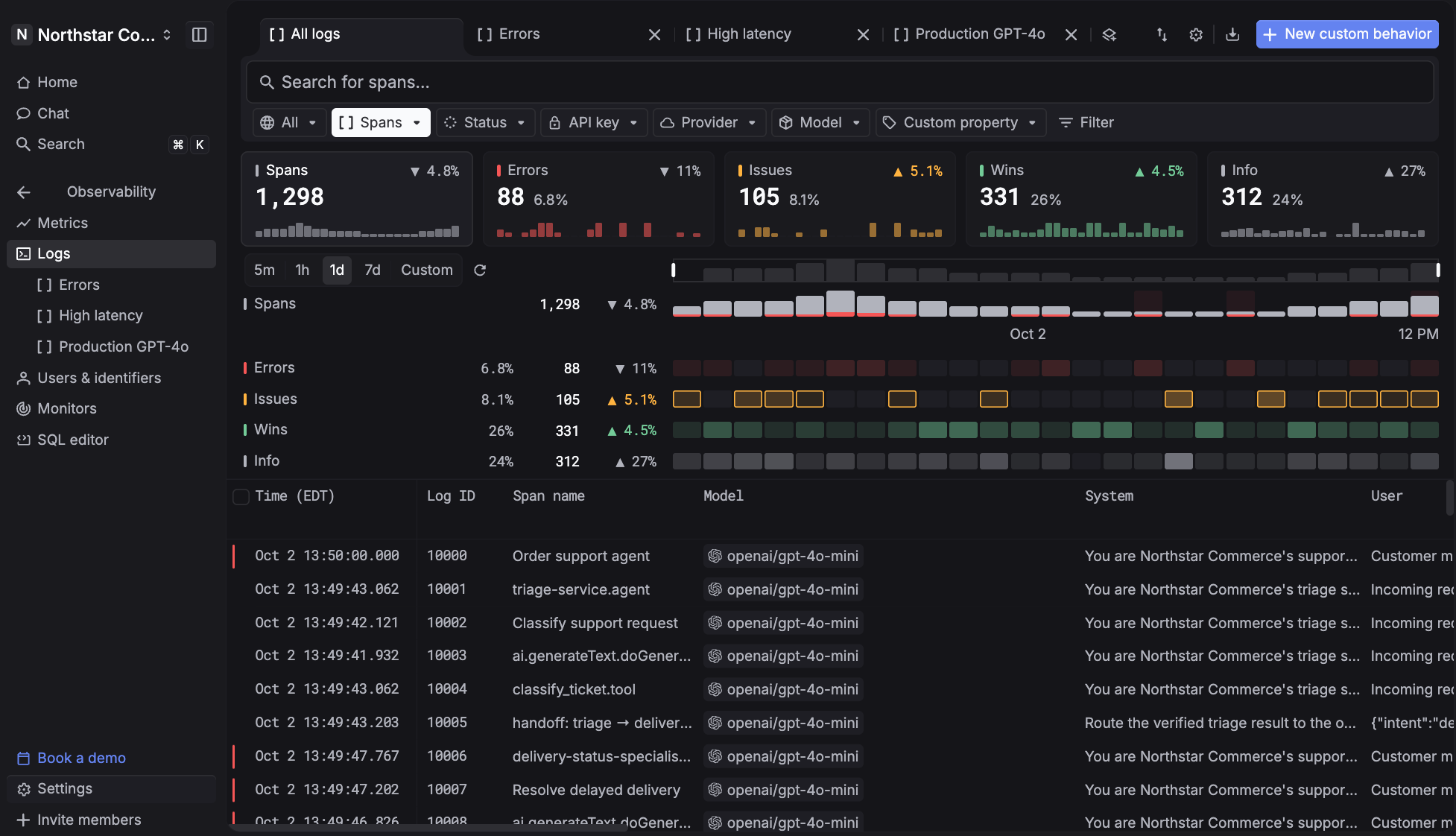
Respan is an AI router with built-in observability and automated evals. Every model call goes through one API, and every request it routes is traced, priced, and scored in the same place, so the collector, queue, columnar store, and trace viewer above come with the integration instead of the backlog.
If you instrumented with OpenTelemetry as in section 2, you keep that work. Respan accepts standard OTLP traces, so pointing your existing exporter at Respan is the whole migration, using the SDK's standard environment variables:
export OTEL_EXPORTER_OTLP_ENDPOINT="https://api.respan.ai/api"
export OTEL_EXPORTER_OTLP_HEADERS="Authorization=Bearer YOUR_RESPAN_API_KEY"
export OTEL_EXPORTER_OTLP_PROTOCOL="http/protobuf"
If you pass an endpoint in code, as the wrapper in section 2 does, remove that argument so the exporter reads these variables. If you already run the collector from section 3, add Respan as an otlphttp exporter pointed at the same endpoint instead.
From there, each trace connects to routing, cost, evals, and alerts in the same product:
- Route, observe, and evaluate every LLM call - One API for 1,000+ models, with fallbacks you configure once and costs broken down by model, request, and end customer.
- Nested agent traces - Every LLM call, tool run, retrieval, and agent turn becomes a span in one trace, and threads stitch multi-turn sessions together.
- Integrations for the frameworks you already use - Vercel AI SDK, LangChain, LlamaIndex, OpenAI Agents SDK, and CrewAI, and Pydantic AI can send its native OTel spans directly.
- Evals on live traffic - Run the same evaluators on sampled production spans that you run on datasets before shipping.
- Behaviors and fix prompts - Span-01 scores live traffic for patterns like frustration, laziness, or jailbreaks, and a flagged span comes with a fix prompt for your coding agent.
- Monitors and alerts - Watch cost, errors, latency, or tokens, with alerts to Slack, email, or a webhook when a threshold breaches.
- Compliance - SOC 2, HIPAA with a BAA, GDPR, ISO 27001, and PII masking.
Instrument with OpenTelemetry as in section 2, send the data to Respan, and build in-house only the pieces that are specific to your product. Your instrumentation stays portable either way.