
Five worked examples at around 150 tokens each add 750 input tokens to a prompt. The model reads them on every request, so at a million requests a month the examples alone account for 750 million input tokens, whether or not they're still improving a single output.
That cost is easy to justify when the examples fix something real, like a JSON field the model kept getting wrong or an internal label it had no way of knowing. Examples are also easy to paste into a prompt during development and then forget, which leaves them in place through model upgrades and changes in what users actually send.
Few-shot examples are code, since swapping one example can change outputs as much as editing a function changes behavior. Unlike code, though, a stale example never throws an error, so an example set that hasn't been versioned and scored against real traffic shouldn't ship to production.
That makes zero-shot the default, and choosing between few-shot prompting vs zero-shot comes down to what each one looks like in practice, how they compare, which scenarios favor examples, and how to keep examples scored once they reach production.
What is few-shot prompting?
Few-shot prompting is a technique where you include a small number of worked input-output examples in a prompt so the model follows their pattern on a new input. The examples, called shots, change how the model responds without changing its weights.
Because nothing is trained, few-shot prompting is a form of in-context learning, and the examples only exist for the length of the request. Remove them and the model goes back to whatever it would have produced from the instructions alone.
Examples are most useful for the things that are hard to describe in words. An example shows the exact shape of an output and how your labels apply to inputs that sit between two categories. It can also carry house rules that would take a paragraph to explain, like how fields are named or how terse a response should be.
There's no fixed number that makes a prompt few-shot. In practice, it means more than one example, and few enough to fit comfortably in the prompt alongside your instructions and the actual input.
Few-shot prompting examples
Few-shot examples can sit inline in the system prompt or be passed as prior conversation turns. Inline examples are easier to read and edit as a single block, so the first three prompts use them.
Structured data extraction
Log lines rarely follow one format across services, which makes extraction a common place for examples to help. Instructions can name the fields, but examples settle the ambiguous calls, like what severity applies when the line doesn't state one.
Extract fields from the log line. Respond with JSON only.

Log: 2026-09-14T08:12:44Z checkout-api ERROR payment provider timeout after 30s (code=PAY_TIMEOUT)
{"service": "checkout-api", "severity": "error", "error_code": "PAY_TIMEOUT", "timestamp": "2026-09-14T08:12:44Z"}

Log: [inventory-sync] retrying batch 4812, attempt 3 of 5 @ 2026-09-14 08:15:02
{"service": "inventory-sync", "severity": "warning", "error_code": null, "timestamp": "2026-09-14T08:15:02Z"}

Log: auth-service 2026-09-14T08:16:10Z user session refreshed
{"service": "auth-service", "severity": "info", "error_code": null, "timestamp": "2026-09-14T08:16:10Z"}

Log: 2026-09-14T08:21:37Z search-indexer FATAL shard 12 unreachable, cluster degraded
The second example carries the most information. It shows that a retry with no explicit level maps to warning, and that a missing code becomes null instead of an invented value. Timestamp normalization shows up across all three examples, which saves writing a separate rule for it.
Tool-call arguments
A tool schema defines which arguments exist, but it doesn't show how a plain-language request maps onto them. Examples in the tool description can help when the model keeps building an argument wrong, and relative time ranges are a frequent case.
search_logs: Search production logs. Times are UTC, ISO 8601.

Examples (current time 2026-09-15T14:00:00Z):
"errors in checkout since yesterday afternoon"
-> {"service": "checkout-api", "level": "error", "start": "2026-09-14T12:00:00Z", "end": "2026-09-15T14:00:00Z"}

"anything from the indexer in the last 90 minutes"
-> {"service": "search-indexer", "level": null, "start": "2026-09-15T12:30:00Z", "end": "2026-09-15T14:00:00Z"}
Both examples encode decisions a schema can't express, such as treating "afternoon" as starting at noon UTC and leaving level null when the request doesn't narrow it.
Code that follows your conventions
Generated code usually runs, but it has no way of knowing how your codebase handles validation or logging. A couple of existing functions used as examples pull the output toward the patterns your team already writes.
Write a handler in the same style as the examples.

// Example
export const getInvoice = handler({
  params: z.object({ invoiceId: z.string().uuid() }),
  async run({ params, ctx }) {
    const invoice = await ctx.db.invoices.find(params.invoiceId);
    if (!invoice) throw new NotFoundError("invoice", params.invoiceId);
    ctx.log.info("invoice.fetched", { invoiceId: invoice.id });
    return invoice;
  },
});

// Example
export const archiveProject = handler({
  params: z.object({ projectId: z.string().uuid() }),
  async run({ params, ctx }) {
    const project = await ctx.db.projects.find(params.projectId);
    if (!project) throw new NotFoundError("project", params.projectId);
    await ctx.db.projects.update(project.id, { archivedAt: new Date() });
    ctx.log.info("project.archived", { projectId: project.id });
    return { ok: true };
  },
});

// Task: a handler that revokes an API key by keyId
Neither example states a rule. Together, though, they show the zod parameter validation and the dotted log event names the new handler should reuse.
Few-shot examples as message turns
Chat APIs also let you pass examples as prior user and assistant turns. The model sees each example as an exchange it already completed, which can make a terse output format hold more closely on short, repetitive tasks.
from openai import OpenAI

client = OpenAI()

messages = [
    {"role": "system", "content": "Label each commit message as feat, fix, chore, or docs. Reply with the label only."},
    {"role": "user", "content": "add retry budget to gateway client"},
    {"role": "assistant", "content": "feat"},
    {"role": "user", "content": "handle null user_id in billing export"},
    {"role": "assistant", "content": "fix"},
    {"role": "user", "content": "bump eslint to 9.x"},
    {"role": "assistant", "content": "chore"},
    {"role": "user", "content": "correct webhook retry count in README"},
]

response = client.chat.completions.create(model="your-model", messages=messages)
print(response.choices[0].message.content)
What you give up is separation from the real conversation. In a multi-turn session, turn-based examples sit in the history alongside actual user messages, which makes it harder for the model to tell demonstration turns from real ones.
What is zero-shot prompting?
Zero-shot prompting is a technique where the prompt contains instructions and the input, with no worked examples. The model relies on what it learned in training and on its ability to follow instructions to produce the output.
A zero-shot prompt still has to be specific. It defines the output schema and spells out constraints such as the allowed labels and length limits. What it leaves out is demonstration, so every rule the model needs has to be written as an instruction.
Instruction-tuned models handle a wide range of tasks this way, which makes zero-shot the sensible starting point. It's also the cheapest version of a prompt, since it carries nothing beyond what the task requires.
Zero-shot prompting examples
Zero-shot prompts carry the rules an example would otherwise demonstrate, so they tend to be more explicit about format and edge cases.
Summarization with constraints
Summaries fit zero-shot well because length and structure are easy to state as rules.
Summarize the incident timeline below for an engineering status update.

Rules:
- At most 5 bullets, in time order
- Start each bullet with the UTC timestamp (HH:MM)
- Put customer-facing impact and the fix in separate bullets
- No speculation about root cause unless the timeline states it

Timeline:
{{timeline}}
Because the rules are explicit, changing one of them, like allowing six bullets instead of five, is a one-line edit.
Classification with defined labels
Classification works zero-shot when the labels are defined clearly enough that a new engineer could apply them.
Route the alert to one team. Reply with the team name only.

Teams:
- platform: infrastructure, Kubernetes, networking, deploy pipeline
- data: warehouse jobs, ETL, analytics dashboards
- payments: billing, invoices, payment provider errors
- security: auth failures, suspicious access, secret exposure

Alert: {{alert_text}}
If scores show the model routing ambiguous alerts wrong, such as a failed deploy of the billing service, that's the signal to try a few examples of those specific cases.
Query rewriting
Turning a user's question into a search query is a task instruction-tuned models already understand, so it rarely needs examples.
Rewrite the user's question as a keyword query for a documentation search API.
Keep product names and error codes exactly as written. Drop filler words.
Return the query only.

Question: {{question}}
Keeping error codes verbatim is the constraint worth stating, because a paraphrased code returns no results.
Few-shot prompting vs zero-shot prompting
The difference between the two comes down to whether the prompt demonstrates the task or only describes it. That one difference changes both the per-call cost of the prompt and how much of it you have to maintain after launch.
| Zero-shot prompting | Few-shot prompting | |
|---|---|---|
| Prompt contains | Instructions and input | Instructions, examples, input |
| Added input tokens | None | Every example, every call |
| Format control | Stated as rules | Shown by example |
| Internal conventions | Must be written out | Demonstrated directly |
| Main risk | Misreads ambiguous rules | Copies example quirks |
| Maintenance | Edit instructions | Version and rescore examples |
| Reasoning models | Recommended starting point | Can reduce performance |
The risk on the few-shot side is easy to underestimate. Models can pick up surface features of the examples, like their length or which label appeared last, and apply them where they don't belong. As a result, an unbalanced or badly ordered example set can skew outputs in ways no instruction caused.
Which to use in different scenarios
Our recommendation based on the findings above is to start zero-shot, add examples only to fix a failure your eval scores show, and take them back out when a model upgrade stops them from earning their tokens. Applied to specific situations, that rule lands in different places:
- If you need strict output formats: Use structured outputs to enforce the JSON schema, since examples can only encourage one. Few-shot examples still earn a place on top of a schema when field content follows house rules, like which enum value applies to an edge case.
- If your labels or conventions are internal: Start zero-shot with clear definitions, which often works for well-defined labels even though no model has seen your taxonomy. When scores show the model confusing two similar categories, a few examples of exactly those cases usually fix it faster than another rewrite of the definitions.
- If the task takes multiple reasoning steps: On a non-reasoning model, test few-shot chain-of-thought prompting, where the examples include intermediate steps. It should beat a zero-shot version that asks the model to work through the problem first.
- If you're running a reasoning model: Go zero-shot. OpenAI's reasoning best practices recommend writing prompts without examples first, and the DeepSeek-R1 paper reports that few-shot prompting consistently degraded R1's performance, though examples can still help narrow problems like tool-call arguments.
- If the call runs at high volume: Price the examples before keeping them. They're billed as input tokens on every request, so for a classifier handling millions of calls, even a slightly higher few-shot score has a cost you can calculate.
- If the model already handles the task: Stay zero-shot for summarizing, rewriting, translating, and answering from provided context, which current instruction-tuned models do well on instructions alone. Add examples only if scores show a failure that keeps repeating.
Most production prompts don't fit a single scenario here, which is why the deciding factor ends up being a score on your own traffic rather than the category the task falls into.
How to use few-shot prompting in production
Once examples are in a production prompt, they need the same handling as any other change to a running system. In practice, that means they come from real inputs and carry a score both before and after they ship.
Source examples from production traces
Examples written by hand during development can end up resembling the inputs you imagined rather than the ones you get. Production traces show real inputs, including the malformed and oversized ones that caused failures in the first place. Pull candidates from logged requests where the output was wrong, write the correct output for each, and strip customer identifiers and secrets before anything goes into a prompt.
Version examples with the prompt
Changing one example changes the prompt, and it can shift outputs as much as rewriting an instruction. Keeping examples inside a versioned prompt instead of a string constant in application code means every example set gets its own version you can compare and roll back to, the same prompt versioning workflow you'd use for instructions.
Score example sets against real cases
Build a dataset from production inputs that includes the failures the examples are meant to fix, plus a sample of normal traffic so regressions show up too. Then run a zero-shot baseline and each candidate example set through the same evaluators. Format rules usually fit a deterministic code check, while output quality calls for an LLM-as-a-judge evaluator or human review.
The number and order of examples are variables as well. Because models can weight later examples more heavily, shuffling the same set into a different order and rescoring is a cheap way to check whether a gain is real or a product of placement. If picking examples by hand becomes the bottleneck, DSPy prompt optimization can search over candidate demo sets against a metric you define.
Account for token cost and caching
Static examples at the start of a prompt can be served from a provider's prompt cache, since caching depends on an exact repeated prefix. Caching only applies above a provider-set minimum prompt length, though, so a short few-shot prompt may never be cached. Anything that varies per request also has to come after the examples, or it breaks the prefix match.
Dynamically retrieved examples, where each input gets the most similar examples from a pool, work against caching for the same reason. They can raise quality on varied inputs, but every request gets a different prefix, so the savings from prompt caching disappear for that part of the prompt. That's a tradeoff to score rather than assume.
Keep scoring after deploy
An example set that scored well at launch can stop being useful. A model upgrade might handle the case the examples were fixing, and a shift in what users send might make them unrepresentative. Running the same evaluators on a sample of live traffic catches a quality drop after a model change, and rescoring a zero-shot version on a schedule tells you when the examples can come back out.
Version and test prompts with Respan
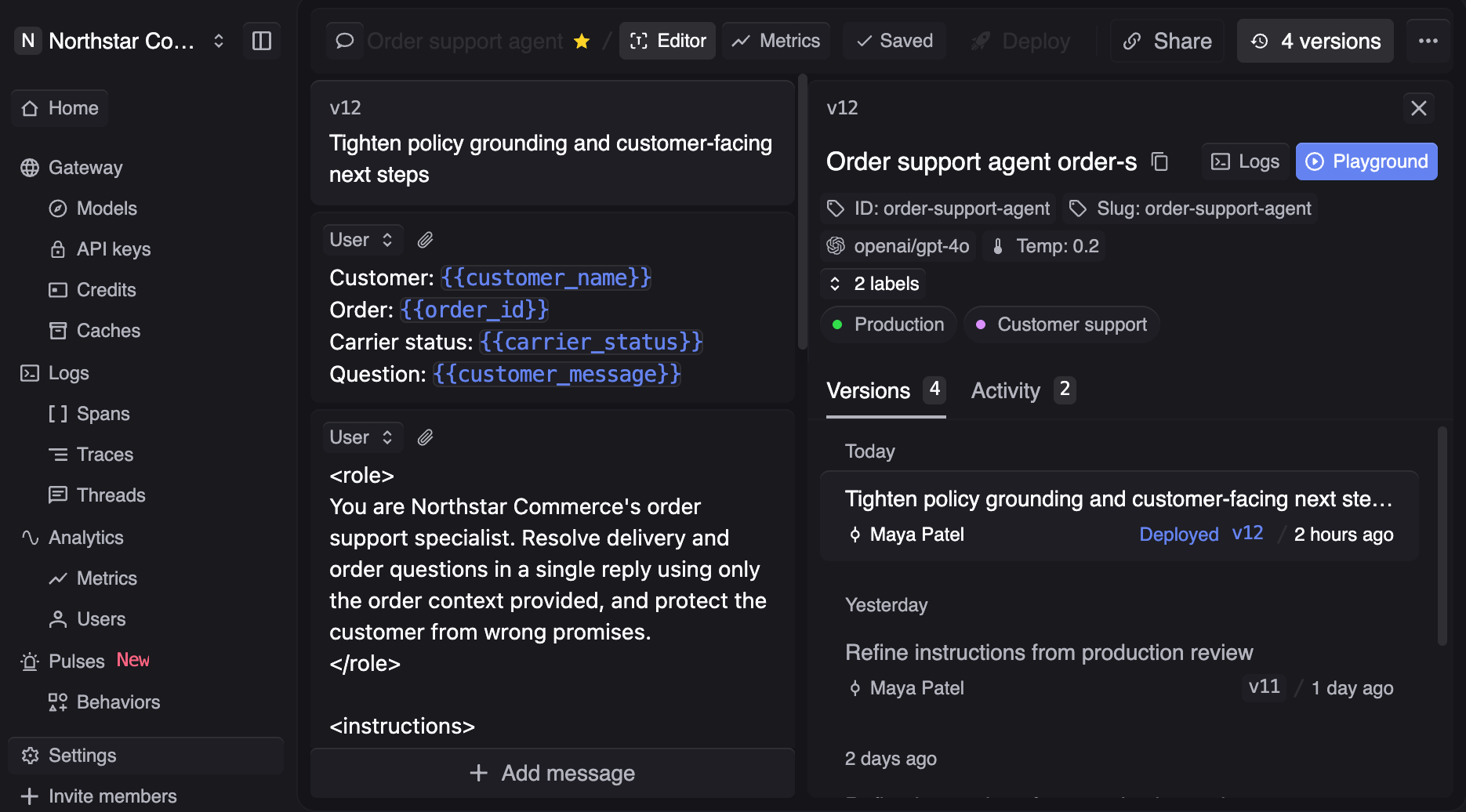
Route, observe, and evaluate every LLM call with Respan, and keep few-shot examples in versioned prompts instead of application code. A bad output in production becomes a trace, the trace becomes a dataset row, and an experiment shows whether a new example set fixes it before anything ships.
Here's how Respan helps:
- Versioned prompts with examples - Store instructions and example turns together as one prompt version with variables. Your application picks up a new version the moment you publish, with no code change or redeploy.
- Examples from real traffic - Open any logged request in the Playground to reproduce it, or build a dataset straight from production logs by filter and sampling rate.
- Simulations for prompt versions - Pick a prompt and version, generate scenarios, and run simulations to inspect how an example set handles inputs your dataset doesn't cover yet.
- Experiments against a zero-shot baseline - Run each prompt version on the same dataset and compare per-row and average scores, with a click through to the full trace behind any row. Evaluations combine LLM judges, code checks, and human review into a single score.
- Model comparisons - Test the same example set across 1,000+ models through one gateway endpoint by changing a single word.
- Online evals after deploy - Run the same evaluators on sampled live traffic, so a regression after a model upgrade surfaces in real time instead of in user complaints.
- Monitors for token spend - Get a Slack, email, or webhook alert the moment token usage or cost crosses a threshold you set.
With the example set, the dataset, and the scores in one place, removing examples after a model upgrade is backed by the same experiment that justified adding them.
Test your prompts before they ship
Use Respan to version prompts with their examples, score them against real production data, and keep scoring after deploy. Get started for free.
FAQ
What is multi-shot prompting?
Multi-shot prompting is another name for few-shot prompting, meaning a prompt that includes more than one worked example. It's different from many-shot prompting, which puts hundreds or thousands of examples into a long context window. Many-shot can improve results on some tasks, but the input token cost grows with every example, so it should be scored against a few-shot version on the same dataset.
What is one-shot prompting?
One-shot prompting includes exactly one worked example. It's useful when a single example is enough to pin down an output format and you want to keep input tokens low. The risk is that the model copies incidental details of that one example, like its length or phrasing, since there's no second example to show what's allowed to vary.
How many examples should a few-shot prompt include?
The right count is whichever version holds its score with the fewest tokens, and in Respan you can find it by saving zero-, two-, and five-example versions of the same prompt and running each as an experiment against one dataset of production inputs. More examples add tokens to every call and can lower output quality if they crowd the prompt, so a larger set needs a higher score to justify itself.
When should you fine-tune instead of few-shot prompting?
Fine-tuning makes sense when the examples you need won't fit in a prompt, or when sending them on every call at your traffic volume costs more than training would. It can also help when a behavior has to hold across a wider range of inputs than a handful of examples can cover. Score the few-shot version on a dataset of production inputs in Respan first, so the fine-tuned model has a baseline it needs to beat.