DevOps tools now come with AI attached at every stage of the pipeline: code assistance, testing, CI/CD and deployment, automation and infrastructure, security, and monitoring and observability. Most use AI to help teams ship software faster. A smaller set exists because the software being shipped is itself AI, which fails in ways the rest of the toolchain cannot see.
The 15 best AI DevOps tools for 2026 are below, grouped into those six categories, with what each one does, what it costs, and how it behaves when it gets things wrong.
What Are DevOps Tools?
DevOps tools are the software that carries code from an engineer's editor to a running production system, and then tells you what happened once it got there. They cover source control, build and test automation, deployment orchestration, infrastructure provisioning, security scanning, and monitoring.
The category exists because those stages used to belong to different teams with different incentives. Developers wanted to ship. Operations wanted stability. DevOps tooling collapsed the handoffs into a pipeline that any engineer on the team can run, inspect, and fix.
The shape of that pipeline has been stable and a DevOps best practice for a decade: Plan, build, test, deploy, operate, monitor. What changed is what runs inside each stage. Monitoring in particular stopped being a dashboard someone checks and became a triage problem, which is the gap AIOps tools fill by correlating alerts into incidents instead of forwarding all of them.
How AI Changed DevOps
AI arrived in DevOps as help. Copilot writes the code. Snyk finds the vulnerability. Dynatrace groups the alerts. Every stage got an assistant, and the pipeline kept its shape. Faster, noisier, but structurally the same.
That help is measurable, and the measurement is not flattering. GitHub's own research puts developers at 55 percent faster on task completion with Copilot, with 85 percent reporting more confidence in their code. DORA measured the other side: a 25 percent increase in AI adoption came with a 1.5 percent drop in delivery throughput and a 7.2 percent drop in delivery stability. Faster and more confident, less stable. AI amplifies whatever the delivery system already does rather than fixing it.
Then AI became the thing being deployed. That breaks the shape.
A pipeline assumes the code you tested is the code that runs. An LLM feature carries no such guarantee. Its behavior comes from a model, a prompt, and whatever the user typed, and any of those can change without a commit. A provider ships a new model version and summaries quietly get worse. A prompt edit fixes one case and breaks four others. An agent picks the wrong tool on an input nobody wrote a test for.
None of that trips the existing toolchain. The deploy succeeded. The endpoint returns 200 in 400 milliseconds. Error rate is flat. There is no exception to catch and no stack trace to read, because nothing failed. It got worse.
So the stages need different instruments. Testing means scoring outputs against criteria instead of asserting equality. Deployment means comparing a prompt or model change against the last one before it reaches everyone. Monitoring means watching what the model did, not just whether the service answered.
That split runs through the list below: tools that use AI to help you ship, and tools for when the thing you ship is AI.
15 Best AI Tools for DevOps
Every entry below is assessed on the same five things, because these are what separate a DevOps tool purchase from a software purchase generally.
- What the AI does - The mechanism, not the marketing category.
- Where it runs - Editor, pull request, CI job, or production runtime. A tool that lives in the IDE is a productivity purchase. The same vendor's PR bot is a process change that needs buy-in from everyone who merges.
- What the pricing scales with - Not the number, the axis. Seats scale with headcount and stay predictable. Hosts scale with infrastructure, so autoscaling moves the bill on its own. Credits scale with how hard the AI works, which nobody can forecast in advance.
- Signal quality - AI DevOps tools fail by being noisy, not by being wrong. A scanner with too many false positives gets its checks marked non-blocking within a month.
- Data boundary - Whether code, telemetry, or prompt content leaves your infrastructure, and whether self-hosting exists.
| Tool | Category | What the AI does | Pricing model | Starting price |
|---|---|---|---|---|
| GitHub Copilot | Code assistance | Completions, chat, agentic PR work | Seats plus AI credits | $4/user/mo (Team) |
| Cursor | Code assistance | Agentic editing across a codebase | Seats plus credit pool | $0 (Hobby) |
| Qodo | Testing | PR review and unit test generation | Review volume | $30/mo (~18 reviews) |
| Diffblue Cover | Testing | Autonomous Java unit test writing | Platform fee plus per-line | $1,500 plus $0.30/line |
| Harness | CI/CD and deployment | Deployment verification and rollback | Quoted | Contact sales |
| GitLab Duo | CI/CD and deployment | Agents across the DevSecOps lifecycle | Seats plus credits | $29/user/mo (Premium) |
| CircleCI | CI/CD and deployment | Autonomous pipeline agent | Compute credits | $15/mo |
| Ansible Lightspeed | Automation and infrastructure | Playbook generation from prompts | Bundled with AAP | No standalone price |
| Pulumi | Automation and infrastructure | IaC generation and cloud querying | Base fee plus credits | $40/mo, 40 credits included |
| Snyk | Security | Vulnerability detection and fix suggestion | Per developer | $25/mo (Team) |
| Semgrep | Security | Finding triage and false-positive filtering | Per contributor | $30/mo per contributor |
| Sysdig | Security | Agentic threat investigation | Quoted | Contact sales |
| Respan | Monitoring and observability | Route, observe, and evaluate every LLM call | Free tier plus paid tiers | Free |
| Datadog | Monitoring and observability | Anomaly detection and incident correlation | Per host plus ingest | $15/host/mo (Infrastructure) |
| Dynatrace | Monitoring and observability | Causal root cause analysis | Per host | $7/host/mo (Foundation) |
AI Code Assistance Tools
Code assistance is where AI entered DevOps first and where its effect on the rest of the pipeline is largest. These tools do not deploy anything. They change how much code arrives at the pipeline and how much of it a human has actually read, which is why the categories downstream had to adapt.
GitHub Copilot
- What the AI does: Completions, chat, and agentic pull request work
- Where it runs: IDE, CLI, and GitHub pull requests
- Pricing scales with: Seats plus AI credits
- Free tier: Yes
- Self-host: No
GitHub Copilot suggests completions inline, answers questions with repository context, and assigns issues to a coding agent that opens pull requests on its own.
Signal quality: Copilot is the broadest tool in this category and rarely the sharpest. On complex multi-step work it trails purpose-built agents, and its suggestions degrade fastest in large codebases with heavy internal convention, where the model confidently produces code that compiles and violates a pattern the team enforces in review.
Pricing:
- Free tier available with limited monthly usage
- Team: $4 per user per month
- Enterprise: $21 per user per month
- All plans include a monthly AI Credit allotment; completions and next-edit suggestions are unmetered
- Credits do not roll over
Best fit: Teams already standardized on GitHub, where the integration breadth is worth more than best-in-class agent quality. Weakest fit for teams on other Git hosts, where most of the platform advantage disappears.
Cursor
- What the AI does: Agentic editing across a whole codebase
- Where it runs: Desktop editor, plus cloud agents
- Pricing scales with: Seats plus a credit pool
- Free tier: Yes (Hobby)
- Self-host: No
Cursor is a fork of VS Code built so the agent, not the cursor, is the primary way code gets written. It indexes the repository and edits across many files in one pass, which is the difference that matters against completion-first tools. Background agents run tasks outside the editor session.
Signal quality: The multi-file edit is the strength and the risk in the same feature. When the agent understands the task, it produces a coherent change across a dozen files. When it does not, it produces a coherent-looking change across a dozen files, and the review burden lands on a human reading a diff far larger than the one they would have written.
Pricing:
- Hobby: $0
- Pro: $20/month, Pro+ $60/month, Ultra $200/month
- Teams Standard: $40/user/month; Teams Premium $120/user/month, or $96 annual
- Annual billing takes 20% off paid plans
- Overage beyond the included pool bills at API rates
Best fit: Teams doing substantial refactoring or greenfield work where whole-codebase context pays for itself. Less compelling for teams whose AI use is mostly line completion, where the cheaper option covers it.
AI Testing Tools
Testing is the stage most directly disrupted by the category above. More code arriving with less human authorship means test coverage stops being a discipline problem and becomes a throughput problem. These tools generate tests rather than help you write them, which raises a question the older tooling never had to answer: whether a test nobody wrote is a test anybody will maintain.
Qodo
- What the AI does: Multi-agent PR review and unit test generation
- Where it runs: IDE, pull request, and CLI
- Pricing scales with: Review volume
- Free tier: No
- Self-host: Enterprise, including air-gapped
Qodo splits into three surfaces: an IDE plugin that generates code and tests, an open-source PR agent that reviews pull requests inline, and a CLI for scripted agent workflows in CI. The PR review is the part that earns the category slot, because it combines review comments with generated tests rather than stopping at commentary.
Signal quality: Generated tests skew toward paths that already work. That produces coverage numbers that rise faster than defect detection, and a suite that grows without getting more protective. The practical failure is a team turning on required checks across every repository at once: the first flaky generated test teaches everyone to bypass the check, and the check never recovers its authority.
Pricing:
- 14-day free trial with full access, then a paid plan is required
- $30 per month covers roughly 18 reviews
- $60 per month covers roughly 36 reviews
- Credits are shared across the workspace and renew monthly; overage bills at the same per-credit rate against a configurable spending cap
- No annual self-serve billing
- Qualified open source projects can apply for free access
- Cost tracks pull request volume rather than headcount, so a small team on a busy repository pays more than a large team on a quiet one
Best fit: Teams where pull request volume has outpaced review capacity and low test coverage is the reason changes sit. The open-source LLM core and air-gapped deployment make it the realistic option in regulated environments where other tools in this category cannot run.
Diffblue Cover
- What the AI does: Writes Java unit tests autonomously
- Where it runs: CLI and CI job
- Pricing scales with: Platform fee plus lines of code
- Free tier: No
- Self-host: Yes
Diffblue Cover is the outlier in this list, and deliberately so. It does not use an LLM. It uses reinforcement learning to search for test inputs that exercise a given method, then writes a JUnit test that captures the observed behavior. It runs unattended. Point it at a Java codebase in CI and it writes tests for uncovered methods, then rewrites them when the code changes. Nobody prompts it.
Signal quality: Because it captures observed behavior rather than intended behavior, it will faithfully write a test that locks in a bug. That is a real limitation and also the honest description of what a characterization test is for, which is why it works best on legacy code being brought under test before a refactor rather than on new code where the intended behavior is the thing in question. The other constraint is scope: Java and JVM languages only, which rules it out entirely for most teams.
Pricing:
- $1,500 platform fee
- $0.30 per line of code
- No free tier
Best fit: Java teams with a large legacy codebase and coverage requirements they cannot meet by hand. The per-line pricing rewards exactly that use case and punishes casual adoption.
AI CI/CD and Deployment Tools
The pipeline is where AI's two arrivals collide most visibly. These platforms added AI to make builds faster and deployments safer. They are now also absorbing the fact that agents, not people, are generating much of what enters the pipeline.
Harness
- What the AI does: Deployment verification, anomaly detection, and automated rollback
- Where it runs: CI job and production deployment
- Pricing scales with: Quoted contract
- Free tier: Yes, on some modules
- Self-host: Yes
Harness built its reputation on one mechanism: after a deployment, it compares production telemetry against the pre-deployment baseline, decides whether the new version is behaving worse, and rolls back on its own if it is.
Signal quality: Automated rollback is only as good as the baseline it compares against. Deploy during an unusual traffic pattern and the verification either rolls back a healthy release or, worse, learns the anomaly as normal. The broader risk is scope: Harness is a platform play, and the AI features are hard to evaluate in isolation from a migration off whatever you currently run.
Pricing:
- Contact sales for a quote
- Free tiers exist on individual modules, but full platform pricing is not published
- Quoted contracts make this the least forecastable purchase on the list at evaluation time
Best fit: Organizations consolidating a fragmented delivery stack onto one platform, with enough deployment volume that automated verification pays back the setup cost. Wrong fit for a team that wants one AI capability without a platform migration.
GitLab Duo
- What the AI does: Agents that work across code, review, security, and CI
- Where it runs: IDE, merge request, and CI pipeline
- Pricing scales with: Seats plus credits
- Free tier: Yes, on GitLab Free
- Self-host: Yes
GitLab's advantage in this category is that the pipeline, the repository, the security scanning, and the issue tracker are one product. Duo agents operate across all of it, which means an agent can read a failing pipeline, trace it to a merge request, and propose a fix without crossing a vendor boundary.
Signal quality: Each Premium seat includes $12 in credits per month, and that allowance is a floor rather than a cap. Agentic usage passes it quickly on teams that lean on it, which makes the invoice a function of behavior rather than headcount, and behavior is hard to predict before adoption. The second issue is tier positioning: capabilities have historically moved between GitLab tiers, so a feature included at signing may sit behind a different line item at renewal. Worth getting contractual language on.
Pricing:
- Free tier: 5 users, 400 compute minutes per month
- Premium: $29/user/month billed annually, including $12 in GitLab Credits per user per month
- Ultimate: quoted, adds full security testing and compliance
- Credit consumption beyond the included allowance bills separately
Best fit: Teams already on GitLab, where agents spanning the whole lifecycle is a genuine structural advantage. Teams evaluating GitLab solely for Duo are buying a platform migration to get it.
CircleCI
- What the AI does: An autonomous agent that validates, optimizes, and fixes pipelines
- Where it runs: CI job and local development environment
- Pricing scales with: Compute credits
- Free tier: Yes
- Self-host: Yes, with self-hosted runners
CircleCI is the entry on this list most directly shaped by AI's second arrival. Its agent, Chunk, analyzes pipeline execution history to find bottlenecks, optimize build configurations, and propose fixes.
Signal quality: Local pre-validation is only as trustworthy as its fidelity to the real pipeline. A sidecar that drifts from the actual CI environment produces green checks locally and red builds centrally, which is worse than no pre-check because it erodes trust in both. This is a young capability, so expect to verify the equivalence yourself rather than assume it.
Pricing:
- Free tier available with monthly included credits
- Paid plans from $15 per month
- Credits are consumed per minute of compute at rates that vary by resource class
- Additional credits sold in blocks, with volume discounts at high thresholds
- Cost scales with build frequency and machine size, so parallelism speeds up feedback and raises the bill
Best fit: Teams with complex containerized pipelines and enough build volume that optimization matters. Particularly relevant for teams where coding agents already generate a large share of commits.
AI Automation and Infrastructure Tools
Infrastructure is the category where AI assistance is most useful and most dangerous, because the output is not a suggestion in an editor. It is a change to running systems. Both tools here generate infrastructure definitions rather than execute changes directly, which is the design choice that makes them usable.
Ansible Lightspeed
- What the AI does: Generates Ansible tasks, playbooks, and roles from natural language
- Where it runs: VS Code and the Ansible Automation Platform UI
- Pricing scales with: Bundled subscription
- Free tier: Trial only
- Self-host: Yes
Ansible Lightspeed with IBM watsonx Code Assistant turns prompts into Ansible content inside VS Code, using models tuned specifically on Ansible data rather than general code. A separate intelligent assistant sits in the Automation Platform UI and uses retrieval over documentation to help operators install, configure, and troubleshoot.
Signal quality: Generated playbooks are syntactically sound far more often than they are operationally correct, and the gap shows up in idempotency. A task that runs cleanly once and produces a different result on the second run is the classic failure, and it does not surface until the playbook runs against a host that is already partly configured.
Pricing:
- No standalone purchase. Requires a trial or paid subscription to Red Hat Ansible Automation Platform, plus either an IBM watsonx Code Assistant subscription or a Lightspeed trial account
- A 60-day no-cost trial of Ansible Automation Platform includes Lightspeed access
- On-premise deployment requires an AAP subscription plus a local watsonx Code Assistant installation
- Cost is a function of the underlying Automation Platform subscription, not the AI feature
Best fit: Organizations already running Ansible Automation Platform at scale, where the marginal cost is small and the volume of playbook authoring is high. There is no sensible path to Lightspeed for a team that is not already a Red Hat customer.
Pulumi
- What the AI does: Generates infrastructure code and answers questions about live cloud state
- Where it runs: CLI, CI job, and web console
- Pricing scales with: Base fee plus credits
- Free tier: Yes
- Self-host: Yes
Pulumi's distinguishing property predates its AI features: infrastructure is defined in TypeScript, Python, Go, or C#, not a bespoke configuration language. That matters for AI generation, because models are far stronger at general-purpose languages than at DSLs, and because generated infrastructure code can be reviewed, tested, and typechecked with the tooling the team already runs.
Its AI capabilities generate infrastructure definitions from descriptions and answer natural-language questions about resources actually deployed across accounts and clouds.
Signal quality: Generated infrastructure code passes typechecking long before it is correct, and the errors that survive are the expensive kind: an overly permissive IAM policy, a security group open wider than intended, a resource in the wrong region. None of those fail a build. The mitigation is policy-as-code enforcement in the pipeline rather than review discipline, because reviewers approve generated infrastructure faster than they approve generated application code.
Pricing:
- Free tier available
- $40 per month base, including 40 credits
- Credit consumption scales with usage beyond the included allowance
- Self-hosting available for teams that need the state backend in their own infrastructure
Best fit: Teams that want infrastructure in a real programming language and already have review and testing discipline to apply to it. Teams committed to HCL will not find enough here to justify the migration.
AI Security Tools for DevOps
Security is where AI has the clearest measurable job, because the pre-AI baseline was so noisy. Scanners historically produced more findings than any team could triage, and the industry response was to mark the checks non-blocking. Every tool here is aimed at that specific failure.
Snyk
- What the AI does: Detects vulnerabilities and proposes fixes
- Where it runs: IDE, pull request, CI job, and container registry
- Pricing scales with: Contributing developers
- Free tier: Yes
- Self-host: Enterprise
Snyk scans source code, open-source dependencies, container images, and infrastructure as code, then proposes a specific fix rather than a description of the problem. A finding tells a developer they have work to do. A pull request with the patch already in it changes whether the work happens.
Signal quality: Reachability is the dividing line. A vulnerability in a dependency your code never calls is not a vulnerability in your application, and tools that report both identically train developers to ignore the report.
Pricing:
- Free tier available with limited monthly tests
- Team: $25 per month
- Ignite: $1,260 per year per contributing developer
- Enterprise: quoted, adds self-hosting and advanced governance
- Contributing developer counting means cost tracks active committers rather than headcount, which is more forgiving for large organizations with concentrated commit activity
Best fit: Teams that want one vendor across dependencies, code, containers, and infrastructure as code, rather than a separate scanner for each surface. Weaker fit for teams whose main need is encoding their own conventions as rules, which is Semgrep's strength.
Semgrep
- What the AI does: Triages findings and filters false positives
- Where it runs: CLI, pull request, and CI job
- Pricing scales with: Contributors
- Free tier: Yes, plus open-source engine
- Self-host: Yes
Semgrep's scanning engine is open source and rule-based, with rules written in a syntax that resembles the code being matched rather than an abstract query language. Teams write their own rules for their own conventions, which is the reason it shows up in stacks that already have a commercial scanner.
The AI layer sits on top of that engine and does something narrower than the rest of this category: it examines findings and judges which are actually exploitable in context, so the queue that reaches a developer is shorter than the queue the scanner produced.
Signal quality: Filtering false positives is the right target, and the risk is symmetric. A filter tuned to reduce noise will eventually suppress a real finding, and unlike a false positive, a false negative produces no evidence that it happened. The honest way to run this is to sample suppressed findings periodically rather than trust the filter permanently.
Pricing:
- Free tier available, plus a fully open-source scanning engine with no metering
- $30 per month per contributor
- Self-hosting supported on the open-source engine at no cost
- Contributor-based pricing tracks active committers rather than total seats
Best fit: Teams that want to encode their own security and code conventions as rules, and teams that need a scanner running in an air-gapped environment. The open-source engine makes it the low-risk evaluation on this list.
Sysdig
- What the AI does: Autonomous agents that investigate and remediate cloud threats
- Where it runs: Production runtime, containers, and Kubernetes
- Pricing scales with: Quoted contract
- Free tier: Trial
- Self-host: Yes
Sysdig is the only entry in this category focused on runtime rather than build time. Its argument is that static analysis tells you what could be exploited while runtime tells you what is being exploited, and that the second signal is what should drive prioritization.
Sysdig Sage runs multiple specialized agents cooperatively across security workflows. They perform semantic analysis of the environment to understand asset types, business function, and data flows, correlate that against observed runtime behavior, and then recommend or, when permitted, execute remediation.
Signal quality: Runtime context genuinely improves prioritization, and the tradeoff is coverage: this only sees what is running. A vulnerability in a code path that has not executed is invisible, which is why Sysdig complements rather than replaces build-time scanning.
Pricing:
- Contact sales for a quote
- Trial available
- Pricing is not published, which makes early-stage evaluation harder than the alternatives in this category
Best fit: Container and Kubernetes-heavy environments where runtime behavior is the security signal that matters. Overkill for teams whose deployment surface is a handful of managed services.
AI Monitoring and Observability Tools
Monitoring and observability tools are where the two arrivals of AI are most clearly different platforms rather than different features. The first entry here watches what a model actually did. The two below it use AI to make sense of infrastructure telemetry: metrics, traces, logs, and the relationships between them.
The distinction is not vendor positioning. It is a difference in what gets recorded. Infrastructure observability records that a request succeeded in 400 milliseconds. Whether the answer inside that response was correct is not a field in the trace.
Respan
- What the AI does: Routes, observes, and evaluates LLM and agent behavior in production
- Where it runs: Production runtime, plus CI via API
- Pricing scales with: Plan tier, not host count
- Free tier: Yes
- Self-host: Enterprise
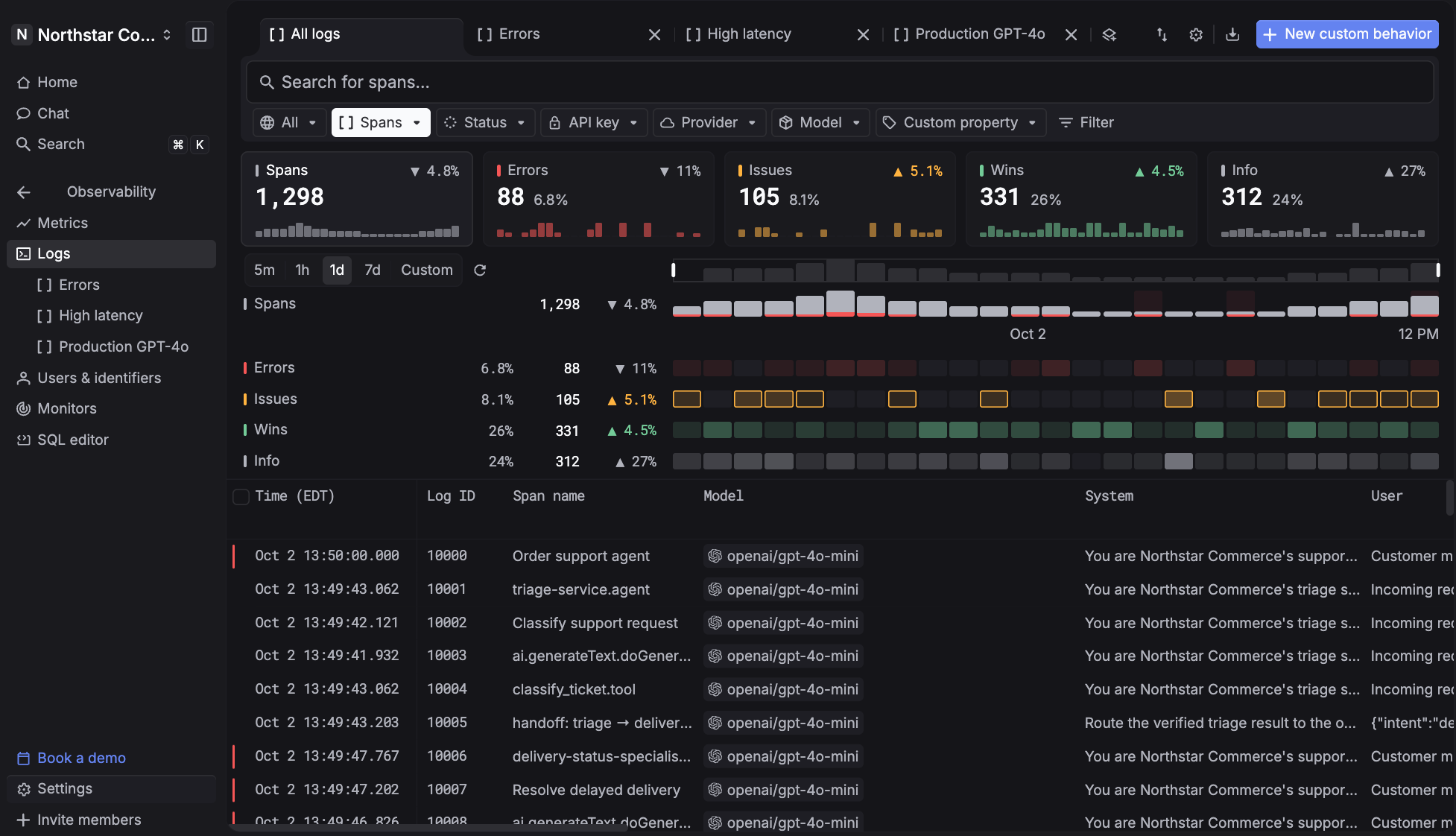
Infrastructure monitoring answers whether the service responded. It does not answer whether the model was right, because that is not a property of a request. It is a property of an output.
Respan records that output. Route, observe, and evaluate every LLM call, and see exactly what your agents did in a fraction of the time it takes to reconstruct it from logs.
When an agent calls the wrong tool, the trace tree shows which step chose it and what context it had. Every metric opens the traffic that produced it, so there are no dead ends between a chart and the run behind it.
When a model version rolls forward and quality drops, evaluators score live traffic as it lands. Built-in judges cover faithfulness, relevance, coherence, and toxicity. Custom Python evaluators handle criteria specific to the product. Results export to CI, so a bad prompt or model change gets blocked before it ships instead of diagnosed after.
Cost, latency, tokens, and error rate all carry threshold monitors that alert to Slack, email, or a webhook. Instead of reading logs after the fact, use Respan to run observability in production, know when production shifts, and act before it spreads.
Tracing, evals, prompt management, and the gateway run on one platform, so nothing needs stitching together to answer a single question. Respan also captures 100 percent of traces by default, with no sampling math to reason about.
Signal quality: Evaluation runs on judges, and an LLM-as-judge is a model with its own failure modes. Scores drift as judge models change, and a judge that agrees with itself is not the same as a judge that is right, so validating against human review on a set cadence is not optional. Respan also covers LLM and agent traffic specifically, which means it sits alongside infrastructure monitoring rather than replacing it.
Pricing:
- Pro: $0 per month, including 100,000 logs, 1,000 scores, 5 datasets, 2 evaluators, and 5 prompts
- Team: adds unlimited datasets, evaluators, and prompts, higher score limits, and private Slack support
- Enterprise: custom packages, volume discounts, HIPAA BAA, dedicated support engineer, and self-hosted deployment
- Tier-based rather than per-host, so cost does not move when infrastructure autoscales
Best fit: Teams running LLM features or agents in production who need to know what the model did, not just whether the service answered. Strongest when tracing, evaluation, and gateway are wanted together, since running them as separate products means reconciling three data models to answer one question.
Datadog
- What the AI does: Anomaly detection, incident correlation, and root cause surfacing
- Where it runs: Production runtime
- Pricing scales with: Hosts, plus ingested and indexed volume
- Free tier: Limited
- Self-host: No
Datadog correlates telemetry across infrastructure, applications, and logs, then surfaces outliers and probable root causes across the stack. Its Bits AI layer investigates incidents conversationally and builds custom agents against platform data.
Signal quality: The most important limitation is structural rather than algorithmic. Each APM host includes an allotment of ingested and indexed spans, and past that overage bills per million. The practical consequence is that many teams enable trace sampling at 25 to 50 percent to stay inside the allotment, which means that during an incident, when complete traces matter most, they are reconstructing events from a partial record.
Pricing:
- Infrastructure: from $15 per host per month billed annually, $18 on-demand, $23 Enterprise
- APM: $31 per host per month annual, up to $40 Enterprise, and requires a paired Infrastructure plan
- Each APM host includes 150 GB ingested spans and 1 million indexed spans at 15-day retention; overage from $1.70 per million
- Logs: $0.10 per GB ingested plus $1.70 per million indexed events
- Bits AI runs on credits that reset monthly and do not roll over
Best fit: Organizations that want one vendor across every telemetry type and have the FinOps discipline to manage a bill with many independent meters. Teams without that discipline routinely see invoices land well above their estimate.
Dynatrace
- What the AI does: Deterministic causal root cause analysis
- Where it runs: Production runtime
- Pricing scales with: Hosts
- Free tier: Trial
- Self-host: Yes
Dynatrace approaches root cause differently from the correlation-based tools around it. Its Davis engine builds a live dependency map of every entity in the environment and traverses it to identify causation rather than inferring it statistically. The practical difference is that Davis returns one root cause with a stated causal path instead of a ranked list of things that changed at the same time.
Signal quality: Causal analysis in tools like Dynatrace is only as good as the topology, and the topology depends on complete instrumentation. Environments with partial agent coverage produce gaps in the dependency graph, and a gap in the graph means Davis attributes the root cause to the last entity it can see rather than the actual one. The failure is quiet and confident, which is worse than an unhelpful ranked list.
Pricing:
- Foundation and Discovery: $7 per host per month
- Infrastructure Monitoring: $29 per host per month
- Additional capabilities including full-stack monitoring, logs, and digital experience monitoring are separately metered
- Host-based pricing means autoscaling moves the bill without any change in team behavior
Best fit: Large environments with dense service dependencies, where correlation-based tooling produces alert storms that a topology-aware engine can collapse. The low Foundation tier makes broad coverage affordable before the expensive modules are added.
How to Choose an AI DevOps Tool
Sort by the failure you are trying to catch, not by the category label. Each of the six maps to a different kind of breakage:
- A build that breaks points at CI/CD tooling
- A vulnerable dependency reaching production points at security scanning
- Coverage that cannot keep pace with merge volume points at test generation
- Review queues backing up behind AI-authored changes points at code assistance
- Configuration drift between environments points at automation and infrastructure
- A model that quietly degrades after a provider update points at LLM observability, and none of the other five will surface it
Once the category is settled, three questions decide most of these purchases:
- Does it gate, and do you want it to? Advisory tools get ignored under deadline pressure. Gating tools change behavior and create friction. Gating on a probabilistic signal means occasionally blocking a good deploy, which is a tradeoff worth making deliberately rather than discovering during an incident.
- What does the price scale with? Seats scale with headcount and stay predictable. Hosts scale with infrastructure, so autoscaling moves the bill without anyone deciding anything. Credits scale with how hard the AI works, and that is the axis nobody forecasts correctly in the first quarter. Most tools here carry a credit component, so read the included allowance as a floor rather than a budget.
- Where does the data go? Source code, telemetry, and prompt content all leave your infrastructure on most of these tools. Self-hosting is available on some, restricted to the top tier on others, and absent on the rest. For regulated workloads this filter runs before any evaluation of capability.
Adding AI to the pipeline raises throughput at every stage except review. More code, more generated tests, more automated pull requests, and the same number of engineers reading them. The tools that pay for themselves are the ones that reduce what a human has to look at, not the ones that produce more of it.
Frequently Asked Questions
Do AI DevOps tools replace existing CI/CD and monitoring tools?
Mostly no. Almost every tool here is an AI layer on an existing category rather than a new category, so it replaces the incumbent in that slot rather than the pipeline around it. The exception is LLM observability, which adds a signal no existing tool collects, and therefore runs alongside infrastructure monitoring rather than instead of it.
Which AI DevOps tools have a free tier?
GitHub Copilot, Cursor, CircleCI, Snyk, Semgrep, Pulumi, and Respan all offer free tiers, and Harness offers one on individual modules though not on the full platform. Semgrep additionally ships a fully open-source scanning engine with no metering. Qodo does not have a permanent free tier, only a 14-day trial. Sysdig and Ansible Lightspeed are trial-only.
Why do standard monitoring tools miss LLM failures?
Because nothing fails. Infrastructure monitoring records status codes, latency, and error rates, and an LLM producing a wrong answer returns a 200 in normal response time. There is no exception, no stack trace, and no threshold breach. Catching the failure requires recording the input, the output, the model, and the prompt version, then scoring the output against criteria. That is a different record, which is why it needs different tooling.
What does it cost to run AI tools across a DevOps pipeline?
There is no single answer, because the axes differ. Per-seat tools scale with headcount and are forecastable. Per-host tools scale with infrastructure and move on their own when autoscaling kicks in. Credit-based tools scale with agent activity and are the least predictable of the three. A practical approach is to budget the base rate for every tool, then model the overage separately at two to three times current usage, since credit consumption tends to rise as teams get comfortable with agentic features.
Trace, evaluate, and improve AI agents in one platform. Start free with Respan.