A request that reaches an AI agent rarely stays one model call. The agent plans, picks a tool, reads the result, calls the model again, and sometimes hands the task to another agent, so a single answer can sit on top of a dozen steps.
That chain is where production failures hide. Each step can return a 200 in normal time while the run as a whole does the wrong thing, and a dashboard built on latency and error rates will show nothing unusual.
The fix is to treat the run as the unit you observe: one connected trace per run, with cost and a quality score attached, so you can see what the agent did and why. Agent observability best practices for multi-step AI agents come down to seven habits, from capturing the whole run to turning a bad one into a test case.
What Is Agent Observability?
Agent observability is the ability to reconstruct and explain a single agent run after it happens. It records every planning step, model call, tool call, retrieval, and handoff as part of one connected trace, so you can follow the path from the user's request to the final answer and see where it went wrong.
What separates it from related practices is the unit. LLM observability centers on the individual model call and its prompt, output, cost, and score, while AI observability is the broader category covering any AI system in production. Agent observability sits on top of both, because an agent's failure usually lives in how its calls connect rather than in any one call.
How Does Agent Observability Work?
Instrumentation wraps each step of an agent run in a span, a timed record with its own inputs, outputs, and metadata. Spans nest parent to child, so a run produces a tree with the agent at the root and its plan steps, model calls, and tool calls underneath.
The model comes from distributed tracing, where one trace follows a request across services. In an agent, the services are the model, the tools, and any sub-agents, and attributes like cost, token counts, and an evaluator's score attach to the spans they describe.
Multi-turn conversations add one more layer: a thread or session ID that ties several runs together, so a bad answer on turn three can be traced to context set on turn one.
Example: tracing one agent run
Take a support agent handling a third-turn question: "Where's my new order? I placed it yesterday." Earlier in the conversation, the user asked to return order 1182. The run produces a trace like this:
agent.run           thread 7f2a, turn 3                        1.9s   $0.012
├── llm.plan        get_order(order_id="1182")                 0.6s   $0.004
├── tool.get_order  → 200 {status: "delivered", date: "Tue"}   0.2s
└── llm.respond     "Your order was delivered Tuesday."        1.1s   $0.008
Every span succeeded and the latency is normal, so a dashboard built on errors and latency shows a healthy run. Only the eval on the run flags it, and the trace shows why: order 1182 is the order from turn one, so the agent answered confidently about the wrong order.
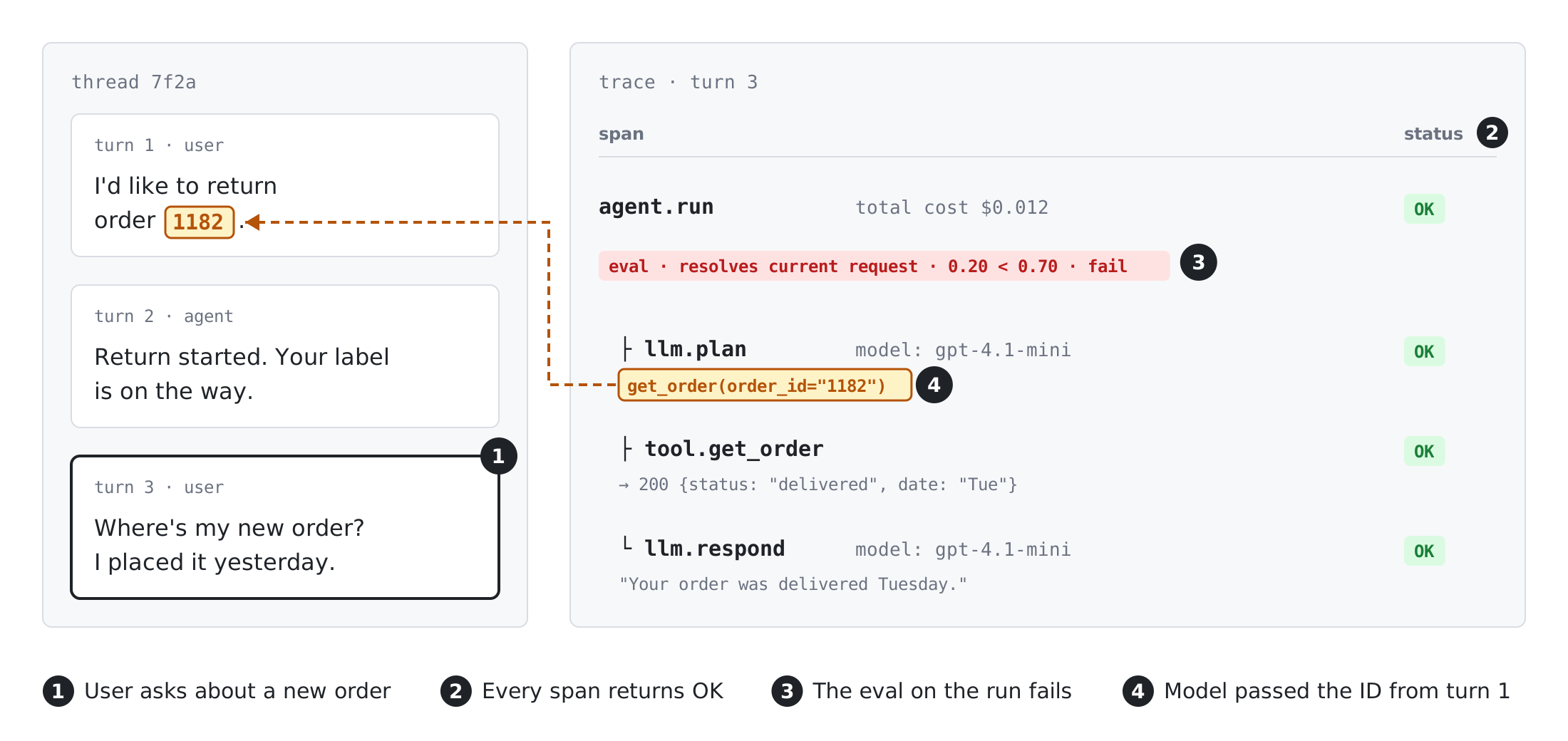
Opening the plan span shows the model generated the tool call with the ID from turn one, and the thread view confirms the user never gave an ID for the new order. That points the fix at how the agent resolves which order the user means, not at the tool itself.
Why AI Agents Need Observability
Traditional application monitoring assumes a fixed code path, so a failed request throws an error and a slow one shows up in latency. Agents choose their own path at runtime, and that breaks the assumption in a few ways:
- Failures look like successes - The most expensive agent failures produce valid responses: a skipped tool, a stale argument, a loop that eventually finishes, or an answer that reads well and is wrong.
- Debugging means reconstructing decisions - After an incident, the questions are which tool the agent picked, what arguments it passed, and what context it carried forward. Without a trace, you're reproducing a non-deterministic system by hand, and the same input may not take the same path twice.
- Cost hides inside the run - An agent that loops or retries a tool runs up tokens on a run that still reports success, and that spend is only visible once you add up the run.
In each case, the evidence you need lives in the run as a whole, which is what agent observability captures.
7 Agent Observability Best Practices
1. Trace every agent run as one connected trace
Start every run with a root span and make each step a child of it, including steps that happen in background tasks, queues, or parallel tool calls. If async work drops the parent context, the trace splits into fragments and the run can't be read end to end.
Give spans consistent names and types (agent, LLM, tool, retrieval), and carry the same identifiers on each: trace ID, thread or session ID, and the end customer. These are the same span kinds and IDs you'd settle on when designing an in-house agent tracing system, so the decisions hold whether you build the pipeline or buy one.
2. Capture tool calls with their arguments and outputs
Tools are where an agent acts on real systems, so tool spans need more than a duration. Record the tool name, the exact arguments the model generated, the raw response, retries, and the error state.
Arguments deserve the most attention because they're where hallucinations become actions. A model that invents a field name or reuses a stale ID produces a call that succeeds technically, and the only record of the mistake is the argument payload.
3. Carry context across handoffs and multi-turn threads
When one agent hands work to another, pass the parent span along with the task and log the context that went with it. A sub-agent that receives a truncated summary will make reasonable decisions on bad input, and without the handoff payload the error looks like it started downstream.
Across turns, attach a thread ID to every run in a conversation. Many agent failures, like the one in the example above, come from context set several turns earlier, and a single-run view can't show that.
4. Attribute cost to each run and each customer
Roll token costs up from each span to the run, then tag runs with the end customer and the feature that triggered them. Cost per completed task tells you whether an agent is getting more expensive, since per-call cost can stay flat while the number of calls per run climbs.
Per-customer attribution shows which account or workflow is driving spend, and it lets you set limits before one user's runaway loop shows up on the invoice.
5. Score live production traffic, not just test sets
Test sets cover the inputs you thought of, while production covers the ones users send. Run evaluators on live spans as well: LLM judges for qualities like relevance or tone, code checks for format and policy rules, and classifiers for behaviors like user frustration or jailbreak attempts.
Store each score on the span it judges. A quality score that lives in a separate system can tell you something got worse, but not which runs to open.
6. Make every metric click through to the run behind it
Dashboards and alerts work best as entry points into traces. When completion rate drops or cost per run jumps, you should be able to go from the chart straight to the runs that moved it.
That link is also what makes an alert actionable at 2am. An alert that opens the worst five traces gets triaged quickly, while one that only names a metric starts an investigation from scratch.
7. Turn failed runs into test cases before the next release
When a trace shows a real failure, save its input, context, and expected behavior as a test case. Over time, that set reflects how the agent breaks for your users in a way a synthetic benchmark can't.
Run the set before changing a prompt, a model, or a tool definition. A fix for one failure often shifts behavior on others, and a regression set built from production is how you catch that before users do.
What to Look for in an Agent Trace
Once your runs are traced, some failure patterns come up again and again, and each has a recognizable shape in the trace.
Recognizing the shape gets you to the right span quickly, and from there, fixing it follows the trace-first workflow for debugging AI agents.
Wrong tool or bad arguments
Check the plan span before the tool call. If the model chose a tool that can't answer the question, or passed arguments that don't match the user's request, the problem is usually in the prompt or the tool descriptions rather than the tool itself.
Loops and repeated calls
A run with far more spans than usual, or the same tool called with the same arguments several times, usually means the agent isn't getting what it needs from the result. Step count and cost per run make these easy to spot across traffic, and the trace shows which result the agent kept rejecting.
Context lost between steps
Compare what a step received with what earlier steps produced. Summaries that drop a constraint, handoffs that omit an ID, and memory reads that return the wrong entity all show up as a gap between the two.
Answers that look right but aren't
The hardest failures have clean traces, where every span succeeds and the final answer is fluent. These only surface when a score is attached to the run, which is why live evaluation and tracing belong together.
Agent Observability with Respan
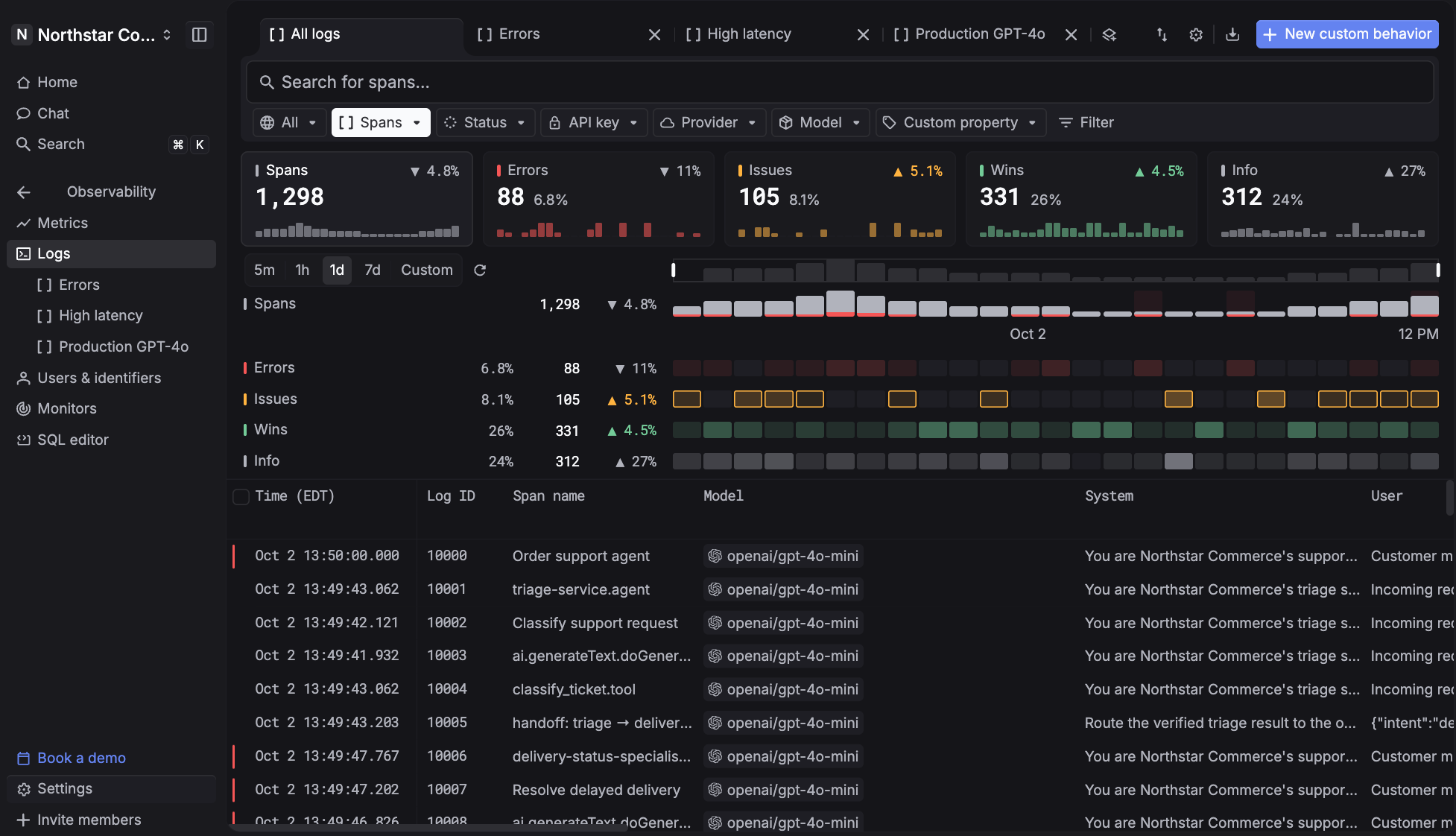
Agent observability gets harder to run when the router, the tracer, and the eval tool are separate products, because the trace and the score end up in different places. Respan is the AI router with built-in observability and automated evals, so every request it routes is traced, priced, and scored in the same place, and a metric always ties back to the run behind it.
Route, observe, and evaluate every LLM call through one platform, with each agent run captured as a span tree from the first plan step to the final response.
- One API for 1,000+ models - Every model call, tool run, retrieval, and agent turn becomes a span in one trace with latency and cost attached, and switching models means changing a single word.
- Threads for multi-turn agents - Spans that share a
thread_identifiergroup into one conversation, so a bad answer on turn five traces back to context set on turn two. - Cost per customer, with hard limits - Attach a customer ID to see spend, requests, and tokens for each end user, then set per-user budgets that stop gateway requests once spend passes the limit.
- Live scoring with Behaviors - Write a behavior in plain language, or use built-in ones like frustration, jailbreak, and escalation, and Span-01 scores every new span against it. From any behavior, you can jump to every span where it fired.
- Alerts that reach you first - Monitors watch cost, errors, latency, and tokens, and send an alert to Slack, email, or a webhook the moment a threshold breaks.
- Datasets and LLM-as-judge evaluators - Keep the cases worth testing in datasets and score output with LLM-as-judge evaluators.
- Fallbacks when a provider fails - Set a fallback chain once, and traffic moves to the next model automatically when a provider errors or rate-limits.
- PII masking and compliance - Mask sensitive data at the gateway before it reaches the provider, on a platform covered by SOC 2, HIPAA with a BAA, GDPR, and ISO 27001.
Instead of reading logs after the fact, use Respan to run observability in production, know when production shifts, and act before it spreads.
Tips for Implementing Agent Observability in Production
Most of the work in rolling out agent observability is in setup decisions that are hard to change later.
Instrument once at the call path
Adding a logging line to each model call doesn't scale across agents and frameworks. Routing model calls through a gateway, or using your framework's tracing integration, captures every call in one place and covers new agents without extra work.
Use OpenTelemetry conventions
If you already run OpenTelemetry for your services, emit agent spans through it so model and tool calls sit in the same traces as the rest of your stack. Following the OpenTelemetry GenAI semantic conventions for attribute names keeps spans from different frameworks comparable when you query them.
Sample live evals to control cost
An LLM judge costs a model call per score, so scoring every span can rival what the agent itself spends. Score a percentage of normal traffic plus every run that errors or gets flagged, the same sampling approach used for online evals in LLM monitoring, and keep full coverage for cheap code-based checks.
Mask PII and set retention
Agent traces hold user messages, tool outputs, and retrieved documents, so they often contain more personal data than application logs. Mask sensitive fields before they're stored, limit who can open raw traces, and set retention to what debugging and audits need.
Roll out in stages
Start with end-to-end tracing on your highest-traffic agent, then add customer and thread IDs, then live scoring, and finally a regression set built from failed runs. Each stage is useful on its own, so you don't need the next one in place to get value from the last.
FAQ
How is agent observability different from LLM observability?
LLM observability tracks individual model calls: the prompt, the output, tokens, latency, and cost. Agent observability tracks the full run those calls belong to, including tool calls, handoffs, and the decisions that connect them, so you can see why a run failed even when every call in it looks fine. Respan covers both from the same traces, since every routed call is already a span inside its agent run.
How is agent observability different from agent monitoring?
Agent monitoring watches signals you choose in advance, like completion rate, tool error rate, and cost per run, and alerts when they move. Agent observability is what lets you explain the alert afterward by opening the runs behind it. You need both, and the AI agent monitoring tools worth considering keep alerts connected to traces. Respan runs both from the same data, with monitors and Behaviors tied to the spans they fire on.
Why isn't APM enough for AI agents?
APM tracks request rate, latency, and errors, which catch outages and slowdowns but not wrong answers. An agent can call the wrong tool, get a successful response, and answer with confidence, and APM has no record of the prompt, the tool arguments, or a quality score to show it. Agent observability adds those, either alongside your APM or feeding into it through OpenTelemetry.
Does agent observability work with any agent framework?
Yes, as long as the framework can be instrumented through a native integration or OpenTelemetry. Respan integrates with dozens of agent frameworks, including the OpenAI Agents SDK, Claude Agent SDK, LangGraph, CrewAI, Vercel AI SDK, Pydantic AI, Mastra, and Google ADK, and model calls routed through the Respan gateway are traced regardless of framework.