LangSmith's free plan allows exactly one seat. Not one paid seat with room to invite a colleague, but a hard maximum of one user on the account, which means the moment your colleague wants to look at a trace, your team is on the Plus plan at $39 per seat per month.
The trace ceiling arrives around the same time. Developer includes 5,000 base traces a month and Plus includes 10,000, after which every trace bills as usage. For a service handling a few thousand requests a day, that allowance is gone inside the first week, and it runs out faster once agents enter the picture, because a single agent run with tool calls and retries produces far more telemetry than a single completion does.
Neither of those is a hidden cost. Both sit on LangChain's public pricing page. However, they do explain why the search happens at all, since teams tend to go looking at exactly the moment they want production visibility shared across the people responsible for production.
So here are the ten best free LangSmith alternatives, compared on seat caps, trace limits, retention, and what ends each free tier.
What Is LangSmith?
LangSmith is LangChain Inc.'s commercial platform for building, monitoring, and evaluating LLM applications, built by the same team behind the LangChain and LangGraph frameworks. Its tracing captures every model call, chain execution, and agent step with inputs, outputs, latency, token usage, and cost attached, and for applications already written in LangChain, turning it on is a matter of setting an environment variable.
In 2026, LangSmith offers tracing, observability, evaluation, and now Deployment for long-running agents, Sandboxes for agent-generated code, Fleet for no-code agents, an Engine that analyzes traces on a schedule and proposes fixes, and an LLM gateway.
The friction that sends teams elsewhere is mostly structural rather than a missing feature. Deployment is cloud-only below Enterprise, which turns a data-residency requirement into a procurement conversation. And because the deepest instrumentation path is LangChain's own, a team on a mixed stack gets the framework-agnostic experience rather than the one the product was designed around, which is the tradeoff our Respan vs LangSmith comparison works through in more detail.
Is LangSmith Free? LangSmith Pricing in 2026
As per LangChain's pricing page, LangSmith is free on the Developer plan, with the caveats that the plan is capped at one seat, includes 5,000 base traces a month before pay-as-you-go pricing takes over, and offers community support only. It is a genuine free tier in the sense that you can run production traffic through it without a credit card, and a constrained one in the sense that you cannot share what you find with anyone.
Plus is $39 per seat per month and lifts the allowance to 10,000 base traces, adds one free small serverless deployment, and lets you buy as many seats as you need. Seats bill on the total number of users in the organization including people you have only invited, charged monthly on the first and prorated when added mid-month, with no credit issued when someone leaves. A ten-person team therefore starts at $390 a month before a single trace over the allowance.
Work performed on Engine, Fleet, deployments, and sandboxes bills in LangChain Compute Units at $1.50 each, and stored data bills in LangChain Storage Units at $1.00 each, so the invoice has more inputs than seats and traces alone.
The detail that catches teams out is retention. Base traces hold for 14 days, and moving a trace to the 400-day extended tier costs extra. Since the traces worth keeping are the ones carrying evaluator scores, annotations, and human feedback, the features you adopt as you get more serious are the same ones that push data onto the more expensive tier. What ends the free tier, then, is almost never the trace count. It is the second person who needs to see a trace.
10 Best Free LangSmith Alternatives Compared
The tools below are ordered by how far the free tier carries a full team. Every platform here has a free tier that runs real traffic.
| Tool | Free tier | Seats on free | Retention on free | Meters on | First paid tier |
|---|---|---|---|---|---|
| Respan | 100k logs, 1k scores | Unlimited | 7 days | Logs and scores | $199/mo flat |
| Comet Opik | 25k spans | 10 members | 60 days | Spans | $19/mo |
| Braintrust | 1 GB, 10k scores | Unlimited | Not published | Processed data | $249/mo flat |
| Arize | 25k spans, 1 GB | Unlimited | 15 days | Spans and storage | $50/mo |
| Galileo | 5k traces | Unlimited | Not published | Traces | $100/mo |
| Langfuse | 50k units | 2 users | 30 days | Units | $29/mo |
| Confident AI | 5 test runs weekly | 2 seats | Unlimited | GB-months of spans | $200/mo |
| Laminar | 1 GB, no overage | 1 seat | 7 days | Data volume | $30/mo |
| MLflow | Uncapped, self-run | Unlimited | Your storage | N/A | N/A |
| Mirascope | Uncapped library | Unlimited | Your backend | N/A | N/A |
1. Respan
What is Respan?
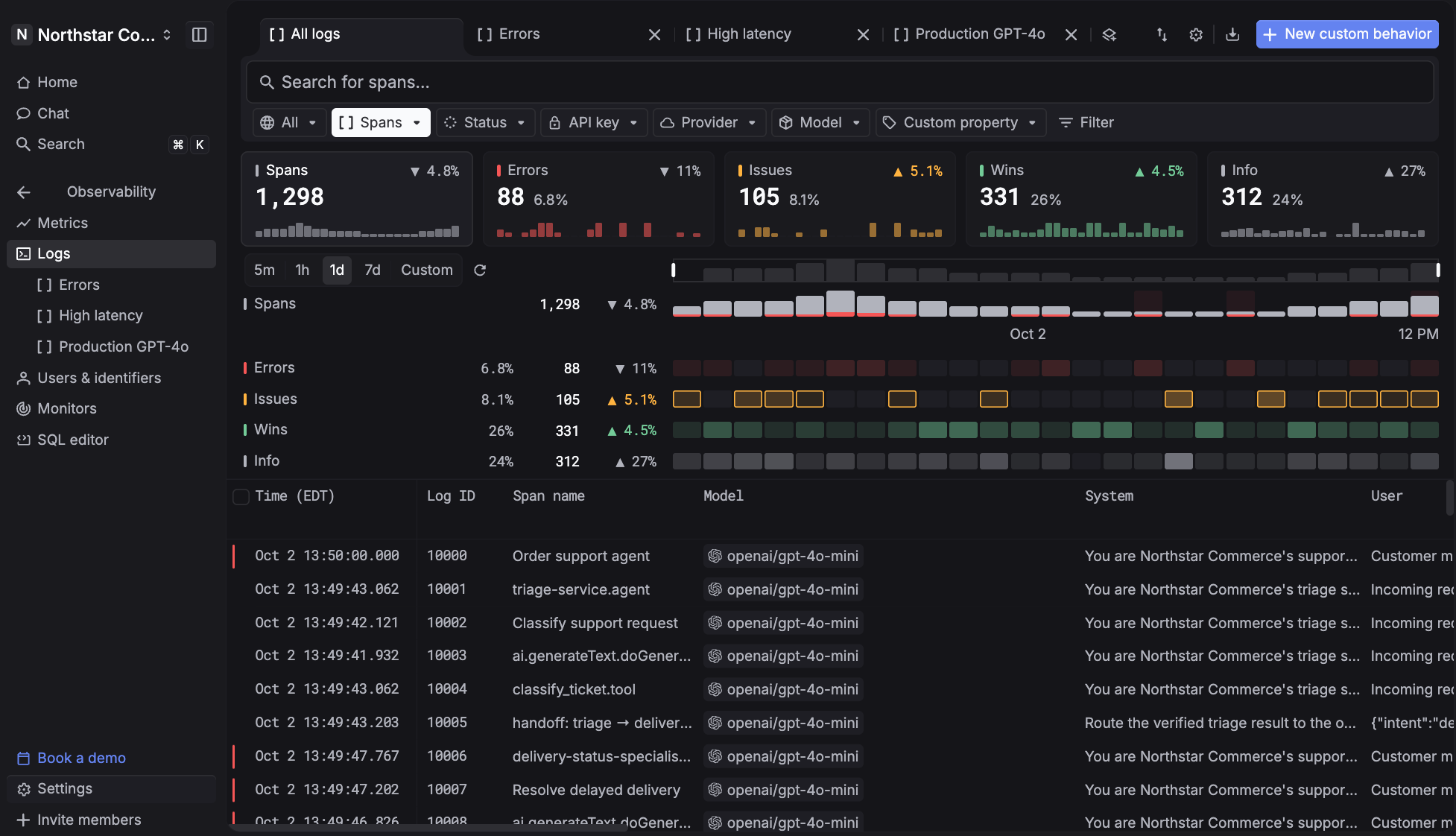
Respan is an LLM engineering platform that routes, observes, and evaluates every LLM call from one place. Every request through the gateway becomes a span automatically with latency and cost attached, so instrumentation and traffic management are the same act rather than two integrations. Agent workflows arrive as span trees nested parent to child, threads group multi-turn sessions so a bad output on turn five traces back to context set on turn two, and any score in the interface clicks straight through to the run that produced it.
Where it differs from most of this roster is that the loop closes inside one product. A bad score in production becomes a dataset, an experiment, a new prompt version, and a proven fix without exporting anything or opening a second tool. That matters most during an incident, when the alternative is holding a score in one system and the record of which model served the request in another.
- Route across 1,000+ models through one endpoint, switching models by changing a single word, with automatic fallback chains, retries, and load balancing when a provider errors or rate-limits.
- Debug faster with full LLM observability across requests, errors, cost, latency, and tokens, sliced by model, key, or end customer.
- Know where every dollar goes with costs broken down per model, per request, and per customer, plus soft and hard spend caps that stop a leaked key rather than warning about it.
- Measure quality with scores, not vibes, using LLM judges, deterministic code checks, or human reviewers, run offline before shipping and online against live production spans.
- Check behaviors with a free classifier using Span-01 Lite, which applies plain-English behavior definitions like tool misuse or user frustration to a trace in a single forward pass and outperforms Sonnet 5 on Respan's Behavior Benchmark.
- Ship prompts without shipping code, running v3 in production while v4 is in progress and deploying the moment you publish.
- Attack your own agent first with autonomous red team campaigns against the OWASP Top 10 LLM risks, run against the same connected agent you already trace.
- Screen requests at the gateway with Respan Guardrails, in early access, which block categories like prompt injection or system prompt leak before a request reaches the model and come free with the gateway.
How Much Does Respan Cost?
The free plan is $0 and includes the full platform: 100,000 logs a month, 1,000 evaluation scores, 5 datasets, 2 evaluators, 5 prompts, and unlimited seats. Unlimited is literal there, so the whole engineering team can read traces, annotate them, and argue about a regression without anyone reaching for a card.
Team is $199 a month billed yearly, which lifts scores to 10,000, makes datasets, evaluators, and prompts unlimited, raises gateway throughput to 8,400 requests a minute, extends retention to 30 days, and includes five members with additional members at $15 each.
Enterprise adds custom retention, SAML, a 99.99% uptime SLA, and a HIPAA BAA.
Because the meter is logs rather than people, the bill tracks what your application does instead of how many colleagues are curious about it. Additional logs run $8 per 100,000 and additional scores $1 per 1,000, both of which move with traffic.
Pros & Cons of Respan
Pros:
- Unlimited seats on the free plan, so trace access never depends on budget
- Gateway, observability, evals, and prompt management in one product, with the trace attached at every step
- Every gateway request is logged as a span automatically, with no separate instrumentation step
- Automatic failover, retries, and hard spend caps in the same layer that produces the telemetry
- Span-01 Lite for free behavior checks, with Guardrails in early access at the gateway
Cons:
- Free retention is 7 days, and 30 days on Team, so longer history requires Enterprise
- The free plan caps evaluators at 2 and prompts at 5
2. Comet Opik
What is Comet Opik?
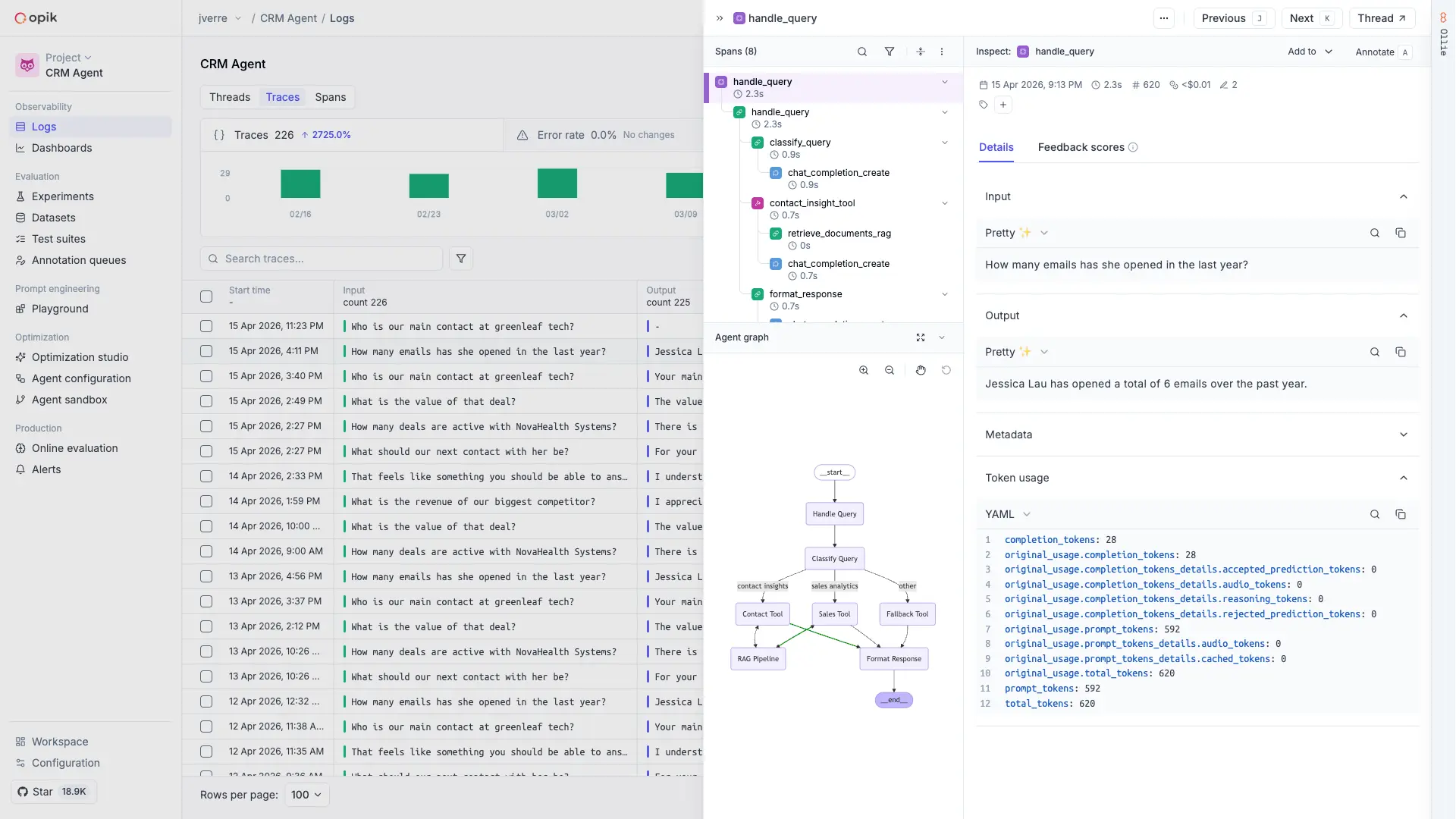
Opik is Comet's GenAI observability and evaluation platform, covering tracing, agent execution graphs, test suites with pass/fail assertions, datasets, experiments, prompt management, and online evaluation on production traces. The open-source build runs the same codebase as the hosted versions, which is a meaningful distinction in a category where "open source" can often mean "a stripped core with the useful parts held back."
The framing assumes an ML lifecycle you may not have, since Opik sits inside Comet's broader platform alongside experiment tracking and a model registry. For a team that only ships LLM applications, some of the surrounding furniture is irrelevant. The evaluation tooling itself is deep, with built-in LLM-as-judge metrics, custom code metrics, automated dataset expansion, and an agent optimizer that runs prompt optimization algorithms against your evaluation results.
How Much Does Comet Opik Cost?
Free Cloud is $0 for up to 10 team members, 25,000 spans a month, and 60-day retention. Pro is $19 a month for up to 50 members and 100,000 spans, with additional spans at $5 per 100,000 and an option to extend retention from 60 to 400 days at $29 per 100,000 spans. Enterprise brings unlimited members, flexible deployment, SSO, RBAC, and the compliance certifications, and is the only tier where those live.
Ten members on the free plan is generous enough that a mid-sized team can work in it without paying, and the pricing is unusual in charging for span volume while treating people as close to free. Note that AI guardrails are available on the self-hosted open-source build rather than the cloud tiers, so a team that wants guardrails and managed hosting is picking one or the other. What ends the free tier is the 25,000-span ceiling, which production traffic clears well before ten people run out of room.
Pros & Cons of Comet Opik
Pros:
- Ten team members on the free cloud plan
- The self-hostable open-source build ships the same codebase as the hosted product
- Built-in LLM-as-judge metrics, custom code metrics, and automated dataset expansion
- Prompt optimization algorithms that run against your own evaluation results
Cons:
- 25,000 spans a month on free is tight for anything past a pilot
- SSO, RBAC, and compliance certifications all sit on Enterprise
- Guardrails run on the self-hosted build rather than the cloud tiers
3. Braintrust
What is Braintrust?
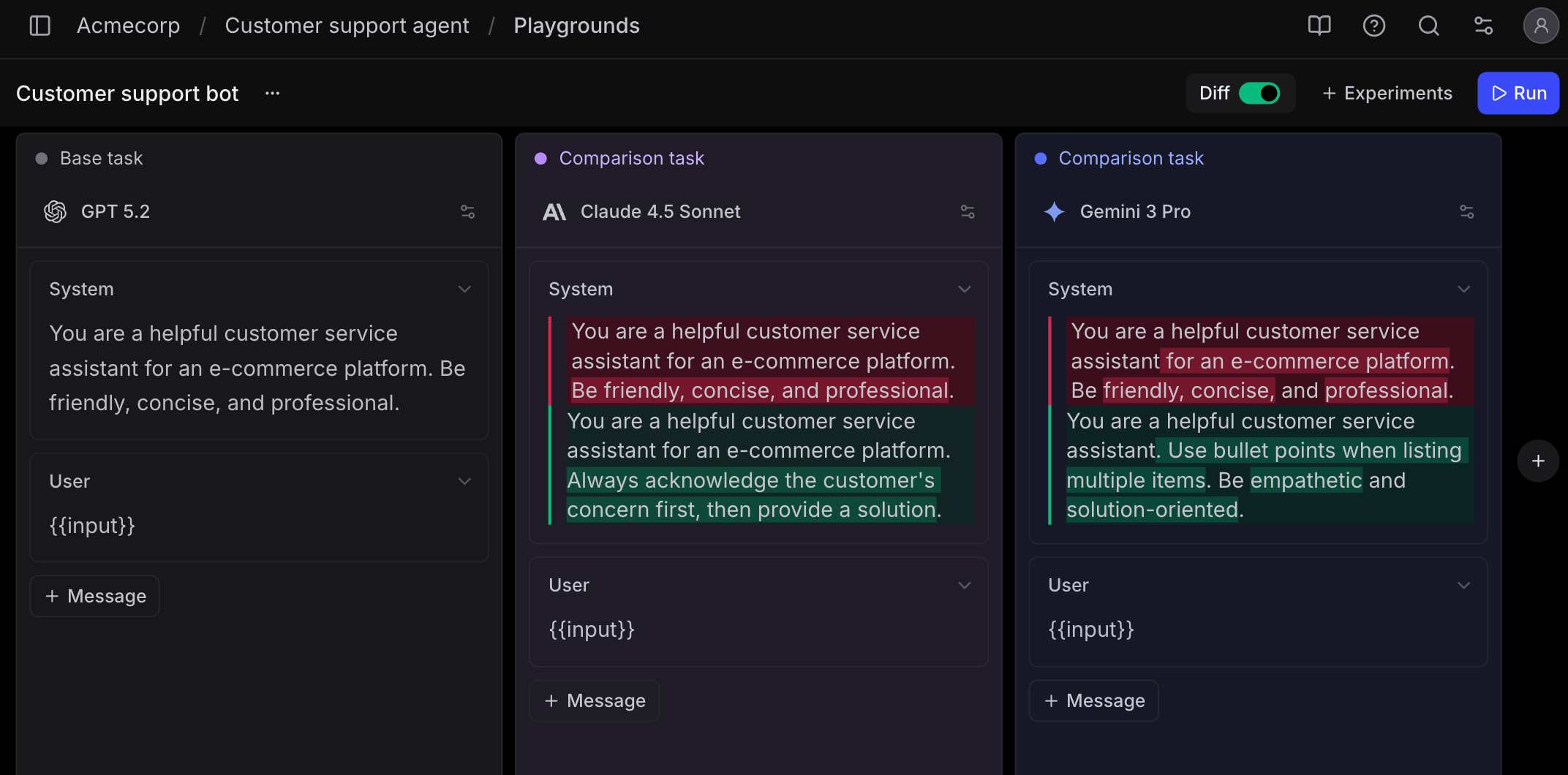
Braintrust is an evaluation platform with observability attached, built around the idea that evaluation results should gate releases rather than sit in a dashboard. A GitHub Action runs evals on every pull request and blocks the merge when scores fall below a threshold you define, and any production trace converts into a dataset entry, which turns a live failure into a permanent regression test.
Prompt work happens in a shared Playground where engineers and product people compare outputs side by side against real production data. Loop, the built-in assistant, generates scorers and datasets from production traffic in plain language. Tracing exists and is framework-agnostic through OpenTelemetry and native SDKs, but it serves the eval workflow rather than standing on its own, which is the tradeoff at the center of any Braintrust comparison worth reading.
How Much Does Braintrust Cost?
The free plan includes 1 GB of processed data, 10,000 scores, and unlimited users. Pro is a flat $249 a month for 5 GB and any team size, and Enterprise is custom. Self-hosting is Enterprise-only and the platform is closed source.
Metering on processed data rather than seats means the bill follows what your application generates, and the flat $249 is predictable in a way per-seat pricing is not. The jump from free to Pro is steep though, since there is no intermediate tier, so a team that outgrows 1 GB moves straight to $249 whether they needed 1.2 GB or 4 GB. What ends the free tier is the data volume, and because agent traces carry the whole conversation on every turn, 1 GB arrives faster on agent workloads than on single completions.
Pros & Cons of Braintrust
Pros:
- Unlimited users on the free plan
- Evaluations run in CI and block merges automatically when scores regress
- One-click conversion from a production trace to a regression test case
- Flat pricing at $249 regardless of team size
Cons:
- No tier between free and $249, so the first upgrade is a large step
- Closed source, with self-hosting only on Enterprise
- Tracing is built to feed evaluation rather than to stand alone as a debugging surface
4. Arize
What is Arize?
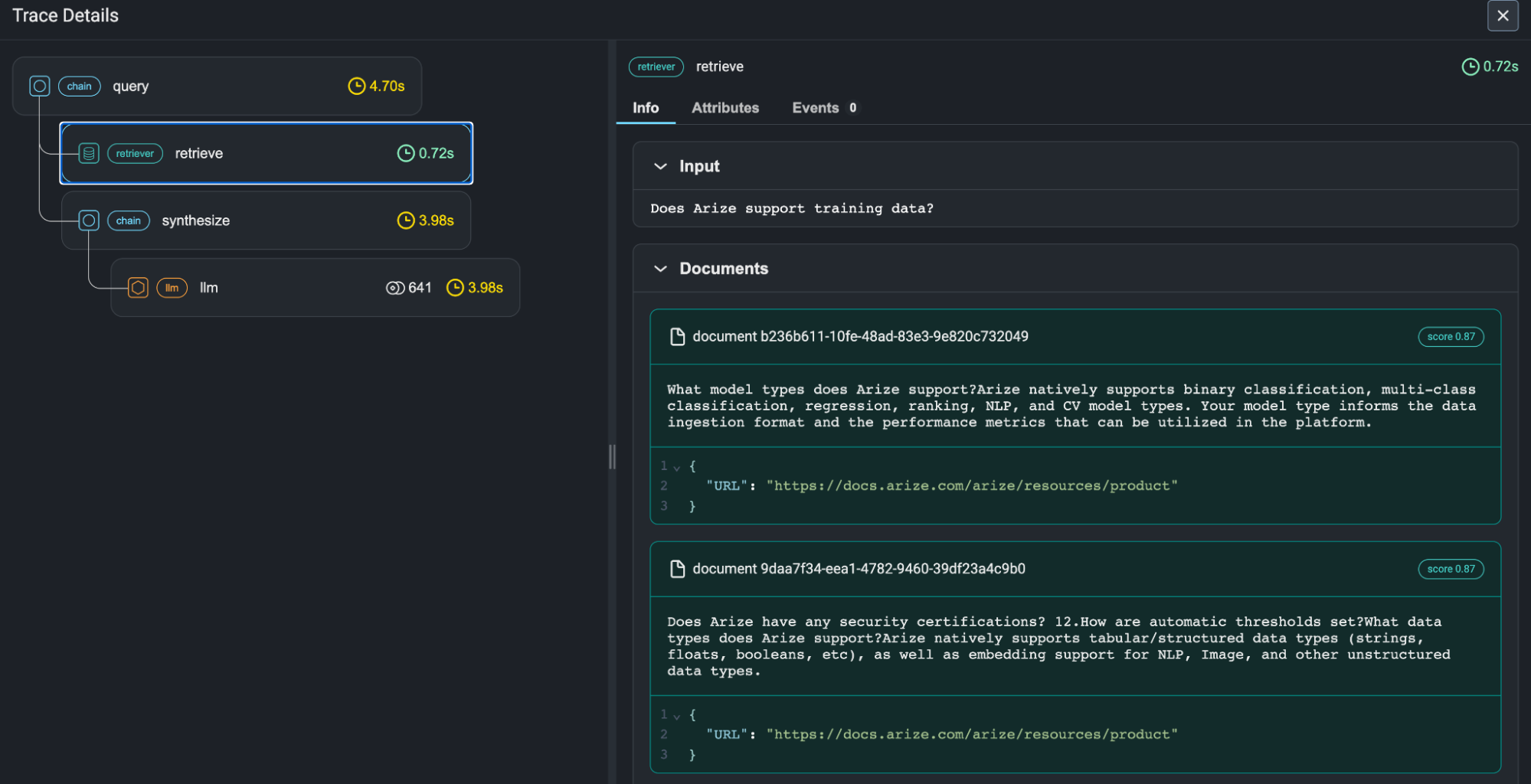
Arize sells AX, a managed agent observability and evaluation platform, and maintains Phoenix, a separate open-source project for local tracing and evaluation. AX covers OpenTelemetry-compliant tracing, agent trajectory visualizations, session evaluations across multi-turn conversations, custom dashboards and monitors, playgrounds, datasets, and prompt versioning. Signal, its issue-clustering agent, groups failures into a ranked list rather than leaving you to read traces by hand.
The heritage is machine learning monitoring, and it shows in how the platform handles scale and in the enterprise shape of the product. Teams migrating a mixed classical ML and LLM portfolio tend to find it familiar. Teams that only ship LLM applications sometimes find the surface larger than the problem, which is a fair thing to weigh when comparing AI observability tools generally.
How Much Does Arize Cost?
AX Free covers 25,000 spans a month, 1 GB of ingestion, 15-day retention, unlimited users, and unlimited evaluations, experiments, and human annotations, plus 10 Signal issues a month. Pro is $50 a month for 50,000 spans, 10 GB, and 30-day retention. Enterprise is custom and is where self-hosted deployment, SSO, audit logs, and HIPAA sit. Phoenix self-hosts free with no usage caps as a separate track.
Unlimited evaluations on a free plan is genuinely unusual, and it means you can build out an eval suite before spending anything. Retention is the constraint that bites, since 15 days on free and 30 on Pro is short for regression work, and custom code evaluators are Enterprise-only, so the free and Pro tiers give you unlimited runs of the evaluators Arize provides rather than unlimited runs of the ones you write. What ends the free tier is usually retention rather than span count.
Pros & Cons of Arize
Pros:
- Unlimited users, evaluations, experiments, and human annotations on the free plan
- Signal clusters failures into ranked issues instead of raw trace lists
- Phoenix self-hosts free with no usage caps as a separate open-source track
- Session-level evaluation across multi-turn conversations
Cons:
- 15-day retention on free and 30 days on Pro
- Custom code evaluators are Enterprise-only
- Self-hosted AX, SSO, and audit logs all require an Enterprise contract
5. Galileo
What is Galileo?
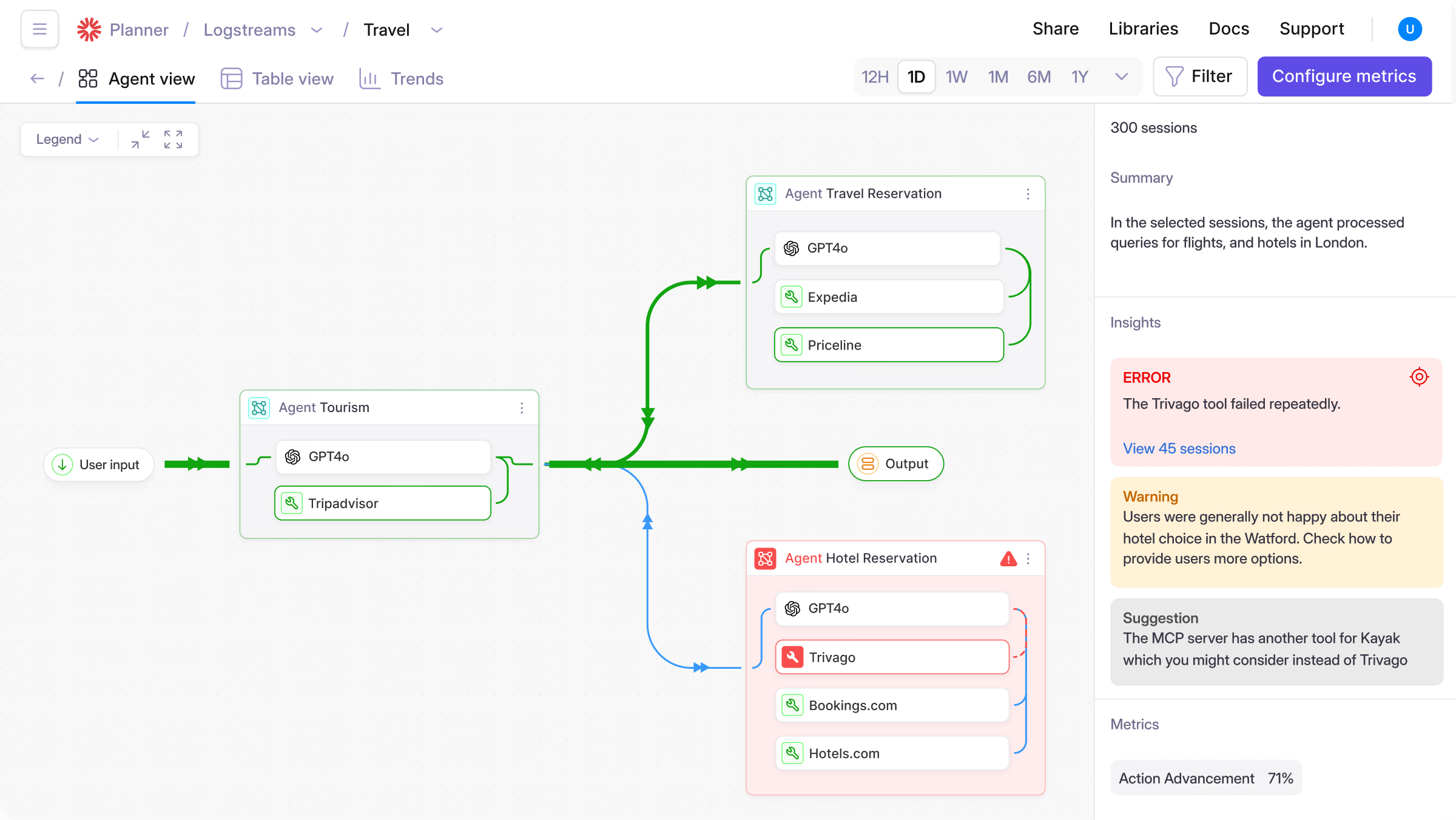
Galileo is an evaluation and guardrails platform focused on scoring production traffic continuously rather than only in test runs. Its Luna small language models handle evaluation at low latency, which is the design answer to the cost of calling a frontier model as a judge on every request, and it ships built-in metrics for retrieval systems, agents, safety, and security alongside runtime guardrails that catch quality issues as they happen.
Note that Cisco acquired Galileo in 2026, and the center of gravity is evaluation and guardrails rather than prompt iteration or trace debugging. What that might mean is that a team whose main problem is understanding why an agent took a wrong turn will find the tracing surface narrower than what a debugging-first platform offers.
How Much Does Galileo Cost?
The free tier covers 5,000 traces a month with unlimited users and unlimited custom evaluators. Pro is $100 a month billed annually or $150 billed monthly and raises the allowance to 50,000 traces with usage-based overages, standard RBAC, and advanced analytics. Enterprise is custom priced and is where runtime guardrails, VPC and on-premise deployment, SSO, and dedicated support live.
The structure is worth reading carefully, because guardrails are the reason most teams look at Galileo and neither tier with a published price includes them. That makes the practical entry point a sales conversation rather than the $100 the pricing page suggests, unless evaluation alone is what you need. What ends the free tier is the 5,000-trace ceiling, which is the same allowance LangSmith's free plan gives, so this is a lateral move on volume and a real gain on seats.
Pros & Cons of Galileo
Pros:
- Unlimited users and unlimited custom evaluators on the free plan
- Purpose-built small models keep evaluation latency and cost down at production volume
- Built-in metrics covering retrieval, agents, safety, and security
- Continuous scoring against live traffic rather than test sets only
Cons:
- 5,000 traces a month on free, matching what LangSmith already gives you
- Runtime guardrails require Enterprise, so the published prices do not include them
- Tracing and prompt iteration are narrower than on debugging-first platforms
6. Langfuse
What is Langfuse?
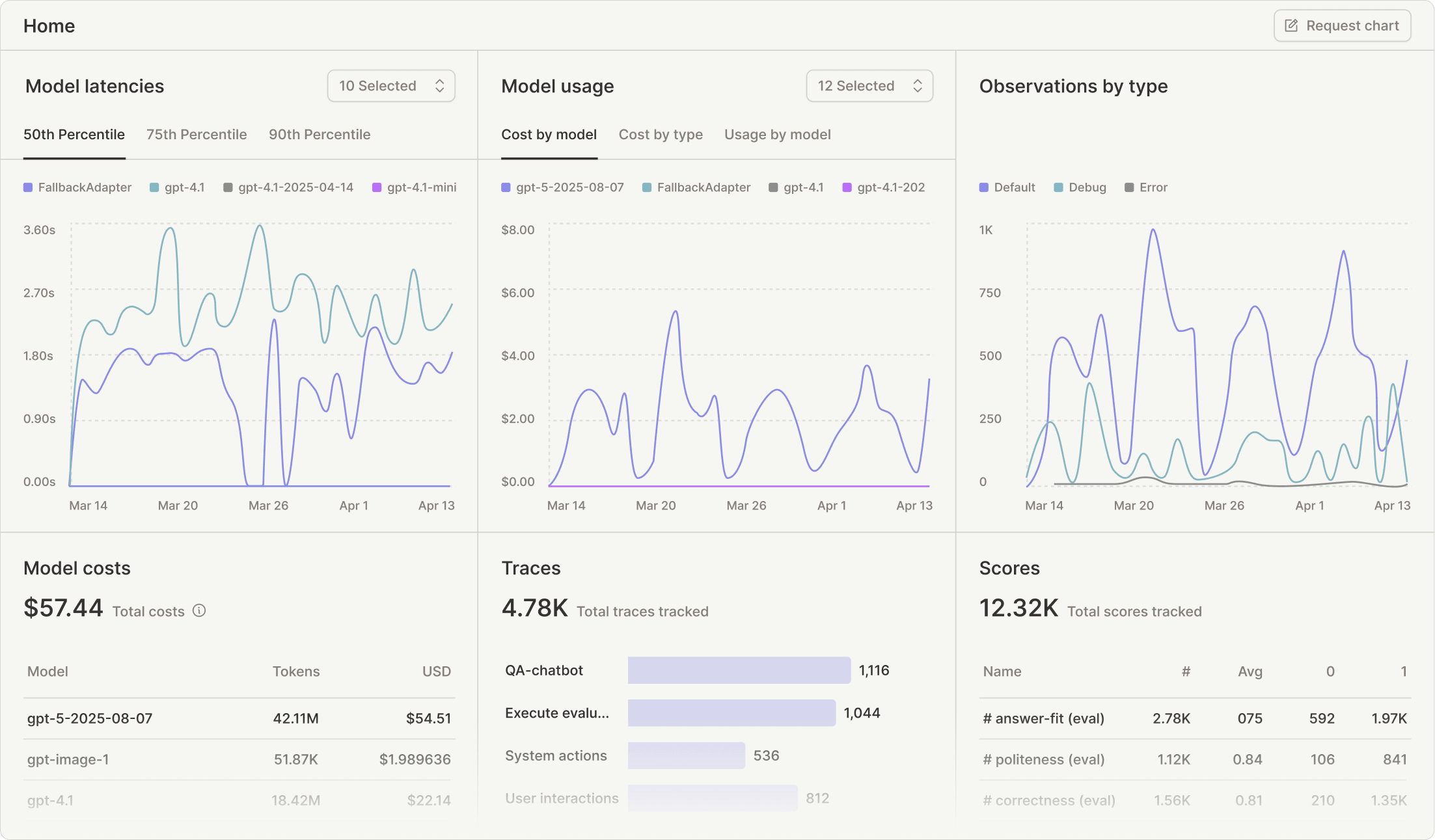
Langfuse is an open-source LLM engineering platform covering tracing, prompt management, datasets, evaluations, and metrics, with an MIT-licensed core that runs at production scale on your own infrastructure. It is framework-agnostic by design rather than by accommodation, ingests OpenTelemetry natively, and is the most direct like-for-like replacement on this list for a team that wants LangSmith's shape without LangSmith's ownership of the data.
Langfuse was acquired by ClickHouse in January 2026, with the MIT core, self-hosting, and cloud endpoints continuing unchanged (so far). Running it yourself means operating Postgres, ClickHouse, Redis, and S3-compatible storage as separate services, which is the architecture that lets it scale and also the reason it is more to run than a single-binary tool. If you cannot operate ClickHouse, that one constraint rules out the self-hosted path and puts you on Cloud, where the tier structure applies.
How Much Does Langfuse Cost?
Self-hosting the core costs nothing in license fees. On Cloud, Hobby is free with 50,000 units a month, 30-day data access, one annotation queue, two alerts, and 2 users. Core is $29 a month for 100,000 units, 90-day access, and unlimited users. Pro is $199 with three-year data access and SOC 2 and ISO 27001 reports, and Enterprise is $2,499. Additional usage runs $8 per 100,000 units on every paid tier.
Two things are worth flagging in that structure. The jump from Hobby to Core is small in money and large in effect, since $29 removes the seat cap entirely, which makes Langfuse Cloud one of the cheapest ways to get a whole team looking at traces. Less obviously, enterprise SSO, SSO enforcement, and fine-grained RBAC live in a $300 per month Teams add-on that sits on top of Pro, so the real cost of a governed deployment is nearer $499 than $199. What ends the free tier is the second user, at which point you are choosing between $29 and running the infrastructure yourself. For a fuller treatment of where it fits against the rest of the category, our roundup of Langfuse alternatives goes deeper.
Pros & Cons of Langfuse
Pros:
- MIT-licensed core that self-hosts at production scale with no license fee
- Unlimited users from $29 a month on Cloud
- Native OpenTelemetry ingestion with broad framework coverage
- Tracing, prompt management, datasets, and evaluations in a single product
Cons:
- Hobby is capped at 2 users, so evaluating it with a colleague means paying
- Self-hosting requires operating Postgres, ClickHouse, Redis, and object storage
- Enterprise SSO and fine-grained RBAC sit behind a $300 monthly add-on on top of Pro
7. Confident AI
What is Confident AI?
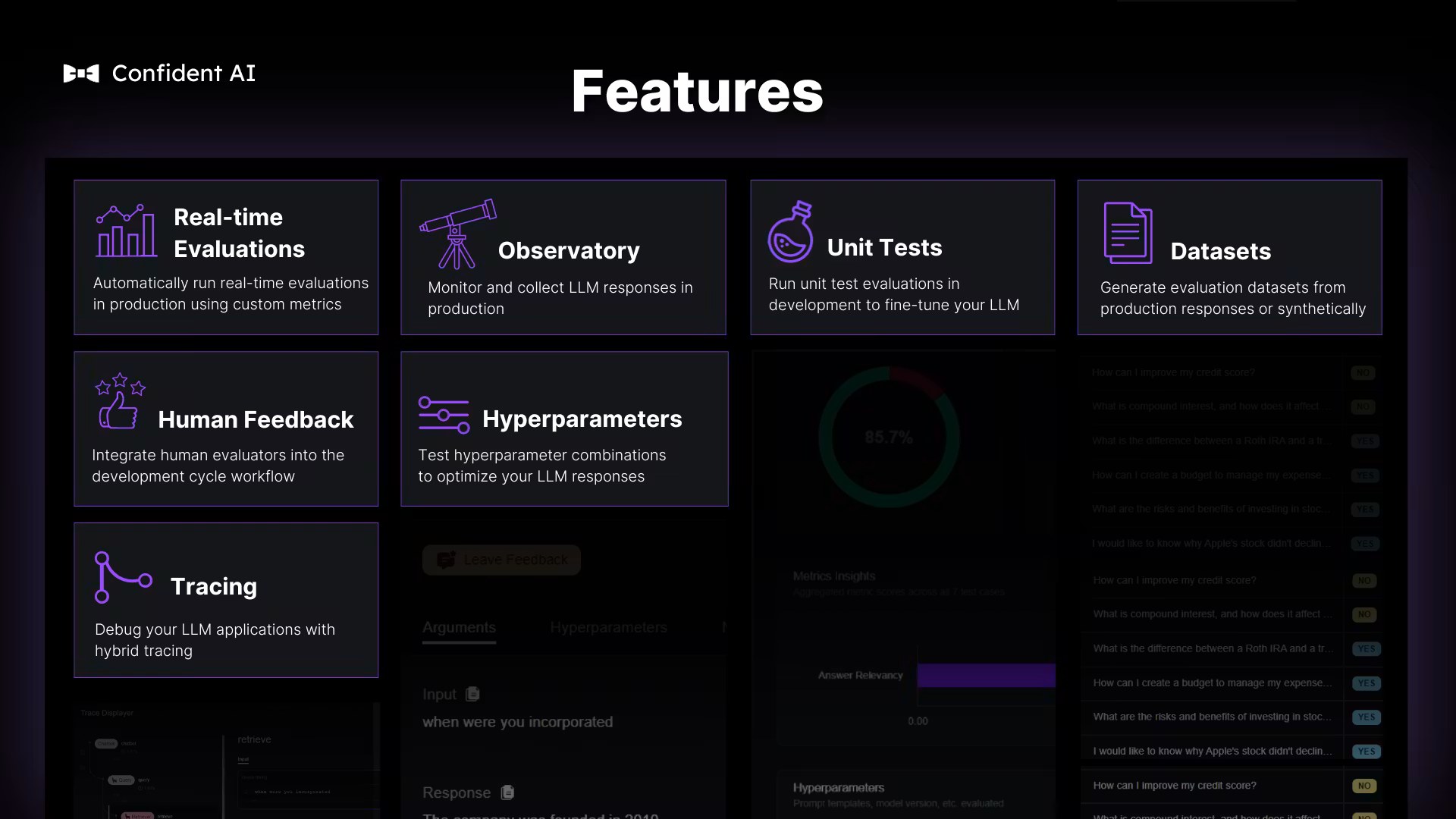
Confident AI is an evaluation-first platform built on DeepEval, the open-source evaluation framework from the same team. The metric library is the draw, covering single-turn and multi-turn evaluation, custom G-Eval metrics defined in natural language, and deterministic code-based metrics, all of it open source and usable locally before you touch the cloud product.
The platform is shaped around cross-functional workflows more than most tools here, with no-code evaluation runs, annotation queues, custom annotation forms, and dataset editing in the browser. Tracing exists and integrates with OpenTelemetry, though it serves the eval workflow rather than functioning as a general debugging surface. Red teaming and AI governance are separate modules rather than part of the base product.
How Much Does Confident AI Cost?
The free plan gives 2 seats, 1 project, 1 GB-month of trace spans, and 5 test runs per week, with additional runs locked and additional spans dropped. Starter is $200 a month for unlimited seats, 5 projects, and 5 GB-months, then $1 per GB-month. Team is $2,000 a month for 75 GB-months and adds SOC 2, SSO, custom RBAC, and Git-based prompt workflows. Enterprise is custom and covers on-premise deployment, HIPAA, and the red teaming and governance modules.
The weekly test-run cap is the one to understand, because it is a rate limit rather than a volume limit. Five runs a week is roughly one a day, so a team iterating on a prompt in the morning is locked out by the afternoon, and the constraint has nothing to do with how much traffic you have. Priced at $1 per GB-month, the storage itself is inexpensive. What ends the free tier is the test-run ceiling, which arrives during the first serious afternoon of eval work.
Pros & Cons of Confident AI
Pros:
- Metrics are open source through DeepEval and run locally before any cloud commitment
- Multi-turn conversation evaluation and simulation are built in
- Annotation queues and custom review forms support non-engineers running eval cycles
- Trace storage is priced at $1 per GB-month with adjustable retention
Cons:
- 5 test runs per week on free, which is a rate cap rather than a volume cap
- 2 seats on free and 1 project
- Red teaming and governance are separate modules on top of Enterprise
8. Laminar
What is Laminar?
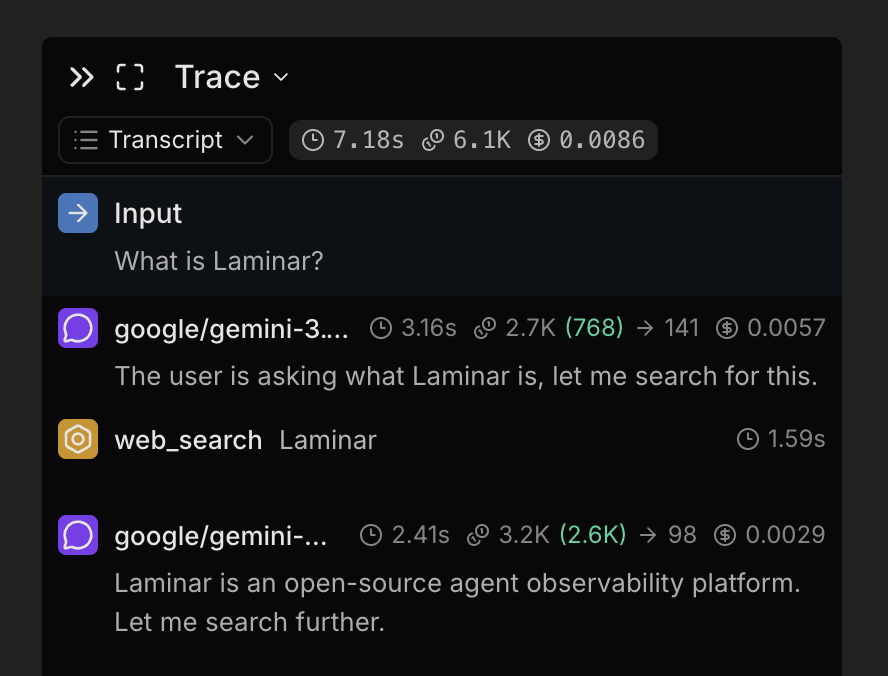
Laminar is an Apache 2.0 observability platform built specifically for agent workloads, on the argument that agent traces are a different shape from prompt-and-completion logging: deeper, longer running, and much larger per interaction. Agents re-send the whole conversation every turn, so Laminar stores each unique message once and reconstructs traces on read.
What you get on top of tracing is a SQL editor over all platform data rather than a fixed query UI, an agent debugger that records runs and replays them against a cache, and Signals, which track outcomes in plain language. Prompt management is limited to playground-style replay rather than the versioning and deployment workflow you would find on a prompt-first platform, so a team that wants to ship prompt changes without redeploying code will need something else alongside it.
How Much Does Laminar Cost?
Free covers 1 GB of data with no overage charges, $5 in Signals credits, 7-day retention, one project, and one seat. Starter is $30 a month for 3 GB then $2 per GB, 30-day retention, and unlimited seats and projects. Pro is $150 for 10 GB then $1.50 per GB with six-month retention.
Billing on ingested data volume means a large team costs no more than a small one from $30 upward, which is the structural fix for the problem that sends people looking in the first place. Signals meter separately by the tokens its analysis agent consumes, so that line moves with how much of your traffic you analyze rather than with storage. What ends the free tier is the single seat, exactly as with LangSmith, so the free plan here is for evaluating the product rather than running a team on it.
Pros & Cons of Laminar
Pros:
- Apache 2.0 and self-hostable via Docker Compose or a Helm chart
- Unlimited seats from $30 a month
- Raw SQL access over all trace data instead of a fixed query interface
- Trace storage designed around repeated agent conversation context
Cons:
- 1 seat and 7-day retention on the free plan
- Prompt management is playground replay rather than versioning and deployment
- Signals bill separately by tokens consumed during analysis
9. MLflow
What is MLflow?
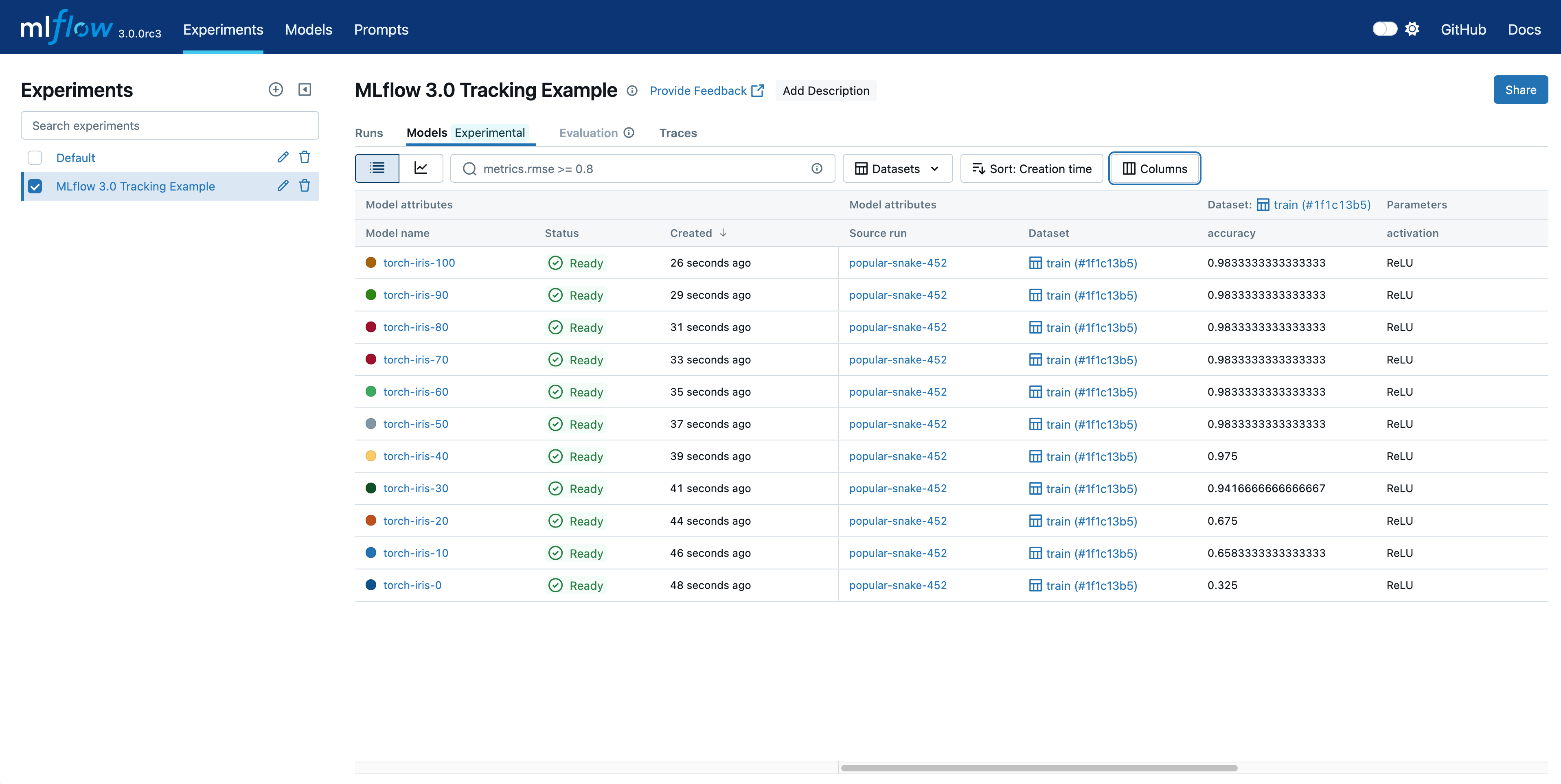
MLflow is an Apache 2.0 platform under the Linux Foundation covering the full agent lifecycle, and its governance is a materially different ownership story from every venture-backed tool on this list. Instrumentation is a single autolog() call across a wide set of frameworks in Python, TypeScript, Java, and R, and traces land alongside your other AI assets rather than in a separate product.
Evaluation goes deeper than most, with built-in LLM judges that support alignment against human feedback, judge versioning, multi-turn conversation evaluation with simulation, and automated prompt optimization that improves prompts from evaluation feedback rather than manual iteration. It also ships an AI Gateway with routing, rate limiting, fallbacks, usage tracking, and credential management across providers. The weight is the tradeoff: without an existing MLflow footprint it is heavier to adopt than a purpose-built LLM tool, and its center of gravity remains the ML lifecycle, which is the same pattern visible across most MLOps tools.
How Much Does MLflow Cost?
Nothing. There are no tiers, no per-trace fees, no per-seat fees, and no feature gating between the open-source release and what you can run. Managed offerings exist on Databricks, AWS SageMaker, Nebius, and Azure ML for teams that would rather not operate it.
The cost is real, it just does not appear on an invoice. You run the server, the database, and the object storage, you handle upgrades, and you own uptime. Teams already running Postgres and S3 will find that modest. Teams without an existing platform function will find it is a hire, not a config change. Nothing ends the free tier, because there is no tier. What ends the arrangement is the week your on-call engineer spends debugging the trace backend instead of the agent.
Pros & Cons of MLflow
Pros:
- Apache 2.0 with foundation governance rather than a single vendor's roadmap
- One-line instrumentation across a wide set of frameworks and four languages
- Judge alignment, judge versioning, and multi-turn evaluation with simulation
- A built-in AI gateway with routing, rate limiting, and fallback chains
Cons:
- You operate the server, database, and storage, including upgrades and uptime
- Heavier to adopt without an existing MLflow deployment
- The product's center of gravity is still the ML lifecycle rather than agent debugging
10. Mirascope
What is Mirascope?
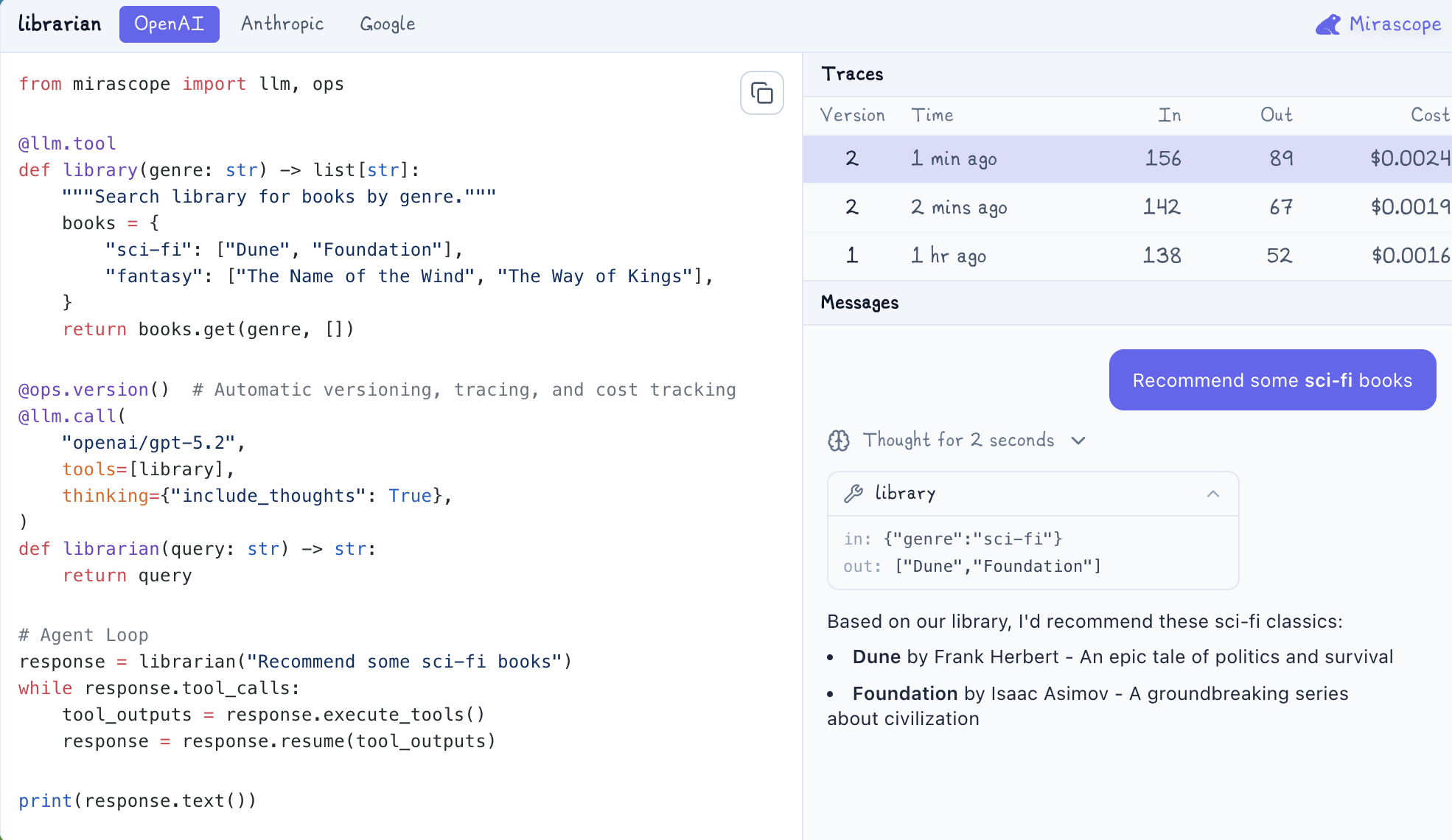
Mirascope is the odd entry here, because it is a Python library rather than a platform. It describes itself as the LLM anti-framework, and the shape of it is decorators: @llm.call defines a model call, @llm.tool defines a tool, and @ops.version() adds versioning, tracing, and cost tracking to whatever it wraps. Agent loops are written as ordinary Python control flow rather than assembled from framework primitives.
For teams whose objection to LangSmith is the platform relationship itself, this answers it differently from everything above. There is no hosted product to sign up for, no account, and no data leaving your infrastructure by default. There is also no dashboard, no annotation queue, no dataset management, and no eval suite waiting for you, so the comparison is not really Mirascope against LangSmith but Mirascope plus a backend you choose against LangSmith. It suits teams who already know where they want telemetry to land.
How Much Does Mirascope Cost?
Nothing, and there is no pricing page because there are no tiers. The library is free to use and the observability it produces goes wherever you send it.
That makes the cost question a different one. You are not buying capacity, you are deciding what to build on top: where spans are stored, what queries them, who can read them, and how long they stay. Every constraint the other nine tools publish becomes a decision you own. Nothing ends the free tier, since there isn't one. What ends the approach is the point at which your team wants a scoring workflow, a shared review surface, or a retention policy, and someone has to build it.
Pros & Cons of Mirascope
Pros:
- Free with no tiers, seats, trace ceilings, or retention windows
- Versioning, tracing, and cost tracking attach through a single decorator
- Agent loops stay ordinary Python rather than framework abstractions
- Telemetry goes to a backend you pick, so nothing is locked to a vendor's data model
Cons:
- No hosted platform, dashboard, or shared review surface
- Datasets, annotation queues, and eval workflows are yours to assemble
- You own the storage, query layer, access control, and retention decisions
How to Choose a LangSmith Alternative
The tool that fits depends less on feature checklists than on which constraint your team hits first, and constraints in this category are not interchangeable.
-
Start with what ends your free tier - A seat cap stops you as soon as a second person cares. A volume ceiling stops you when traffic grows. A retention window never stops you at all until the day you need last month's data and it is gone. A rate cap like Confident AI's five test runs a week stops you during a single afternoon of iteration regardless of how small your application is. Work out which you will hit first, then read the tier above the free one, because that is the plan you will be on.
-
Check how portable your instrumentation is - If you built on LangSmith's own SDK and its run model, leaving means rewriting instrumentation, because runs, feedback, and annotation queues do not map one to one onto OpenTelemetry spans. If you instrumented with OpenTelemetry, moving is mostly an endpoint change. That difference is worth more than any feature on this page, and it is the argument for choosing an OTel-native destination even when a proprietary SDK is more ergonomic today, since LLM tracing built on the standard survives your next vendor decision.
-
Count the tools, not just the dollars - LangSmith covers tracing, evaluation, prompt management, deployment, and a gateway. Several platforms here cover a subset, so the honest comparison is your whole bill afterward. A tool that traces well but has no AI gateway leaves failover, spend caps, and model routing to a second vendor with its own free tier and its own cap.
-
Confirm the tool is still being built - Open the repository and look at the date of the last commit, or check the changelog on a hosted product. A platform that is technically excellent and no longer developed is a migration you have already scheduled without realizing it. Several tools in this category changed hands in 2026 and the outcomes were not the same in each case, so treat an acquisition as a prompt to check the roadmap rather than as a verdict.
Whichever way those four land, export your historical traces before you cancel anything. Retention is finite everywhere, and access ends with the subscription rather than after it.
Frequently Asked Questions
Langfuse vs LangSmith: which should you use?
Langfuse is the better fit if you want the data on your own infrastructure or you need more than one person looking at traces without paying for it, since its MIT-licensed core self-hosts at production scale and Cloud removes the seat cap at $29 a month against LangSmith's $39 per seat. LangSmith is the better fit if your application is built on LangChain or LangGraph and you want the native rendering of that structure, because a single environment variable gives you full tracing where Langfuse asks for explicit instrumentation.
If neither constraint decides it, the question underneath is usually how many products you want to run. Both are observability and evaluation platforms, so a team that also needs model routing, failover, and spend limits will be adding a gateway either way. Respan covers the gateway and the observability in one place, with a free plan that includes 100,000 logs and unlimited seats.
LangChain vs LangGraph vs LangSmith: what is the difference?
They solve three different problems from the same team. LangChain is the framework for composing model calls, tools, memory, and retrieval into applications. LangGraph is the orchestration layer for stateful, multi-step agents, modeling workflows as graphs with branching, cycles, and durable state. LangSmith is the commercial platform that observes and evaluates whatever you built, whether that was LangChain, LangGraph, or neither.
The practical consequence is that choosing LangSmith is a separate decision from choosing the frameworks. You can run LangChain applications and send traces somewhere else, and you can use LangSmith with an application that never imports LangChain. Our LangChain vs LangGraph comparison covers the framework side of that choice in detail.
Braintrust vs LangSmith: which is better for evaluations?
Braintrust is built so evaluation results control what ships. Evals run in CI on every pull request and block the merge when scores drop below your threshold, and a production trace converts into a regression test case in one click. LangSmith provides structured evaluation, managed judges, and dataset management, and surfaces results in dashboards for a person to review, so acting on a regression is a manual step rather than an automatic gate.
Both meter in ways that matter. Braintrust bills processed data at a flat $249 on Pro with unlimited users, where LangSmith bills $39 per seat plus trace usage. If evaluation is the whole reason you are switching, Braintrust is the more opinionated tool. If you also want the evaluation attached to routing and cost data, Respan runs online evals on live production spans with the trace and the model that served it in the same view, free for up to 1,000 scores a month.
Is LangSmith open source?
No. LangChain and LangGraph are open source frameworks, but LangSmith itself is a commercial product from LangChain Inc., and the platform running behind those SDKs is not published. Self-hosting requires an Enterprise contract, so the Developer and Plus tiers send trace data to LangChain's cloud in the US or EU with no option to keep it in your own environment.
If open source is the requirement rather than the preference, the options on this list that publish the whole platform are MLflow under Apache 2.0 with Linux Foundation governance, Comet Opik under Apache 2.0, Langfuse with an MIT core, and Laminar under Apache 2.0.
Can you self-host LangSmith?
Only on Enterprise. LangChain's pricing page lists self-hosted and hybrid deployment as Enterprise-tier features, alongside custom SSO, attribute and role-based access control, and a support SLA. Developer and Plus are cloud-only, which turns a data-residency requirement into a procurement conversation rather than a configuration change.
Teams with compliance obligations who would rather not run infrastructure have a third path, which is a managed platform with the certifications already in place. Respan is SOC 2, HIPAA, GDPR, and ISO 27001 compliant, with PII masking and an omit-logs option for fields that should never leave your environment, and a HIPAA BAA available on Enterprise.