

Browse the model catalog
The model catalog is the current inventory of models available through the Respan Gateway. Use it to find a model identifier, check whether a model is active or deprecated, and understand whether it uses Respan credits or your own provider credentials.
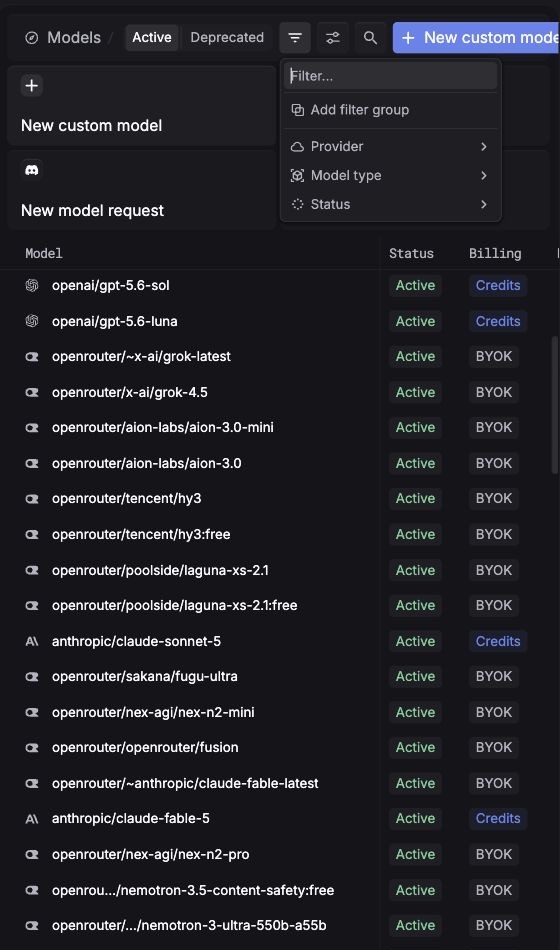
Find a model
- Select Active for models currently offered or Deprecated to review models you should migrate away from.
- Search for a model name, or open filters to narrow by Provider, Model type, or Status.
- Copy the model identifier exactly as displayed, including its provider prefix when present.
- Pass that identifier as the
modelin your Gateway request.
The live catalog is the source of truth for current availability. Avoid hard-coding a catalog size in application guidance because models and statuses change over time.
Understand billing labels
Billing support is model-specific. Check the label on the exact model you plan to call, even when other models from the same provider support credits. When you supply provider credentials, provider usage is billed to your provider account.
Availability and billing mode are separate concerns. An Active model can still require BYOK credentials, and a configured provider key does not make a Deprecated model active.
Add a model that is not listed
The create menu provides two paths:
- New custom model adds an alias or model configuration for a provider model you can already call.
- New model request asks Respan to consider a model that is not available in the catalog.
For request-time routing, provider pinning, credential overrides, and custom-model setup, see Providers & models.
Treat capability, cost, and performance metadata as selection signals, then validate the model with your own prompts and evaluations. A catalog entry does not guarantee that a model is suitable for your workload.